

Webinars
A Continuous Testing roadmap: How to chart your course to maturity in 2021
Start the year off right by learning how to assess your testing...
Learn how continuous performance testing improves software quality by integrating performance tests into CI/CD pipelines with proven best practices.

TL;DR
In the endless pursuit of performance, one can get lost in the weeds of optimization and refactoring. Software is not always straightforward, and building a robust and reliable platform can take years of work and testing.
In order to ensure we meet the performance requirements the modern world demands, testing is crucial. There’s a specific discipline of testing that is optimized for this task. It’s called continuous performance testing.
In this article, we will be diving into what continuous performance testing is, why it matters, and how it survives contact with the modern delivery pipeline. We will talk about release trains, feature flags, AI-assisted code, and deployment measured in hours instead of quarters.
Continuous performance testing is the practice of running automated performance tests throughout the software delivery lifecycle, triggered by code changes and pipeline events rather than scheduled before a release.
This means that instead of having one large validation event at the end of the development lifecycle, teams (or other tools) run many small, targeted tests continuously.
As you probably have noticed, the word “continuous” does a lot of work here. It doesn’t mean tests run every second, but that the performance validation happens on the same cadence as your code changes.
For example, say a commit triggers a short API load test. A nightly build triggers a longer scenario. A release candidate triggers a full-scale peak test.
Every stage produces a pass or fail indicator against a threshold previously defined. And that verdict is the whole point. Continuous performance testing turns performance from a subjective opinion into an automated gate.
There’s a clear reason why performance has been a focal point for enterprise and large-scale platforms: performance problems always end up being expensive.
There’s a clear reason why performance has been a focal point for enterprise and large-scale platforms: performance problems always end up being expensive. This has always been true, but now it’s more true than ever because these issues can now reach users faster.
The main reason continuous performance testing matters is that we ship code faster than ever before. AI coding assistants have supercharged the productivity of every individual contributor, and more code means more surface area for regressions.
When you deploy weekly, a single pre-release performance test is still able to catch a lot of bugs. When you deploy daily, however, chances are it won’t catch much.
Alarmingly, the cost of not having this under control is well known to often reach over six figures. ITIC’s 2024 Hourly Cost of Downtime Survey found that a single hour of downtime exceeds $300,000 for more than 90% of mid-size and large enterprises.
Another important point of focus is how fast users can lose interest.
As Jakob Nielsen of Nielsen Norman Group put it, “User interfaces must be fast, or users will give up.” Nielsen identified three response time limits that hold to this day: 0.1 seconds feels instant, 1 second keeps flow intact, and 10 seconds loses attention completely.
Furthermore, there’s a simple economic argument underlying all this. A performance defect found at commit costs a developer twenty minutes. The same defect found in production unravels a lengthy process involving an incident bridge, a rollback, a postmortem, and, worst of all, a week of trust that is lost.
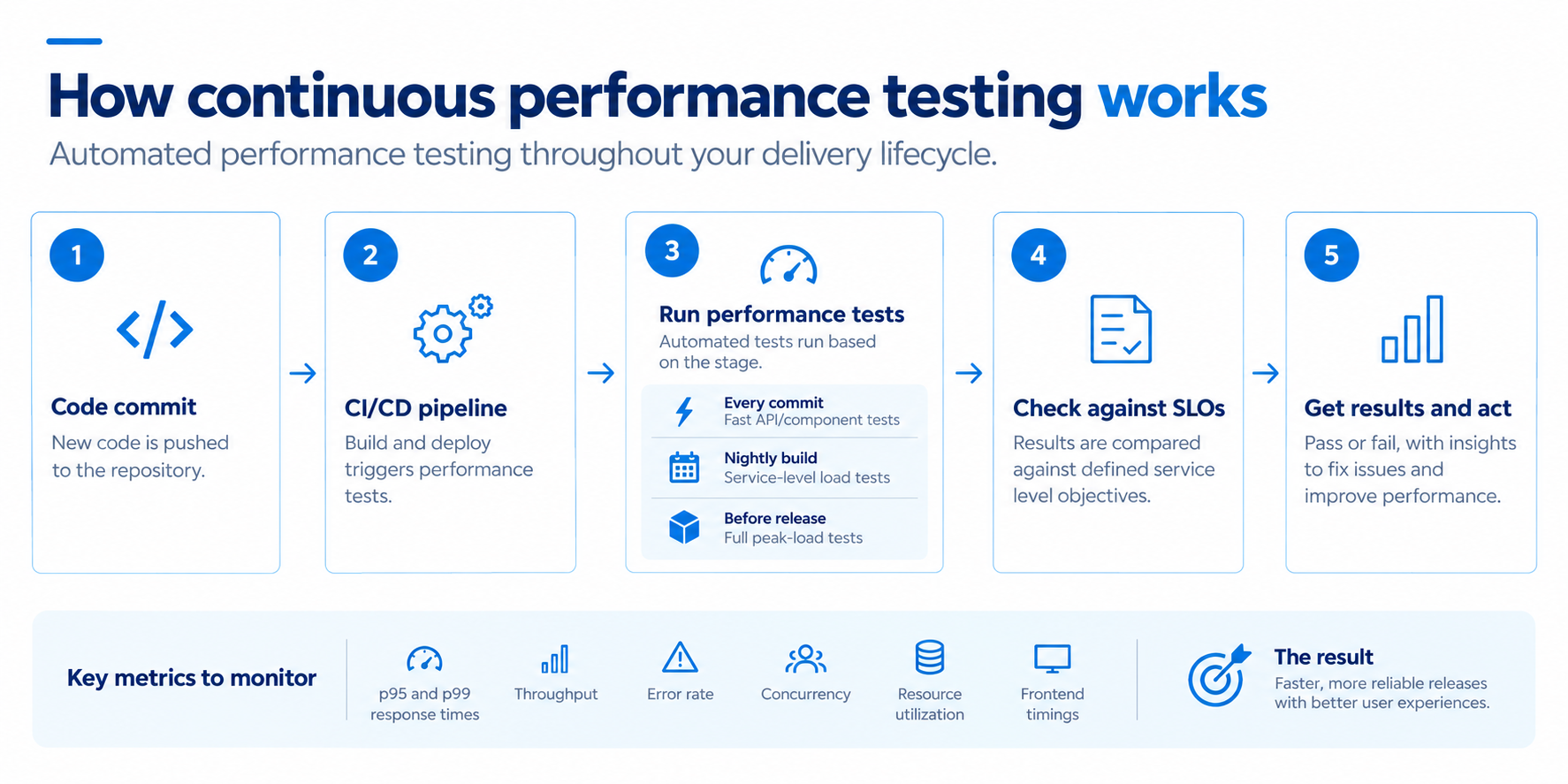
To boil it down to an analogy, traditional performance testing works like a final exam in school, while continuous performance testing works more like the tests you would get every Friday to assess if you are actually learning.
Here’s a quick comparison of their implementation differences.
| Traditional | Continuous | |
| Timing | Late, before release | Throughout the lifecycle |
| Trigger | Project milestone or calendar | Commit, build, merge, deploy |
| Scope | Full end-to-end system | Mostly component and service level |
| Duration | Hours or days | Minutes for pipeline tests |
| Owner | Specialist performance team | Shared across dev, QA, and SRE |
| Output | A report | An automated pass/fail decision |
| Failure mode | Late discovery, schedule slip | Fast feedback, small fixes |
Where they differ most is in ownership. Traditional testing hinges on a small group of specialists who take over at the end of the development cycle. Unsurprisingly, this often leads to bottlenecks the moment delivery speed picks up.
Continuous performance testing, on the other hand, distributes work throughout the development cycle. Developers are required to run small, efficient tests regularly in a localized way. Specialists in this approach design for the hard scenarios and interpret the results of the tests.
One other hinge point is scope. Teams are not required to run a full 10,000-test suite after a commit. Instead, they focus on small tests that answer specific, scoped questions quickly.
Traditional testing hinges on a small group of specialists who take over at the end of the development cycle.
If you are unsure about the cadence of these tests, here’s a brief list of the most common approaches the industry has taken.
Run short component and API tests. Keep them under five minutes and check for obvious regressions like a new N+1 query or a slow serialization path.
Run integrated service-level tests at moderate load. These usually take 20 to 40 minutes and catch interaction issues between services.
Run full end-to-end scenarios at standard production load. Don’t forget to include the business-critical journeys that generate revenue.
Run endurance and stress tests. These reveal memory leaks, breaking points, and connection pool exhaustion.
Think major peaks in traffic like tax deadlines, open enrollment, or holidays like Black Friday. Test at least a couple of these scenarios.
Always match test depth to the speed of your feedback. You are aiming to tie tests to pipeline events.
This will allow you to follow the evolution of your codebase from a performance perspective without risking the bad press of a bad release. Remember, fast tests are more likely to be run often. Slow tests, not so much.
Now, having said all this, it’s important to clarify that not all performance-related tests require automation. The following are tests that do.
Component and API testing validates individual services in isolation. These fast tests make commit-level gating possible and should be run with every commit.
Load testing measures system behavior under expected user volume. It’s your baseline check and belongs in nightly and release-candidate stages.
Stress testing pushes the system past its expected capacity to find its limits. Run it weekly rather than one every commit, since it’s slower and produces more noise.
Spike testing produces a sudden, sharp increase in traffic. It validates autoscaling configurations and queue behavior. This is the same as stress testing and should be prioritized by the e-commerce industry.
Endurance testing sustains moderate load for a long period of time. It is intended to surface memory leak issues and resource exhaustion. It’s the same as stress testing.
Scalability testing measures how performance changes as you grow your user base or infrastructure. It usually informs capacity planning and cloud spend and should be run once a quarter.
The TL;DR is this—start with component tests and load tests. They provide the fastest return and integrate most seamlessly into your pipeline.
The integration process for continuous performance tests, or any tests for that matter, is where most suites safely land or crash completely.
The integration process for continuous performance tests, or any tests for that matter, is where most suites safely land or crash completely. Here’s the game plan.
A service-level objective (SLO) is a measurable performance target, such as “95th percentile checkout latency stays under 800 milliseconds at 500 concurrent users.”
Without SLOs, your pipeline has nothing to fail against. Our guide to modeling performance tests covers how to set component-level SLOs that automate cleanly here.
Run your test suite against the current build several times. Record the results. This becomes the reference point for detecting drift.
Brittle scripts kill continuous programs faster than anything else. Use correlation, parameterization, and automated maintenance so tests don’t break on every UI tweak.
Add performance test steps to Jenkins, Azure DevOps, GitLab, or GitHub Actions. Configure each stage with an appropriate test scope and duration.
The pipeline should stop a build automatically when SLOs fail. Remember, a human reading a PDF afterward is not a gate.
Push results to a dashboard your team already checks. Correlate with APM data from tools like Dynatrace, Datalog, AppDynamics, New Relic, or Prometheus, so you see the cause, not just the symptom.
As a heads up, Tricentis NeoLoad already handles these steps natively for you. It runs automated SLO-based pass/fail gates on every commit, provisions load generators globally through dynamic infrastructure, and correlates results with APM data bidirectionally.
All game plans need a clear strategy. To build an effective continuous performance test suite, focus on these decisions.
First, pick your critical user journeys carefully. The reality is that you cannot test everything continuously. Instead, identify the ten most critical flows for business value. These usually are login, search, checkout, and order submission.
Next, ensure your environments follow production closely. This is usually challenging, but it’s extremely valuable. It doesn’t have to be a one-to-one reproduction, as long as you are consistent. Remember, trend analysis on a scaled-down environment beats one perfect test in production.
Solving test data early is critical to maintain pace and avoid disruption in the testing cycle. Stale or exhausted test data can cause more false positives than bugs. For this, it’s important to plan data refreshes regularly, parameterize as much as possible, and clean up from day one.
Following up, assign clear ownership of responsibilities. Decide who investigates feedback and makes deployment decisions. Ambiguity can create doubt about the pipeline, and that can lead to circumventing important steps.
Continuous performance testing is how you qualify that confidence for speed and scale.
Finally, track trends, not just verdicts. Tests that pass at 800ms today and 830ms tomorrow are a sign of degradation. Don’t ignore this. Cross-examine trends to catch slow drift that could be ignored otherwise.
Google’s Site Reliability Engineering team frames it well. One key responsibility of SREs, they write, is to “quantify confidence in the systems they maintain.” Continuous performance testing is how you qualify that confidence for speed and scale.
Here are the most important metrics to follow for performance:
Frontend timing is often overlooked and deserves more emphasis. A 200ms API response means nothing if the browser takes five seconds to paint. Tools like Tricentis NeoLoad’s RealBrowser capture browser-level performance alongside protocol results in a single test run.
For a fuller breakdown, see our overview of performance testing best practices and metrics here.
Let’s examine a real use case to highlight the impact of continuous performance testing with a tool like Tricentis NeoLoad.
Dell runs SAP as the backbone of its business. Around 2,000 sales representatives use it daily, and the platform handles roughly 35,000 orders per quarter. Dell’s performance engineering team certifies every release and can block any build that misses performance targets.
The team was splitting work across NeoLoad and a legacy load testing tool, which created inconsistent results and duplicated effort. An S/4HANA migration was also approaching.
Dell consolidated SAP GUI and SAP Hybris performance testing onto NeoLoad. Scripting, execution, and analysis moved into a single interface. The team also connected NeoLoad to Dynatrace for deeper analysis of the application under test.
Straightforward projects now take 40% less time to design and create scripts. Test maintenance dropped by 30%, including user path updates.
Across roughly ten performance tests per release and 120 executions per year, those savings compound quickly. Dell also gained transaction-level bottleneck analysis, replacing the user-level visibility its legacy tool provided.
You can learn more about this case study here.
Ensuring that a continuous performance testing suite is implemented correctly requires a lot of work and expertise. To aid this process, it is recommended to always follow the industry best practices, like the following:
A code assistant can help you write a test faster, while an agent can take a goal and work its way towards it.
Agentic performance testing uses AI agents that plan, execute, and analyze performance tests autonomously, rather than simply generating a script when prompted.
This distinction matters. A code assistant can help you write a test faster, while an agent can take a goal and work its way towards it.
In practice, three areas stand out.
This is the clearest win when implementing agentic AI. A continuous program generates dozens of test runs weekly, and most results look fine at a glance.
Agents, on the other hand, review every run, correlate metrics across tiers, identify any anomaly, and produce a report with evidence you can follow.
The performance specialist bottleneck is structural. Domain-specialised agents encode expert judgement about test design, load modeling, and bottleneck diagnosis. A developer without deep performance training gets expert-level output on demand. The specialist moves to strategy instead of execution.
Agents connected through the Model Context Protocol (MCP) can trigger tests, gather results, and hand findings to other tools in your workflow. That makes performance validation part of a broader quality workflow rather than a standalone step.
Tricentis builds this into NeoLoad directly. Agentic performance testing delivers full analysis with evidence and executive-ready reports. AI chat sits inside NeoLoad Web with full context awareness and no external LLM dependency.
Continuous performance testing isn’t a tooling upgrade. It’s a change in when your organization learns the truth about performance.
Pick one critical journey. Define one SLO. Wire one gate into your pipeline. Then expand.
Explore how Tricentis helps teams integrate continuous performance testing into their delivery pipelines with NeoLoad.
This post was written by Juan Reyes. As an entrepreneur, skilled engineer, and mental health champion, Juan pursues sustainable self-growth, embodying leadership, wit, and passion. With over 15 years of experience in the tech industry, Juan has had the opportunity to work with some of the most prominent players in mobile development, web development, and e-commerce in Japan and the US.

A continuous performance test is an automated performance test that runs as part of the software delivery pipeline, triggered by code changes or build events. It produces a pass or fail verdict against predefined service-level objectives.
Common examples include a five-minute API load test on every pull request, a nightly service-level load test at expected traffic, a spike test validating autoscaling, and an endurance test running for several hours before a major release.
Pipeline-level tests typically run for two to fifteen minutes. Nightly integrated tests run 20 to 40 minutes. Endurance tests run for several hours, and full peak-load release tests often take up to four hours.