

Webinars
A Continuous Testing roadmap: How to chart your course to maturity in 2021
Start the year off right by learning how to assess your testing...
Learn what GUI testing is, why it matters, the different testing types, and how automated GUI testing improves software quality and user experience.

TL;DR
Graphical user interface (GUI) testing is the practice of verifying every visible layer of an application––windows, buttons, menus, icons, responsive layouts, and visual feedback––to be sure it behaves and looks the way real users expect.
GUIs are the storefronts of modern software––where the user’s world meets the code behind the curtain.
Whether it’s tapping an app on your phone or navigating a complex enterprise dashboard, GUIs translate digital functionality into human experience. And just like any storefront, if it’s broken, confusing, or misaligned, customers walk away.
GUI testing emerged in the late 1980s, when the mouse-and-windows paradigm replaced command lines; suddenly, testers had to verify not only what software did, but how people experienced it. Early teams poked manually at screens and logged results on clipboards.
Everything has changed since then.
Today’s testers script repeatable checks that run across browsers, mobile devices, and even wearables, and modern GUI is a swirling cocktail of HTML/CSS and other UI code, native widgets, animations, accessibility metadata, and API calls.
A thorough test suite has to probe
Every component must not only function but also align visually across devices, resolutions, and accessibility standards. By confirming those elements, GUI testing safeguards first impressions, brand trust, and, ultimately, revenue.
Whether it’s tapping an app on your phone or navigating a complex enterprise dashboard, GUIs translate digital functionality into human experience.
Users still use “GUI testing” and “UI testing” almost as if referring to the same discipline. But they’re not the same.
UI testing is the broader category, covering any interface a user touches, including command-line tools and voice interfaces.
GUI testing is the graphical subset of the broader discipline. GUI testing specifically targets windows, iconality, navigation, and pointer-based controls. In practice, most modern software is graphical (although that’s an opinionated take in an MCP-prone world), so both terms converge.
Let’s summarize.
| GUI testing | UI testing | |
| Scope | Graphical elements only | Any interface, graphical or not. |
| Primary concern | Does the visual layer work and feel correct? | Does the interface, in any of its forms, work for the user? |
| Tools | Model-based GUI automation, visual regression tools. | GUI tools, plus CLI test harnesses and voice/conversational test tools. |
| Functional ownership | QA/test automation engineers | QA, often alongside UX research and product ownership |
Users form opinions at the speed of a finger snap. The World Wide Web Consortium reminds us very clearly that digital experiences must be “perceivable, operable, understandable, and robust.” Miss just one of these pillars and visitors bounce, complain, or worse, churn.
Imagine launching a sleek new app, only for users to find that the “Submit” button doesn’t work or labels get cut off on mobile screens. It’s not just embarrassing; in this day and age, it can potentially be business-breaking.
GUI testing matters because it allows the team to catch those situations before the customer finds out. A disciplined practice:
Defects that slip past the interface add real cost. A classic study found that teams spend a median of 17% of project effort just fixing bugs discovered after coding finishes. Catching those issues earlier with systematic GUI tests converts lost time into innovation time.
Implementing GUI testing pays off at nearly every stage of the software development lifecycle. Here are a few items where teams see the return on the time investment:
By ensuring that all visual and interactive elements behave intuitively, GUI testing enhances usability and accessibility effectiveness. A user who never notices friction is a happy customer who keeps coming back.
A polished UI reflects your brand’s perceived professionalism. GUI tests maintain consistency across themes, colors, and logos, so that the experience feels the same whether someone opens the app on a laptop, tablet, or phone.
GUI testing often catches bugs that unit or API tests miss, especially those triggered by user interaction.
Translation: details matter. Examples of those details include a modal that won’t close, a dropdown that loses its selected value on resize, and a button that doesn’t change its hue when clicked.
A polished UI reflects your brand’s perceived professionalism.
GUI testing ensures your application behaves consistently across browsers like Chrome, Firefox, and Safari. This also includes native platforms like iOS and Android, and even operating systems including Windows, MacOS, and Linux.
Happy users mean fewer support tickets. GUI testing addresses issues before users stumble upon them. This practice ensures that teams spend less time triaging cosmetic bugs that should have never shipped in the same place.
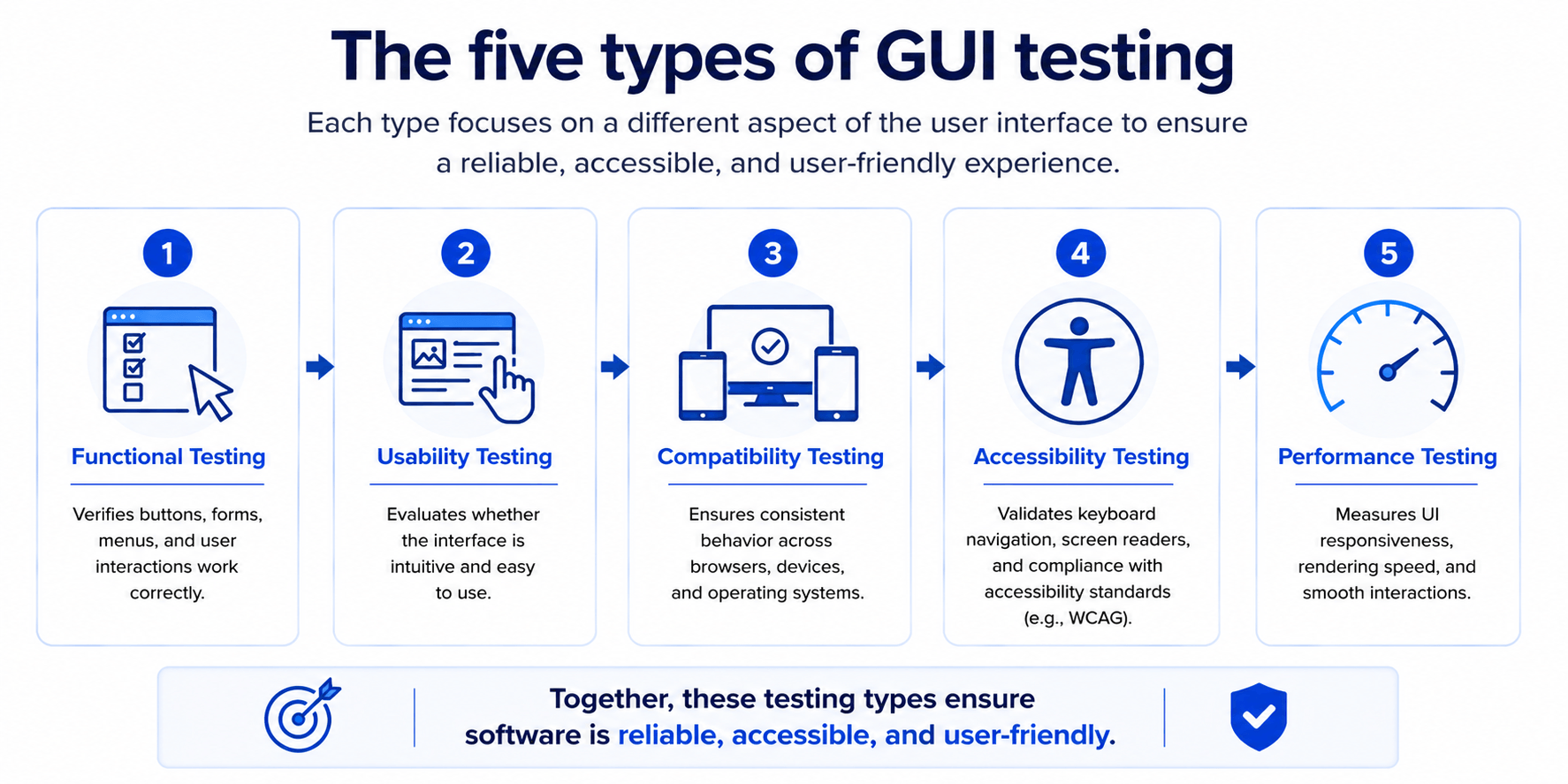
GUI testing isn’t a one-size-fits-all approach. It’s better to think of the discipline as a family of test types, each answering a different question about the interface and its usability. Let’s break down the most common types.
Functional testing verifies that all interactive elements (like buttons and links) perform their intended actions. It essentially answers the question, “Does this feature work?”
Here’s a practical example: confirming that clicking on a simple “add to cart” button actually adds the item to the cart, updates counts, and persists the selection through checkout.
Usability testing focuses on user experience. It evaluates whether the interface is intuitive and accessible, and unlike functional testing, usability testing often involves real users giving feedback.
Think about usability testing as a moderated session where a participant tries to complete checkout without guidance and a facilitator notes where they hesitate. Usability testing is best scheduled before a major redesign ships, not after.
Your UI might look perfect on Chrome but break on Safari. Compatibility testing ensures consistency across different browsers, operating systems, and devices.
For example, you’ll want to verify that a CSS grid layout that renders cleanly on desktop Chrome doesn’t collapse on an older Android WebView. Teams with a wide device footprint (think retail, media, anything consumer-facing) should treat this as continuous, not occasional.
Accessibility testing entails tabbing through an entire checkout form using only a keyboard to confirm every field is reachable and labeled.
With digital accessibility now being both a moral and legal imperative, accessibility testing ensures compliance with standards like WCAG. It checks screen-reader compatibility, keyboard navigation, and color contrast.
Accessibility testing entails tabbing through an entire checkout form using only a keyboard to confirm every field is reachable and labeled. You need to bake this practice into the same cycle as functional testing and treat it as a first-class concern rather than as a separate audit.
Finally, it’s important to remember that GUI responsiveness is part of performance too. Performance testing evaluates load times, response to high user traffic, and smoothness of animations and transitions.
By now, it should be clear how important UI functionality is for your users and your business. To be clearer, a laggy dropdown or a spinner that never resolves is a GUI defect even if the underlying API responds in milliseconds.
Run the GUI under realistic load, not just on the bubble of a staging environment.
Once the team has decided on what to test, the next natural question is how to proceed. Here are a few common techniques that are shared by modern teams and mature test suites:
This technique involves a tester acting once, the tool recording it, and replaying it on future builds. It’s fast to set up but brittle when the UI changes.
For model-based testing, the tool builds a model of the application’s objects and flows, so tests keep working even when the interface’s visual layout shifts, as long as the underlying model is updated.
This technique compares pixel by pixel (or region by region) screenshots from past successful builds against the current working version to catch unintended visual drift.
A human tester probes the interface without a fixed script, hunting for the edge cases that a script wasn’t programmed to check.
The same test logic runs against many different data sets or is assembled from reusable, plain-language keywords, which keeps test maintenance centralized as the application grows.
As with everything in systems and software development, rather than a single tool, organizations typically combine categories.
Building on the family of GUI testing techniques, let’s discuss tools that better adapt to each and offer solutions for a combination of them.
As with everything in systems and software development, rather than a single tool, organizations typically combine categories.
These tools let teams design GUI tests once and replay them across browsers, enterprise systems, and legacy terminals without deep coding investment. Tricentis Tosca is a purpose-built solution for this category.
These are code-first tools for teams with strong engineering resources and a preference for owning their test scripts directly.
These are oriented for catching unintended pixel drift between builds.
These are more involved and infrastructure-heavy tools that run test suites across multiple real devices and browser combinations without a team maintaining the hardware itself.
The takeaway is to keep an ever-present human-in-the-loop mentality and have human testers engaged in the process while letting automation
In manual GUI testing, testers interact with the UI just like users would––clicking buttons, entering data, observing behavior. It’s essential for exploratory testing and catching nuanced issues, like awkward workflows or clunky animations that technically “work” but don’t feel right.
With automated GUI testing, on the other hand, scripts mimic user behavior to validate UI functionality. Tools like Tricentis Tosca offer model-based test automation, allowing teams to test GUIs without deep coding knowledge. Explore the comparison below.
| Manual GUI testing | Automated GUI testing | |
| Ideal for | Exploratory testing, nuanced UX judgement, one-off scenarios | Regression testing, frequent builds, broad device/browser coverage |
| Speed at scale | Slow | Fast; purpose-built for CI/CD cadence |
| Maintenance | Low tooling overhead; simpler day-to-day but involves more people-hours in the long run | Higher entry cost; lower per cycle cost once stable |
| Catches more | Subjective, experiential issues | Repeatable, deterministic regressions |
Automated GUI testing is good for: Regression testing after updates, Frequent builds in CI/CD pipelines, and covering a large matrix of browsers, devices, and platforms.
However, automated testing is not a flawless approach. GUI changes can break test scripts easily, and some visual glitches are next to impossible to detect without human eyes.
The takeaway is to keep an ever-present human-in-the-loop mentality and have human testers engaged in the process while letting automation handle repetition.
Pair exploratory testing charters and run things by a human, with nightly automated regression suites, to strike the right coverage cadence, rather than treating manual and automated as competing ways of proceeding.
GUI testing is indispensable; we’ve established that already. However, it’s not without its own friction points, like
And, to stay precise, GUI testing is not the same as functional testing, though they often overlap. GUI testing focuses on the user interface; functional testing can operate under the hood, validating logic even without a GUI.
Before calling a GUI test pass complete, run through this list:
Tricentis Tosca’s model-based approach lets you design codeless GUI tests once and replay them across browsers, SAP, Salesforce, and even legacy terminals.
AI-driven object recognition shrugs off locator changes, while risk-based dashboards show exactly which business processes need attention. Dive deeper in our UI test automation primer or explore Tosca’s continuous testing platform for enterprise-scale coverage.
“Usability is about people and how they understand and use things, not about technology.” – Steve Krug, Don’t Make Me Think
GUI testing is how we honor that principle––by making sure every click feels like second nature.
In this day and age, GUI testing is no longer optional––it’s a cornerstone of software quality. It ensures that what users see and touch behaves exactly as expected, across every device and interaction. While it has its challenges, the right strategy and tools can transform GUI testing from a tedious chore into a strategic advantage.
With tools like Tricentis Tosca, you can automate the grunt work, maintain test reliability, and release confidently.
“Usability is about people and how they understand and use things, not about technology.” – Steve Krug, Don’t Make Me Think
GUI testing is how we honor that principle––by making sure every click feels like second nature.
This post was written by Juan Reyes. As an entrepreneur, skilled engineer, and mental health champion, Juan pursues sustainable self-growth, embodying leadership, wit, and passion. With over 15 years of experience in the tech industry, Juan has had the opportunity to work with some of the most prominent players in mobile development, web development, and e-commerce in Japan and the US.

A GUI, or graphical user interface, is the visual layer through which a person interacts with software using elements like windows, icons, buttons, and menus rather than typed commands.
For example, a shopping app’s product page, its image, the “add to cart” button, the quantity, and the price display are a GUI. On the other hand, the command line used to install that same app’s dependencies is not.
GUI testing means verifying that the graphical, visible layer of an application behaves and looks as expected. That includes its windows, buttons, menus, layouts, and visual feedback.
API testing validates the application’s logic and data at the code layer, without any interface involved. A GUI test can pass visually while the underlying API is misbehaving.
The other way around is true as well: an API can be functioning correctly while the GUI displays its data incorrectly. This is why mature teams run both in tandem.