

A detailed guide to risk-based testing
Risk-based testing helps prioritize testing efforts, reduce costs, and...
Assertion testing is a testing strategy that uses assertions within test cases to verify that a program behaves as expected.

You write solid code. Tests pass. Everything looks good. You deploy with confidence, then production breaks. Users can’t sign up. Payments fail.
What went wrong?
Your tests didn’t check what matters. Your payment test verified status codes, but it never checked if the required fields existed. Not only that, your sign-up test probably used fake responses, but it never verified the real contract.
Assertion testing fixes this. It’s about writing clear checks in your tests that validate what your code needs. Instead of just testing that functions work, you test that they work correctly with the right data structure.
This guide covers the fundamentals of assertion testing—what it is, why it’s important, and how to use it effectively in popular programming languages through practical examples.
Assertion testing is a testing strategy that uses assertions within test cases to verify that a program behaves as expected by comparing actual outcomes with expected results
Assertion testing is a testing strategy that uses assertions within test cases to verify that a program behaves as expected by comparing actual outcomes with expected results.
Microsoft’s official Power Apps testing documentation defines assertions with precision: “An assertion is an expression that evaluates to true or false in the test. If the expression returns false, the test case will fail.” Assertions are checkpoints that confirm your expectations.
Unlike error handling, which manages unexpected problems in production code for real users, Assertions verify expected behavior in tests during development. Assertions prove correctness; error handling ensures stability.
According to Wikipedia, assertion testing began in the 1940s. Visionaries like von Neumann and Turing suggested adding checks to code.
In the ’60s, Floyd advanced verification, and Hoare introduced preconditions and postconditions. Eiffel embraced assertions in the ’80s. Java joined in the 2000s. Now, tools like JUnit and TestNG depend on assertions to keep software behavior in check.
That precision matters. A few months ago, a startup I work with experienced a two-hour payment outage. Why? A third-party API removed a field that our code depended on. Our tests only checked status codes—nothing else.
//This Jest test would have caught the API change

test('payment API returns required fields', async () => {

  const response = await callPaymentAPI();

  expect(response.confirmationCode).toBeDefined();

  expect(response.status).toMatch(/success|failed/);

});
The key insight here is that your tests should verify not only that APIs work, but also that they return the exact data structure your code requires.
Assertion testing catches problems early and tells you what went wrong before deploying the application to production. Here is why it matters.
You know those hidden bugs, the ones that only surface when users do unexpected things? Like searching for empty strings. Or entering negative payment amounts. Most QA teams test the happy path, but users don’t always follow it.
I’ve run into this exact issue before. It’s easy to miss during testing because no one thinks to search for nothing. But a simple assertion can stop it before it causes problems.
Here’s an example. This test checks that the search query isn’t just empty spaces before searching the database for products:
//This Jest test catches the edge case of empty search queries

describe('Search functionality', () => {

  test('should reject empty search queries', () => {

    expect(() => searchProducts(''))

      .toThrow('Search query cannot be empty');

  });

});When something breaks, you want to know immediately. Assertions make failures loud and obvious.
This test example verifies that the payment was processed successfully. It checks if the amount after processing the payment is positive and that the payment status is completed with a transaction ID:
Without specific assertions, a failing test just says something’s wrong. You’ll spend hours digging through code to find what broke.
But with clear assertions, you are shown exactly what failed: Expected: completed, Received: pending. You know immediately that the payment didn’t finish processing.
Research published in ACCU’s Overload journal shows that well-placed assertions can reduce debugging work by several times, in some cases up to 33 times less effort than debugging without them. That’s real time saved for your team.
Assertions act like checkpoints throughout your tests, making sure everything is still working as expected.
This matters most in complex workflows where multiple services interact. One service might assume that another service cleaned up data properly. Without test assertions, that assumption might be wrong.
This test checks that both services maintain a consistent state after order processing:
//This Jest test checks for inventory not being released after completion

test('should process valid payment successfully', () => {

  const paymentResponse = processPayment(100, validCard);


  // Specific - tells you exactly what's broken

  expect(paymentResponse.status).toBe('completed');

  expect(paymentResponse.transactionId).toBeDefined();

  expect(paymentResponse.amount).toBeGreaterThan(0);

});
These state checks make sure everything is working the way it should. For example, if processOrder() completes the payment but fails to release inventory, the final assertion will catch it. You’ll know something went wrong instead of deploying broken state management.
Assertions become living documentation. New team members read them and instantly understand constraints.
In this example, the test checks that only premium users get discounts and only on orders over $100.
function calculateDiscount(user, order) {

 // In Jest test file:
 test('should only allow premium users to get discounts', () => {

   expect(user.isPremium).toBe(true); // Business rule: only premium users

   expect(order.total).toBeGreaterThan(100); // Minimum order for discount

   expect(calculateDiscount(user, order)).toBe(order.total * 0.1);

 });

}
No separate documentation is needed. The test tells the story.
Assertions show up in different kinds of tests. Each type checks something different but makes sure your code works.
Unit tests check one small piece of code at a time. Like testing if a calculator function can add two numbers correctly.
Here’s a simple test that checks if a tax calculator function works properly. We give it $100 and an 8% tax rate, and we expect it to return $8.
These assertions are simple. You give a function some input and check if you get the right output. If your function is supposed to multiply two numbers, you make sure it does that math right.
Integration tests check if different parts of your app can interact with each other. Like making sure your payment system updates your user’s account balance.
This test makes sure that when someone pays $50, their account balance goes down from $500 to $450.
describe('payment service', () => {

 let paymentService;

 let userService;


 beforeEach(() => {

   userService = new UserService();

   paymentService = new PaymentService(userService);

 });


 test('payment service should update user balance', async () => {

   const payment = await paymentService.processPayment(123, 50);

   const user = await userService.getUser(123);


   expect(payment.success).toBe(true);

   expect(user.balance).toBe(450); // Started with 500, paid 50

 });

});
These catch problems when one part of your app thinks it interacted with another part, but in reality, nothing happened.
E2E tests check complete user actions from start to finish, like a real person clicking buttons and filling out forms on your website.
Here, we test a flow where a customer buys something online—it clicks buttons, enters a credit card, and checks if it gets a confirmation.
test('user can buy something', async ({ page }) => {

  await page.click('#add-to-cart');

  await page.click('#checkout');

  await page.fill('#card-number', '4111111111111111');

  await page.click('#pay-now');


  const success = await page.textContent('.success-message');

  expect(success).toContain('Order confirmed');


  const email = await getLastEmail(user.email);

  expect(email.subject).toContain('Your order');

});
These assertions check the things users care about. Did their order work? Did they get a confirmation email? Can they see what they bought? They catch the issues that might make users unsatisfied.
API tests check that your app gives back the right data when other apps ask for it. For example, it can ensure that your user profile API returns user information.
Here’s a test that asks the server for user info and makes sure it gets back all the important details like name and email.
test('user API gives back good data', async () => {

  const response = await fetch('http://localhost:3000/api/users/62');

  const user = await response.json();


  expect(response.status).toBe(200);

  expect(user).toHaveProperty('id');

  expect(user).toHaveProperty('email');

  expect(typeof user.name).toBe('string');

  expect(user.email).toMatch(/\S+@\S+\.\S+/);

});
API assertions catch contract problems. When your frontend expects user data to look one way, but your backend sends it back differently, these tests will catch that mismatch.
System testing checks if everything behind the scenes works as one. Not just the pieces. APIs, databases, and backend logic—they must all respond as expected.
Take this example. We tested placing an order on an e-commerce site using real data. The test sends a full payload, hits the API, and checks the system’s internal state, from database records to event logs.
test('system processes and records a valid order correctly', async () => {

 const testUser = await createTestUser();

 const testItem = await createTestItem();


 const orderPayload = {

  userId: testUser.id,

  items: [{ id: testItem.id, quantity: 1 }],

  paymentInfo: { cardNumber: '4111111111111111' }

};


 const response = await api.placeOrder(orderPayload);

 expect(response.status).toBe(200);

 expect(response.data.message).toMatch(/order placed/i);


 const order = await getOrderFromDatabase(testUser.id);

 expect(order.status).toBe('confirmed');

 expect(order.items).toHaveLength(1);


 const log = await getSystemLog(order.id);

 expect(log.event).toBe('ORDER_CONFIRMED');


 await clearTestData([testUser.id, testItem.id, order.id]);

});
This test doesn’t just check if the call succeeded. It verifies that the system behaved correctly across services, data layers, and internal logs.
Hard assertions stop your test right away when something fails.
For example, while processing a user’s data, you can check if the user exists. If the user doesn’t exist, this test stops immediately instead of trying to continue.
test('process user data', async () => {

  //fetch user from API

  const response = await fetch('http://localhost:3000/api/users/62');

  const user = await response.json();


  // Test stops here if user doesn't exist

  expect(user).not.toBeNull();


  processUserData(user); // This won't run if the check above fails

});
Use hard assertions when something is super important, like checking if someone is logged in before showing their dashboard. If that check fails, there’s no point continuing with the rest of the test.
Soft assertions keep going even when a particular assertion fails. They collect all the issues and tell you about them at the end.
This code checks multiple things about a user and collects all the errors instead of stopping at the first one.
test('validate user data', async () => {

  // Fetch user data from API endpoint

  const response = await fetch('http://localhost:3000/api/users/62');

  // Parse JSON response into user object

  const user = await response.json();


  // Run all validations and collect any errors

  const errors = validateUser(user);


  // If validation fails, Jest will show the actual error messages

  expect(errors).toEqual([]);

});
Soft assertions are great when you’re checking many things at once, like validating a sign-up form with lots of fields. Instead of fixing one error and running the test again to find the next error, you see all the problems right away.
Different programming languages have their own ways of testing code. It’s kind of like using different tools to fix things—each language has its own go-to set of testing tools that developers like to use.
Java has built-in ways to check if your code works, plus some really popular testing libraries like JUnit 5 that make testing easier.
JUnit 5 is a powerful and flexible framework for writing and running automated tests in Java. It features a range of useful tools that help you verify if your code functions as intended and identify issues early.
In the following example, we’ve created an EmailValidator class and written tests to verify its email validation functionality.
Our tests check if the EmailValidator can properly validate email addresses and show helpful error messages when things go wrong.
testValidEmailAddresses() tests various valid email formats, including basic emails, emails with dots, plus signs, multiple TLDs, numbers, and hyphens.
@Test
 public void testValidEmailAddresses() {
     // Test various valid email formats
     assertAll("valid emails",
             () -> assertTrue(validator.isValidEmail("user@example.com"),
                     "Basic email should be valid"),

             () -> assertTrue(validator.isValidEmail("user.name@example.com"),
                     "Email with dot should be valid"),

             () -> assertTrue(validator.isValidEmail("user+tag@example.com"),
                     "Email with plus should be valid"),

             () -> assertTrue(validator.isValidEmail("user@example.co.uk"),
                     "Email with multiple TLDs should be valid"),

             () -> assertTrue(validator.isValidEmail("123@example.com"),
                     "Email with numbers should be valid"),

             () -> assertTrue(validator.isValidEmail("user-name@example.com"),
                     "Email with hyphen should be valid")
     );
 }
testInvalidEmailAddresses() tests invalid email formats, including empty strings, null values, malformed addresses, and emails with consecutive dots.
@Test
public void testInvalidEmailAddresses() {
     // Test various invalid email formats
    assertAll("invalid emails",
            () -> assertFalse(validator.isValidEmail(""),
                     "Empty email should be invalid"),

            () -> assertFalse(validator.isValidEmail(" "),
                     "Whitespace email should be invalid"),

            () -> assertFalse(validator.isValidEmail(null),
                     "Null email should be invalid"),

            () -> assertFalse(validator.isValidEmail("user@"),
                     "Email without domain should be invalid"),

            () -> assertFalse(validator.isValidEmail("@example.com"),
                     "Email without username should be invalid"),

            () -> assertFalse(validator.isValidEmail("user@.com"),
                     "Email with empty domain should be invalid"),

            () -> assertFalse(validator.isValidEmail("user..name@example.com"),
                     "Email with consecutive dots should be invalid"),

            () -> assertFalse(validator.isValidEmail("user@example..com"),
                     "Email with consecutive dots in domain should be invalid")
    );
}
testCommonProviderDetection() verifies that the validator correctly identifies common email providers like Gmail, Yahoo, Hotmail, and Outlook.
@Test
public void testCommonProviderDetection() {
    // Test common email providers
    assertAll("common providers",
            () -> assertTrue(validator.isCommonProvider("user@gmail.com"),
                    "Gmail should be detected as common provider"),

            () -> assertTrue(validator.isCommonProvider("user@yahoo.com"),
                    "Yahoo should be detected as common provider"),

            () -> assertTrue(validator.isCommonProvider("user@hotmail.com"),
                    "Hotmail should be detected as common provider"),

            () -> assertTrue(validator.isCommonProvider("user@outlook.com"),
                    "Outlook should be detected as common provider"),

            () -> assertTrue(validator.isCommonProvider("user@icloud.com"),
                    "iCloud should be detected as common provider"),

            () -> assertFalse(validator.isCommonProvider("user@company.com"),
                    "Business email should not be common provider"),

            () -> assertFalse(validator.isCommonProvider("invalid-email"),
                    "Invalid email should not be common provider")
    );
}
testUsernameValidation() checks that usernames meet length requirements (3–64 characters).
@Test
public void testUsernameValidation() {
    // Test username length requirements
    assertAll("username validation",
            () -> assertTrue(validator.hasValidUsername("abc@example.com"),
                    "3-character username should be valid"),

            () -> assertTrue(validator.hasValidUsername("user@example.com"),
                    "4-character username should be valid"),

            () -> assertTrue(validator.hasValidUsername("verylongusername@example.com"),
                    "Long username should be valid"),

            () -> assertFalse(validator.hasValidUsername("ab@example.com"),
                    "2-character username should be invalid"),

            () -> assertFalse(validator.hasValidUsername("a@example.com"),
                    "1-character username should be invalid"),

            () -> assertFalse(validator.hasValidUsername("invalid-email"),
                    "Invalid email should have invalid username")
    );
}
testEdgeCases() covers boundary conditions and unusual email formats.
@Test
public void testEdgeCases() {
    // Test edge cases and boundary conditions
    assertAll("edge cases",
            () -> assertTrue(validator.isValidEmail("a@b.c"),
                    "Minimal valid email should work"),

            () -> assertTrue(validator.isValidEmail("user+tag@example.com"),
                    "Email with plus sign should work"),

            () -> assertTrue(validator.isValidEmail("user.name@example.com"),
                    "Email with dot in username should work"),

            () -> assertTrue(validator.isValidEmail("user-name@example.com"),
                    "Email with hyphen should work"),

            () -> assertTrue(validator.isValidEmail("user_name@example.com"),
                    "Email with underscore should work"),

            () -> assertFalse(validator.isValidEmail("user name@example.com"),
                    "Email with space should be invalid"),

            () -> assertFalse(validator.isValidEmail("user@example..com"),
                    "Email with consecutive dots should be invalid"),

            () -> assertFalse(validator.isValidEmail("user@.example.com"),
                    "Email with leading dot in domain should be invalid")
    );
}
Running these tests with mvn test will execute all test cases and report the results in the console.
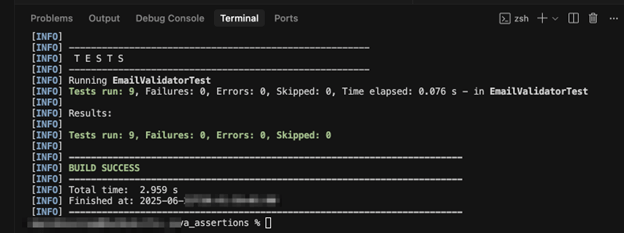
You can follow up with the full source code here.
Python makes testing simple with built-in tools and some awesome testing libraries like Pytest. Here, we’ll go through testing using Pytest.
Pytest is a helpful testing tool that automatically runs your tests and provides clear, detailed reports when something goes wrong. It makes the testing process more efficient and easier to manage.
We wrote a ShoppingCart class that manages a list of items with prices. Here, add_item(item, price) adds items to cart, and get_total() returns the sum of all prices.
#shopping_cart.py
class ShoppingCart:
   def __init__(self):
       self.items = []

   def add_item(self, item, price):
       self.items.append({"item": item, "price": price})

   def get_total(self):
       return sum(item["price"] for item in self.items)
We also wrote a test for the ShoppingCart functionality using pytest. We tested that an empty cart will return a zero total, that adding multiple items calculates the correct sum, and that single item total validation works—all with detailed error messages.
#test_shopping_cart.py
import pytest
from shopping_cart import ShoppingCart

@pytest.fixture
def empty_cart():
   return ShoppingCart()

def test_empty_cart(empty_cart):
   assert empty_cart.get_total() == 0

def test_add_items():
   cart = ShoppingCart()
   cart.add_item("Apple", 1.50)
   cart.add_item("Banana", 0.75)

   assert len(cart.items) == 2
   assert cart.get_total() == 2.25

def test_single_item_total(empty_cart):
   empty_cart.add_item("Test Item", 10.00)
   assert empty_cart.get_total() == 10.00
Running the test with pytest -v will give you a detailed result in your console.
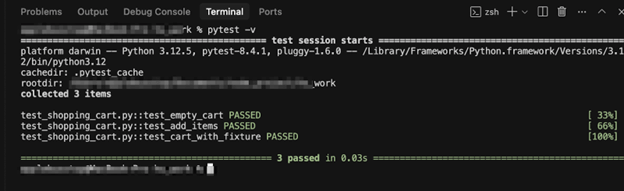
JavaScript and Node.js make testing simple with built-in assertions and powerful frameworks like Jest. With Jest, even small assertions carry weight. Here, we’ll walk through how to test using Jest.
Jest is a helpful testing tool that runs your tests out of the box. It shows detailed errors, gives you feedback fast, and scales well in large codebases.
We wrote a searchProducts function that allow users to search for products by name. The search supports case-insensitive and partial word matches.
// productService.js

const products = [

  { id: 1, name: 'Wireless Mouse' },

  { id: 2, name: 'Bluetooth Headphones' },

  { id: 3, name: 'USB-C Cable' },

  { id: 4, name: 'Wireless Keyboard' }

];


function searchProducts(query) {

  const q = query.trim().toLowerCase();

  return products.filter((p) => p.name.toLowerCase().includes(q));

}


module.exports = { searchProducts };
We also wrote tests for the searchProducts function using Jest. We tested that it correctly matches full names, partial terms, and ignores case sensitivity. Also, we checked that it returns an empty array when no match is found.
// productService.test.js

const { searchProducts } = require('./productService');


test('finds products by exact name', () => {

  const results = searchProducts('Wireless Mouse');

  expect(results).toHaveLength(1);

  expect(results[0].name).toBe('Wireless Mouse');

});


test('matches partial word queries', () => {

  const results = searchProducts('wireless');

  expect(results).toHaveLength(2); // Wireless Mouse and Wireless Keyboard

});


test('ignores case in product names', () => {

  const results = searchProducts('bluetooth headphones');

  expect(results[0].name).toBe('Bluetooth Headphones');

});
Running the test with npm test will give you a detailed result in your console.
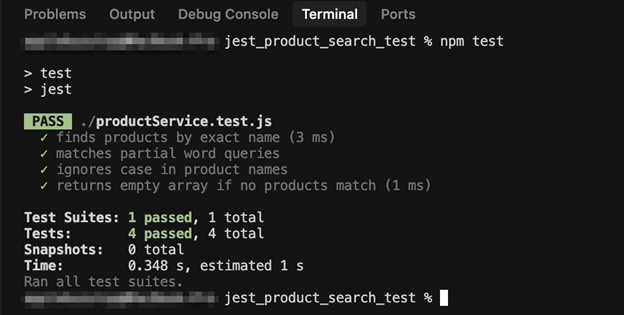
"scripts": {

   "test": "jest"

}Assertion testing plays a quiet but powerful role in building reliable software.
Here’s what good assertions can do:
They’re simple, but they save real time.
Assertion testing delivers significant benefits, but it comes with real challenges that can impact development teams. Understanding these limitations helps you implement assertions more effectively.
If backend teams silently change APIs, your tests will fail. For example, if an API switched from returning “id”: “a0eebc99-9c0b-4ef8-bb6d-6bb9bd380a11” to “id”: 92, a string became a number. Every assertion that depends on the ID field failed instantly. Your team might spend three days fixing these tests instead of building features.
Writing assertions that cover all possible scenarios and edge cases presents significant challenges. Most assertion tests check happy paths perfectly, but what if a user enters John@& as a name? What about empty strings, null values, or 500-character names? Many teams struggle to anticipate every potential failure, leading to errors in production.
Your mocks return perfect data. Clean JSON, no missing fields, predictable responses.
Real APIs are unpredictable. User profiles could have null middle names, emails with trailing spaces, and inconsistent field ordering.
Your assertions expect clean and well-structured mocks like {“name”: “John”, “email”: “john@test.com”}, but production returns {“email”: ” john@test.com “, “name”: null}. This will cause your tests to pass locally but fail everywhere else.
Deep JSON paths create unreadable code. Your assertion becomes expect(response.data.user.profile.settings.notifications.email.enabled).toBe(true). If the backend renames notifications to notificationPreferences, twenty tests could break instantly.
Regular mock tests can pass beautifully, but your app might still break when real users start doing unexpected things, like providing unexpected inputs
Think of assertion testing like a safety net for your application. Regular mock tests can pass beautifully, but your app might still break when real users start doing unexpected things, like providing unexpected inputs.
Good assertion tests catch these problems before they reach production. When something inevitably breaks, assertions tell you exactly what went wrong instead of leaving you hunting through endless code files for hours.
Your code becomes more reliable. You spend less time fixing production emergencies, and you can sleep better at night knowing your safety net is there.
To do assertion testing, start small — pick one important feature and add some basic checks. Trust me, your future self will thank you.
This post was written by Inimfon Willie. Inimfon is a computer scientist with skills in JavaScript, Node.js, Dart, Flutter, and Go. He is very interested in writing technical documents, especially those centered on general computer science concepts, Flutter, and backend technologies, where he can use his strong communication skills and ability to explain complex technical ideas in an understandable and concise manner.

Learn how to supercharge your quality engineering journey with our advanced testing solutions.
Learn how to supercharge your quality engineering journey with our advanced testing solutions.