

Conference Highlights
Salesforce testing 101 with Tricentis
Watch this on-demand discovery session from Accelerate Virtual to...
A complete guide to Salesforce Flow Builder covering features, flow types, real-world use cases, benefits, challenges, and best practices.

Salesforce is one of the leading customer relationship management (CRM) platforms, enabling organizations to manage their customer relationships and driving growth through a unified cloud-based ecosystem.
Within this ecosystem, automation plays a critical role in eliminating manual tasks and ensuring consistent business processes.
Flow Builder is Salesforce’s powerful point-and-click automation tool that enables users to build complex business logic without writing code. It was introduced as part of Salesforce’s commitment to democratizing automation.
Flow Builder allows administrators and developers to create sophisticated workflows that respond to user actions, scheduled events, or platform triggers.
As Marc Benioff, the CEO of Salesforce, once said, “The business of business is improving the state of the world.”
Flow Builder embodies this vision by putting automation capabilities directly into the hands of those who understand business processes best, regardless of their coding expertise.
Flow Builder is a good way to automate routine work like creating follow-ups, setting up reminder emails, or updating records without the need for code, thus allowing folks to focus on more strategic work. Some of the key features of Salesforce Flow Builder include:
Salesforce Flows enable automating complex processes without writing code, thus making it accessible to a broad range of users.
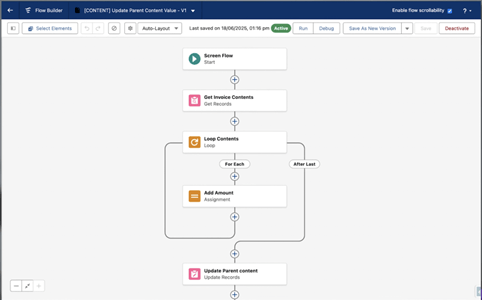
The drag-and-drop canvas provides an intuitive way to construct flows, with elements connected using visual connectors that can clearly depict process logic.
Salesforce Flows enable automating complex processes without writing code, thus making it accessible to a broad range of users.
Flow Builder supports several flow types tailored for different use cases, such as screen flows for user-guided experiences, record-triggered flows for automated responses to changes in data, schedule-triggered flows for time-based automation, platform event-triggered flows for event-driven architecture, and auto-launched flows that can be called from other processes.
Since Flows can be integrated with Apex, Salesforce’s coding language, it also helps perform complex logic and data manipulations easily.
Flow Builder’s built-in debug mode allows you to trace flow execution, thus making it easy to identify errors and validate logic prior to deployment.
It’s also to modularize the automation process by being able to create reusable flow components that can be called from other flows.
Flow Builder can help in several business scenarios:
Flow Builder allows teams to manage the complete subscription life cycle directly from within Salesforce. This includes building flows for subscription creation, upgrades, and cancellations without switching between platforms.
Teams can also create flows that can handle future-dated changes to subscription schedules, such as when a customer negotiates mid-contract and has an upgrade that will take effect in their next renewal.
Maintaining data consistency between Salesforce and the organization is critical for operational visibility. Flow Builder enables bidirectional sync patterns where customer data, subscriptions, invoices, and payment data flow back into Salesforce objects.
For instance, if you are a payment company and a payment succeeds, a flow can update the corresponding Salesforce opportunity or account record with payment confirmation details.
Flow Builder enables bidirectional sync patterns where customer data, subscriptions, invoices, and payment data flow back into Salesforce objects.
Flow Builder supports subscribing to webhook events directly from Salesforce, allowing teams to trigger automated workflows based on what happens in the payment or billing systems.
For instance, when a payment fails, a flow can automatically create a follow-up task for the account manager or trigger some form of collections workflow.
Or when a subscription is cancelled, a flow can update the customer health score and notify the customer success team. These event-driven integrations eliminate the need for manual monitoring and therefore enable proactive customer engagement.
There are two ways to access and manage your flows in Salesforce:
You can navigate to Setup and search for Flows in the Quick Find box. From there, click the New Flow button at the top right to get started creating your first flow.
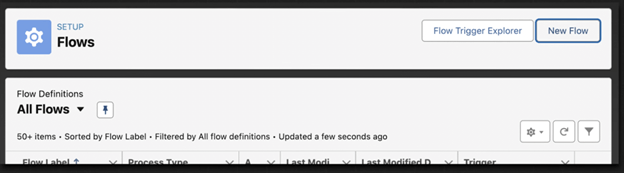
Salesforce recently added a dedicated lightning app called Automation. From this app, simply click the New button either on the home tab or the flows tab. This approach provides a more streamlined experience for flow management.

When you create a new flow, you’ll be prompted to select the type of flow you wish to create. You can search for a specific type, select a category, or choose from commonly used options.
Every flow consists of building blocks:
To start building, click the plus button beneath the start element. Available elements appear dynamically based on your flow—type screen elements, for instance, only appear in screen flows.
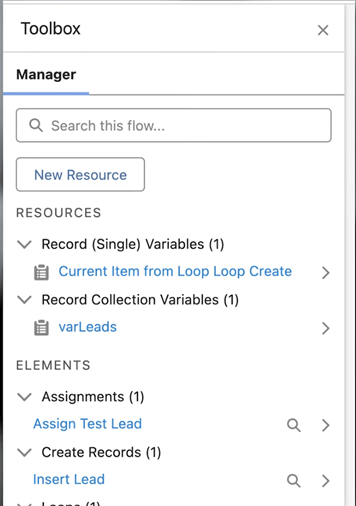
The toolbox on the left side of the canvas contains all available elements and resources, grouped by type. If hidden, expand it using the button at the top right.
Flow Builder is one of those tools that can transform how your team works without relying heavily on developers. The biggest advantage is that it’s a no-code solution, which means your Salesforce admins and operations teams can build and maintain integrations by themselves.
Flow Builder is particularly valuable in the way it lets you embed business logic directly into your sales processes. Instead of switching between multiple systems for managing subscriptions, processing payments, or syncing customer data, your team can do everything from within Salesforce.
This helps in maintaining focus, versus navigating between tabs and having to manually copy information from one place to another.
Another advantage is the flexibility it offers. You can start with something simple, such as syncing customer records or triggering an action when a deal closes, and then expand from there as your needs grow.
The modular nature of flows ensures that you can build incrementally without having to rearchitect everything when requirements change. Since flows can be triggered by external events, you can create a truly responsive workflow that can react in real-time to events in your system.
Finally, there is also the maintenance angle. Flows are visual and declarative, so they are much easier to understand and troubleshoot than custom code.
When someone on your team leaves or a new admin joins, they can look at a flow and understand what it does without needing to read through hundreds of lines of Apex. This transparency reduces risk and makes the automation sustainable over a period of time.
If a flow starts to feel complicated, use subflows and split the logic such that focused flows handle only one specific task.
One of the most frequent issues that teams encounter is that flows become too complex over time, with dozens of branches and conditions that are hard to understand.
The solution here is to break down things early. If a flow starts to feel complicated, use subflows and split the logic such that focused flows handle only one specific task. This keeps the flow clean and makes it easier to test piece by piece.
Performance problems are another bottleneck, especially when flows interact with large volumes of data. A classic mistake is to put database operations like Get Records or Update Records inside a loop.
Salesforce has strict limits on the number of queries you can make in a single transaction, thus resulting in issues. The fix is to gather all the changes in a collection variable as you loop through records and then make a single database call in the end to commit everything at once.
Hard-coded values are another issue, since these values can change over time, especially between environments, thus resulting in broken flows.
It would be prudent to store these values in Custom Labels or Custom Metadata records, such that it’s easy to update them without having to edit the flow itself, and they’ll also stay consistent across environments.
Flows do not have the same robust error-handling mechanisms that Apex has. The best way to manage this would be to build fault paths into your flows.
These are alternative routes that execute when something goes wrong. You can then log the error details to a custom object or notify your team to investigate the issue.
Flow Builder has been instrumental in transforming Salesforce automation and putting powerful capabilities within the reach of admins and developers alike. By utilizing the features of this tool and following best practices, organizations can maintain automations that drive genuine business value.
But as your flows grow in complexity and criticality, partnering with a comprehensive testing platform becomes essential.
Tricentis offers end-to-end Salesforce testing solutions that ensure your flows are flawless across all scenarios, thus protecting your business processes and helping you accelerate your automation initiatives with confidence.
This post was written by Deboshree Banerjee. Deboshree is a backend software engineer with a love for all things reading and writing. She finds distributed systems extremely fascinating and thus her love for technology never ceases.

Learn how to supercharge your quality engineering journey with our advanced testing solutions.
Learn how to supercharge your quality engineering journey with our advanced testing solutions.