

eBooks & Guides
How to automate testing for AI systems
Learn how Globality saved time, increased test coverage, and reduced...
Learn what automated browser testing is, how it works, and best practices to improve web app quality at scale.

Testing a web application across many browsers manually is time-consuming and error-prone.
What works well in Chrome might break in Safari or Firefox, and catching these issues before users do requires testing the same workflows repeatedly across different browsers and versions. This task could quickly become unsustainable as your application grows.
Automated browser testing solves this problem by using code to simulate user interactions across browsers automatically. Instead of clicking through forms and buttons manually, you write test scripts that repeatedly run these actions for you in a consistent, scalable manner.
The Google Chrome Team confirms that:
“Being able to automate browser testing significantly improved the quality of developers’ and testers’ lives.”
This post will walk you through what automated browser testing is, how it works, and how to get started.
TL;DR: Automated browser testing uses scripts to simulate real user interactions in web browsers, helping teams verify functionality, UI behavior, and cross-browser compatibility without manual effort.
Automated browser testing is the practice of using code or scripts to execute test cases in web browsers without manual human intervention, ensuring that web applications function correctly across different browsers and platforms.
Instead of a QA engineer manually clicking through pages, filling out form fields, and checking for errors, automated tests perform these same actions programmatically.
The tests interact with your application the same way a real user would, but they run faster and can be repeated on demand. This frees your team to focus on exploratory testing and complex scenarios that require human judgment.
Automated browser tests can verify functional behavior like form submissions and navigation flows, run regression tests to confirm existing features still work after updates, and validate UI elements like layouts and responsive design across different screen sizes.
This form of testing greatly reduces testing time compared to manual approaches. The efficiency of automated testing becomes very important as applications grow and the number of test scenarios increases.
TL;DR: Automated browser testing follows a simple workflow: write scripts that mimic user actions, execute them in real browsers through drivers or APIs, and analyze reports to identify failures and debug issues.
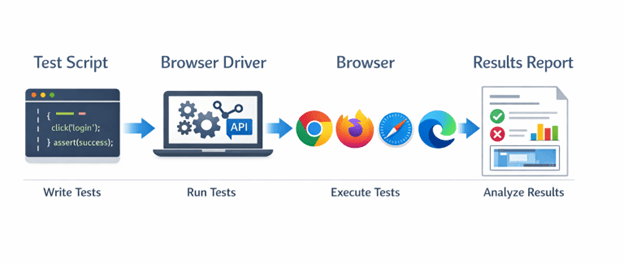
Automated browser testing basically follows a three-step workflow: write test scripts, execute them in browsers, and analyze the results.
First, you write test scripts using a programming language like JavaScript, Python, or Java. These scripts contain instructions that mimic user actions such as clicking buttons, entering text, checking responsiveness, or navigating between pages.
The scripts also include assertions that verify expected outcomes, like checking if a success message appears or if data is saved correctly.
Second, the test execution phase uses browser drivers or APIs to control actual browsers. A browser driver acts as a bridge between your test code and the browser, translating your script commands into browser actions.
When your test says “click the login button,” the driver makes the real browser click that button.
Third, the framework collects results and generates reports showing which tests passed or failed, including screenshots and error logs for debugging.
For example, a login test might navigate to your site, enter credentials, click submit, and verify that the dashboard loads. The same script runs identically across multiple browsers, catching browser-specific issues automatically.
TL;DR: Automated browser testing is most valuable for cross-browser compatibility, regression testing, CI/CD integration, and UI validation—especially for repetitive, high-impact workflows.
Automated browser testing fits several critical testing scenarios where speed, consistency, and coverage matter.
These tests verify your application works identically across Chrome, Firefox, Safari, and Edge. Automated tests run the same scenarios across all browsers simultaneously, catching rendering issues or JavaScript compatibility problems.
Regression testing confirms existing functionality still works after code changes. Every time you deploy new features or updates, automated tests rerun your core user workflows to catch unintended breaks in functionality.
CI/CD runs tests automatically whenever developers push code. This provides immediate feedback on whether changes introduce bugs, preventing broken code from reaching production.
This validation makes sure that responsive designs display correctly across different screen sizes and devices, verifying layouts, spacing, and element positioning.
Automation is very valuable for repetitive tests that run frequently. Although tests that require human judgment, like evaluating visual design aesthetics or exploring new features, still benefit from manual testing.
The goal is to automate stable, predictable scenarios so your team can focus on exploratory and edge-case testing.
Automation is very valuable for repetitive tests that run frequently.
TL;DR: Begin with stable, high-value test scenarios, choose a framework aligned with your stack, set up a proper environment, and integrate tests into CI/CD to catch issues early.
Starting with automated browser testing requires a methodical approach. Follow these steps to build your first automated tests.
Start with high-value, repetitive tests like user login, checkout flows, or form submissions. Choose stable features that change infrequently and run often. Avoid automating tests for features still under active development.
Select a testing framework that matches your team’s skills and technology stack. Popular options include frameworks built on JavaScript, Python, or Java. Consider factors like documentation quality, community support, and integration capabilities with your existing tools.
Install the necessary browser drivers and configure your test framework, then create a dedicated testing environment separate from production to avoid impacting real users during test runs.
Begin with a simple test case, like verifying if a page loads correctly. Write clear, readable test code with descriptive names and include explicit wait conditions to handle dynamic content loading.
Connect your tests to your continuous integration pipeline so they run automatically with each code commit. This catches issues early before they reach production.
Start small with five to ten critical tests, then expand coverage as you gain confidence. Focus on writing maintainable tests that clearly describe what they’re testing. Well-written tests serve as living documentation of how your application should behave.
TL;DR: Focus on critical user paths, write maintainable and readable tests, use reliable waits and selectors, run tests in parallel for speed, and maintain your suite consistently.
Following good practices helps you build reliable, maintainable browser tests and prevent common pitfalls over time.
Automate tests that run frequently and cover critical user paths. A working login flow matters more than rarely used admin features. Focus your automation effort where it delivers the most impact.
Write clear test code with descriptive names and comments. Other team members should understand what a test does without deciphering complex logic. Simple, well-organized tests can save hours during debugging and updates.
Implement explicit waits for elements to load rather than arbitrary sleep timers. Choose stable selectors like data attributes in place of CSS classes that designers might change. This prevents flaky tests that fail randomly.
Run tests simultaneously across multiple browsers and environments instead of sequentially. Parallel execution cuts testing time from hours to minutes.
Update tests when application features change. Ignoring test maintenance leads to a suite filled with broken tests that nobody trusts. Regular maintenance costs far less than rewriting an entire abandoned test suite.
Tests should fail only when real bugs exist, not because of poor wait conditions or fragile selectors.
TL;DR: Browser testing automation faces challenges like flaky tests, maintenance overhead, setup complexity, and long execution times—but disciplined wait strategies, centralized selectors, and smart prioritization help mitigate them.
Even well-planned browser testing automation faces common issues, and understanding these challenges can help you address them proactively.
Tests that pass sometimes and fail other times weaken trust in your test suite.
Tests that pass sometimes and fail other times weaken trust in your test suite. Use explicit waits for elements to appear rather than fixed delays, and verify elements are visible and clickable before interacting with them.
Applications change constantly, and tests need updates to match. Use page object patterns to centralize element selectors. When the UI changes, you can update selectors in one place instead of across hundreds of tests.
Getting browser drivers and dependencies configured correctly takes time. Document your setup process clearly and consider containerized environments for consistency across team members.
Running thousands of tests takes hours. Prioritize critical path tests for every build and run full suites nightly or before releases.
TL;DR: Agentic AI enhances automated browser testing by generating, maintaining, and optimizing tests with reduced manual effort, allowing teams to focus more on building features than maintaining scripts.
Traditional automated browser testing requires developers or QA engineers to write and maintain every test script manually. Agentic AI changes this by enabling AI systems to create, execute, and maintain tests with minimal human intervention.
Teams describe what they need tested in natural language, and AI agents build complete tests automatically.
Tricentis Testim brings agentic AI directly to browser testing through intelligent test creation, self-healing locators, and AI-driven test maintenance.
Teams reduce test authoring time while improving test stability and coverage. Instead of spending hours writing and updating test scripts, your team focuses on building features while AI handles testing complexity.
Discover how Tricentis enables AI-driven testing for web applications.
Starting with high-value test scenarios and following proven best practices helps you build maintainable, reliable tests that deliver real value.
Automated browser testing accelerates your testing process, improves consistency across browsers, and frees your team to focus on innovation rather than repetitive manual checks.
Starting with high-value test scenarios and following proven best practices helps you build maintainable, reliable tests that deliver real value.
This post was written by Chris Ebube Roland. Chris is a dedicated software engineer, technical writer, and open-source advocate. Fascinated by the world of technology development, he is committed to broadening his knowledge of programming, software engineering, and computer science. He enjoys building projects, playing table tennis, and sharing his expertise with the tech community through the content he creates.
Learn how to quickly author tests using modern UI testing and native mobile app testing.
Learn how to quickly author tests using modern UI testing and native mobile app testing.
Automated browser testing uses scripts to run test cases in web browsers without manual intervention, ensuring applications function correctly across different browsers. Tests simulate user actions and verify expected outcomes.
Browser test automation requires testing frameworks, browser drivers for Chrome, Firefox, Safari, or Edge, and execution environments. Teams typically use frameworks designed to work with JavaScript, Python, or Java.
AI-powered platforms like Tricentis Testim add intelligent test creation and self-healing capabilities.
Identify repetitive, high-value test scenarios like login flows or checkout processes. Write test scripts defining user actions and expected outcomes, then configure browser drivers to execute them across browsers. Integrate tests into CI/CD pipelines to run automatically when code changes.