

Webinars
Test automation in 2026: Tosca in the cloud, agentic AI, and a smarter, more scalable future
Watch this webinar to hear two Tricentis experts discuss what’s next...
Learn what smoke testing is, how it works, and why it matters. Explore examples, best practices, and how agentic AI enhances smoke testing.

Your build just deployed. Should you trust it enough to test further, or is it already broken?
That’s exactly what smoke testing answers. It catches broken builds, ensuring you don’t do detailed testing on a build that was already doomed from the start.
In this post, you’ll learn what smoke testing is, why it’s important, steps to perform it, and how AI-powered platforms like Tricentis can keep your tests reliable as you ship.
Smoke testing is the first quick check performed on a software build to see if it works enough to keep testing. The goal is not to verify that everything works perfectly, but to confirm that it works at all.
The International Software Testing Qualifications Board (ISTQB) glossary defines a smoke test as: “A test suite that covers the main functionality of a component or system to determine whether it works properly before planned testing begins.”
In simple terms, smoke testing focuses only on critical functionality and happens before more in-depth testing starts.
The name comes from an old engineering practice: power on a new machine and see if smoke appears. If it does, testing stops. Software follows the same logic.
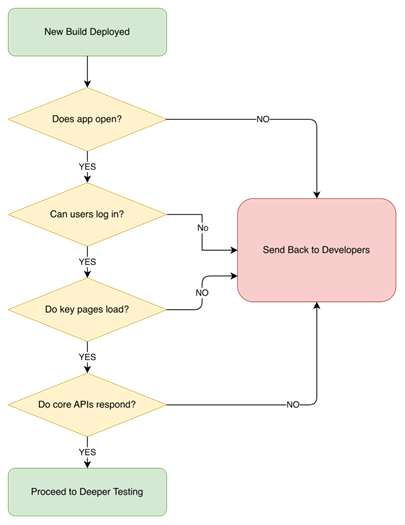
In practice, QA checks core functionality like whether the app opens, whether users can log in, if key pages load, or if core APIs respond as such. If these fail, the build goes back to the developers.
TL;DR: Smoke testing verifies that a build is stable before deeper testing begins. It catches major failures early, such as startup, login, or service issues. This prevents wasted regression effort and keeps CI/CD pipelines reliable.
Skipping smoke tests keeps you at risk of derailing your testing process and slowing down releases. Here’s why it matters:
Smoke testing confirms the build is stable enough to continue testing. It checks that the app starts, core services run, and critical functions respond.
Without smoke tests, you might run a full regression on a broken build and get dozens of failures, which will make you think something serious is wrong when really it’s probably something like a missing environment variable stopping the app from starting.
It prevents teams from wasting hours testing unstable builds, which will reduce rework, minimize delays, and avoid unnecessary debugging and resource costs.
When smoke tests pass, you know the build is stable. For teams releasing multiple times a day, where even small config changes can break things, this is a big win, because with smoke testing, they keep their pipeline reliable and also get quick feedback when the build verification fails.
After a new build is deployed to a test or staging environment, smoke tests are the first to run. They check the most basic expectation. If those fail, there’s no reason to continue with functional, integration, or regression testing.
This early placement makes smoke testing a gatekeeper. It sits between deployment and more expensive testing stages. Without it, teams may run long test suites only to later discover a fundamental issue, wasting time and effort.
For this same reason, smoke tests are designed to fail fast and loudly, which is exactly what is needed at this early stage.
An example of this is a backend server that is deployed successfully but fails to start due to a misconfiguration that blocks database connectivity. Smoke tests are designed to catch this type of issue immediately.
Without smoke testing, teams may run long test suites only to later discover a fundamental issue, wasting time and effort.
Smoke testing is not a one-size-fits-all thing, and how it’s done depends on where a team is and how frequently they release. In practice, most teams fall into one of three approaches:
Manual smoke testing is common in early-stage projects and among teams who are still figuring things out and don’t yet have the system or experience to run automation. After deploying to a testing environment, a team member (especially a QA engineer or developer) checks the basics: Does the app launch? Can a user log in? Does the main dashboard load?
The downside is inconsistency, because different people may check different things. Also, as releases become more frequent, checks may be rushed or skipped.
Agile teams often automate smoke tests inside CI/CD pipelines, where on every build, the same checks are run automatically.
Automation is consistent, scalable, and supports fast releases, but you still have to make sure your tests are focused on core functionality to avoid becoming flaky or noisy. We’ll look at automation more in the next section.
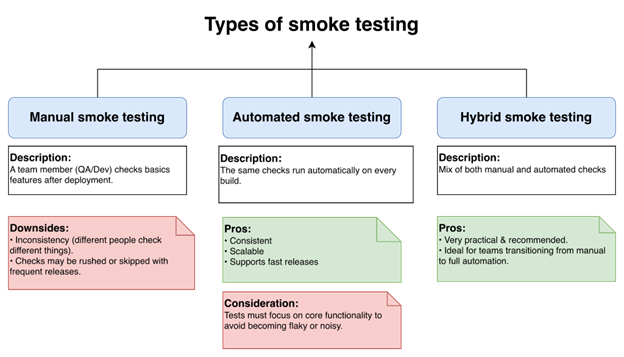
Some teams mix both methods. Automation covers the core functionality, and someone still does a quick check, especially during major releases.
This method isn’t completely perfect, but it’s very practical and also recommended, especially for teams transitioning from manual to full automation.
Teams have learned that a successful build does not automatically mean it can be trusted. Smoke testing adds that layer of trust, making sure the build is stable and reliable. Here is how to perform one:
Figure out what the core functionalities are. What breaks everything if it fails? It could be login, key APIs, or database connections.
Write simple test cases for those critical features, something that will cover enough to see if the system works.
After the build is deployed, run the tests. This could be automated in CI/CD, or it could be done manually. Either way, it should allow you to get fast feedback.
Check the results to see what passed or failed, which will help you get an understanding of how stable the build is and what critical issues need fixing.
And finally, share the results with your team (developers, QA, and stakeholders) so everyone knows what’s happening and can make informed decisions on whether to proceed with deeper testing or fix issues first.
TL;DR: Smoke tests are ideal for automation because they are repetitive and time-sensitive. They should focus only on core system availability and critical flows. When kept small and stable, they act as a reliable gate in CI/CD pipelines.
Smoke testing and automation make sense together because smoke tests are repetitive and time-sensitive, and asking a human to repeat the same five checks ten times a day can lead to costly mistakes.
If your team releases five or more builds in a day, manual testing becomes wishful thinking. One person might forget to check the login service, another might assume someone else tested it, and suddenly, nobody actually knows if the build is safe or not.
Automation fixes these issues, because as soon as a build is deployed, the same checks run the same way every time, and if anything fails, the pipeline stops. No debate and no “It works on my machine.”
If your team releases five or more builds in a day, manual testing becomes wishful thinking.
This will help you keep your smoke tests minimal and focused.
Here’s the part people don’t love: Automation needs maintenance. If your smoke tests start covering UI animations, they will get flaky and will create unnecessarily false failures, which might lead to your engineers ignoring them, which is bad.
They’re supposed to act like your circuit breaker: simple, reliable, and trusted to catch serious build verification issues early.
For the best result, keep them simple with basic features only, so when they fail, it should matter and not be ignored.
TL;DR: Smoke testing checks only basic functionality and does not validate edge cases or deep integrations. A passing smoke test does not guarantee overall system stability. It must be followed by functional and regression testing.
Smoke testing is useful, but it has limits that teams need to understand early. Some of these limits are:
Smoke testing only checks the basic, happy path and does not test invalid inputs, edge cases, or unusual scenarios. For example, an API may respond correctly to valid requests but completely fail with a slightly different request format, a situation that smoke testing isn’t designed to catch.
A build can pass smoke testing and still be unstable underneath, because smoke tests only check the basics. For example, an e-commerce app may launch, login works, and the application loads all products just fine. But during deeper testing, placing an order fails because the payment service cannot properly interact with the inventory system.
Smoke testing does not and should not replace functional, integration, or system testing, because even after smoke tests pass, issues can still appear later. So, it’s important to remember that smoke testing only decides if the build is stable, not if it’s correct.
Smoke tests need clear documentation and well-maintained scripts. If they are not maintained properly, they become unreliable and start failing for the wrong reasons.
Fixing flaky tests takes skilled engineers, time, and money. Instead of saving effort, poorly maintained smoke tests can slowly become expensive to manage.
Instead of saving effort, poorly maintained smoke tests can slowly become expensive to manage.
Smoke testing only works if you do it right. Below are a few best practices that keep it useful:
Focus on tests that almost never change, like app startup or a basic login. If your smoke tests break often for unrelated reasons, something fundamental is wrong.
Test only what would make the app unusable if it failed. For a web app, that might be loading the home page, logging in, and calling your core API.
Smoke testing should run automatically on every build, no exceptions (running it “sometimes” shouldn’t be an option, as broken builds can slip through). This check can save hours by failing a bad build in under five minutes.
Treat smoke tests like production code: update them if any core flows change, and remove ones that are redundant. Having a clean smoke test suite will give your team a predictable release.
TL;DR: Smoke testing verifies that a build is testable. Sanity testing validates a specific fix or small change. Regression testing ensures that existing functionality still works after updates. Each serves a different purpose in the testing lifecycle.
Beginners often confuse smoke testing with sanity or regression testing, but misusing them wastes time, like running a full regression test on a build that cannot load. Here’s a comparison of smoke testing with related testing types:
Sanity testing is when you fix one bug and just want to confirm you didn’t break something obvious. It’s more like, “Okay, we patched the password reset issue, so does password reset work now?” It’s focused and smaller in scope.
| Aspect | Smoke Testing | Sanity Testing |
| Timing | Runs immediately after a new build is deployed | Runs after a small change or bug fix |
| Scope | Focuses on core system stability | Focuses on specific functionality |
| Purpose | Confirms the build is testable | Confirms that a recent change works as expected |
Regression testing checks that old features still behave properly after a change has been made. It’s the heavy one and takes longer compared to sanity and smoke testing.
| Aspect | Smoke Testing | Regression Testing |
| Depth vs. breadth | Wide coverage at a basic level | Deep and detailed coverage |
| Execution frequency | Runs on every build | Runs periodically due to longer execution time |
| Role | Filters out unstable builds early | Ensure existing functionality still behaves correctly |
Here’s a simple way to think about it using a car as an example. Smoke testing is turning on your car to see if it starts. Sanity testing is checking that the new brake pads you installed work. Regression testing is driving around the town to make sure nothing else falls apart after you fix the brake pads.
TL;DR: Agentic AI improves smoke testing by prioritizing high-risk checks based on recent changes. It provides structured insights instead of raw failure logs. It can also reduce maintenance through adaptive and self-healing automation.
Traditional smoke tests just run the same checks every build, no matter what changed. Agentic AI, on the other hand, pauses, reviews risk, reprioritizes smartly, and keeps engineers involved. Here’s how it improves smoke testing:
If integrated, agentic AI can look at your build metadata—like commit history, pull requests, modified files, and deployment configs—before running tests. Then it can decide which smoke tests matter more.
For instance, if it were only the backend APIs that changed, it could prioritize service availability or database connectivity instead of checking areas that nobody touched. Meanwhile, you can still force critical baseline tests to always run, ensuring safety boundaries remain intact.
If integrated, agentic AI can look at your build metadata—like commit history, pull requests, modified files, and deployment configs—before running tests.
AI agents can reorder tests on the fly and run the high-risk ones first, like service startup validation and health endpoints, before checking less critical ones.
If something breaks, the pipeline stops with detailed, useful logs to help developers resolve the issue. Also, the agents learn from past failures, helping them get better at knowing what to check first.
Instead of running the test and showing you the result like traditional automation would, agentic AI can generate structured insights, summarize failures, cluster related issues, and also spot recurring patterns.
Instead of just saying “test failed,” it tells you that your failures probably trace back to a recent config change or dependency mismatch, giving your engineers something concrete to work with instead of drowning in isolated logs.
Maintaining a script has always been one major challenge with automation, as even a minor UI tweak or change in response format can break your tests.
With agentic AI, this changes—it can adapt, update selectors, or realign validation automatically, resulting in less maintenance, fewer false failures, and a smoke test that is more resilient.
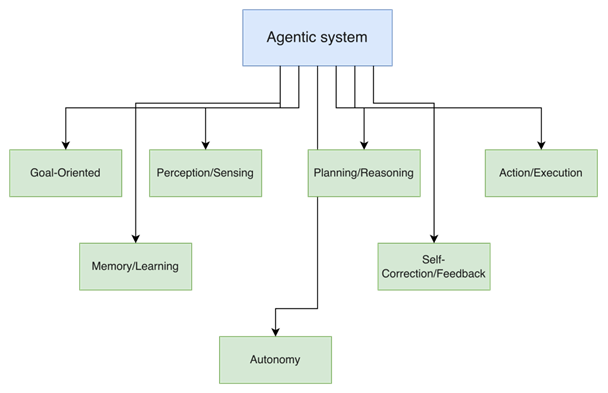
Agentic AI in testing is exciting and very promising, but it’s still an emerging space, and not every tool is fully autonomous. You’ll still need good test design, clear guardrails, and human oversight to make it work safely and effectively.
That’s where platforms like Tricentis come in—combining AI-driven capabilities with structured governance and enterprise-grade control to support agentic testing in a practical way.
Tricentis is an AI-driven quality engineering platform that helps teams run smarter, faster, and more relevant tests instead of executing everything, build after build.
What makes it powerful is that it combines AI intelligence, risk awareness, and practical automation across your entire software delivery process.
Here are its key features, which can power your AI-driven smoke testing approach:
Tricentis Tosca uses Vision AI, which uses machine learning and computer vision to identify UI elements visually instead of object IDs or XPaths, so your smoke tests keep working even after minor frontend changes to critical pages like your homepage or login page.
With it, you can create your automation based on a simple mockup or UI description, before any code is written, enabling you to truly shift UI testing to the left.
Tricentis SeaLights adds impact analytics and code coverage intelligence on top of your automation by analyzing what changed in the code and mapping it to the tests that cover those specific areas.
So when a build goes out, you’re only running tests relevant to recent changes instead of executing your entire suite for a one-line config tweak, which helps cut your testing cycle times by up to 90%. It also blocks untested code from reaching production, preventing risky releases.
With Tricentis Testim, you can build tests fast without writing code by using reusable components, auto-grouping, and scheduling that can cut test authoring time by up to 95%.
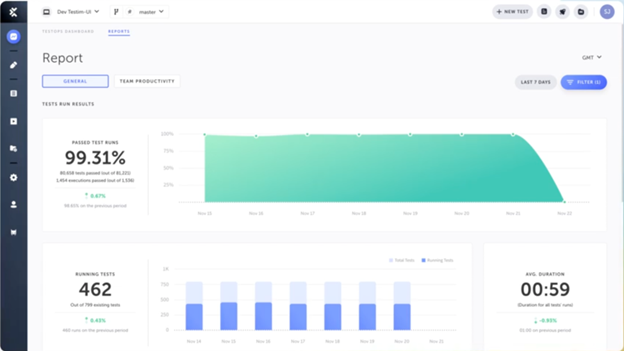
Its AI-powered self-healing locators can reduce test maintenance effort by up to 85%, so you’re not spending all your time fixing your test scripts. It also has a TestOps dashboard that gives insights and helps you manage tests at scale.
Smoke testing catches broken builds early and saves your team from wasting time testing what was never going to work anyway. It also gives you the confidence to keep shipping to your users. But keeping these tests working is hard, especially when you’re releasing multiple times per day.
That’s where Tricentis comes in. Its AI platforms can adapt to changes in your application and prioritize more critical tests, allowing your tests to stay reliable even when your code changes constantly.
If your tests keep failing, check out Tricentis AI Automation and see how our AI-powered tools can help you test smarter and ship faster.
This post was written by Inimfon Willie. Inimfon is a computer scientist with skills in JavaScript, Node.js, Dart, Flutter, and Go Language. He is very interested in writing technical documents, especially those centered on general computer science concepts, Flutter, and backend technologies, where he can use his strong communication skills and ability to explain complex technical ideas in an understandable and concise manner.
Usually, QA engineers or DevOps automate it, while developers may trigger and monitor results.
Ideally, it should be 5-20 minutes, just enough to validate critical flows quickly.
The CI/CD pipeline stops immediately, the build is marked “failed,” and the team investigates and fixes the blocking issue before proceeding.
Yes, it runs automatically on every commit or deployment in CI/CD.