

eBooks & Guides
How to evolve your test management strategy when you’ve outgrown 3rd party Jira add-ons
At enterprise scale, Jira test management apps can cause significant...
User access control (UAC) is a security method that controls digital system access for users and defines their permitted actions.

Your company faces a security risk whenever former employees maintain access to sensitive organizational files after their departure. This situation occurs frequently in businesses, yet organizations often ignore this risk. The security of systems depends heavily on the ability to control which users can access specific data. User access control (UAC) functions as a system to manage access permissions.
This post explains user access control fundamentals by covering access models, providing effective implementation guidelines, and supplying some best practices.
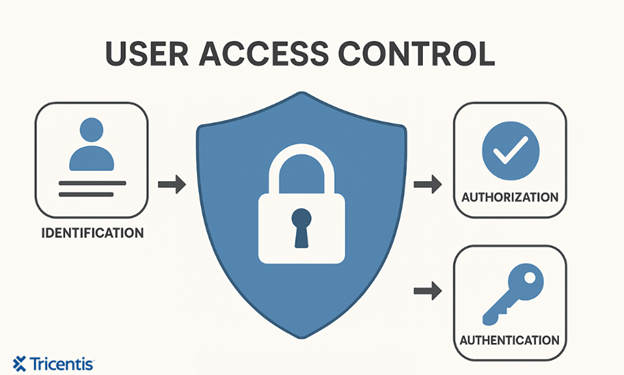
User access control (UAC) is a security method that controls digital system access for users and defines their permitted actions. It protects sensitive information and prevents unauthorized access while minimizing damage when an account becomes compromised, whether intentionally or by mistake. According to Bruce Schneier, “Security systems fail more often due to human error than technical flaws.”
Here’s how it works:
The implementation of UAC enhances security measures and supports data protection standards by granting users only the access they require.
User access control involves several fundamental concepts that help organizations protect their data and systems effectively.
This means giving users, applications, or systems only the access or permissions they need to carry out their tasks. It’s the main idea behind strong cybersecurity because it limits the potential damage caused if an account is compromised or misused.
Zero trust is based on the idea that no user or device should be trusted automatically, even if they’re inside the network.
“Insider threats often cost more than external attacks—because insiders know how to hide it.” – Dr. Larry Ponemon, Founder of the Ponemon Institute
Instead of assuming everything inside the system is safe, zero trust requires continuous verification. Every access request must be authenticated, authorized, and validated, no matter where it comes from.
This approach helps protect against internal threats, compromised accounts, and lateral movement during attacks. It’s often summed up as: “Never trust, always verify.”
The need-to-know principle means users should only have access to information that’s directly relevant to their job or task
The need-to-know principle means users should only have access to information that’s directly relevant to their job or task. Even if someone is trusted or high-ranking, they shouldn’t be able to see sensitive data unless it’s necessary for their job.
For example, a marketing manager doesn’t need to have access to employee salary records.
This helps to protect confidential data, reduce insider threats, and keep information exposure to a minimum.
Access control models are the methods used to decide how access is granted within a system. Each model has its own way of determining who gets access and under what rules. Here are the most common ones:
Good access control takes planning and ongoing effort. Here are the key steps to set it up properly, whether you’re starting fresh or improving what you already have.
The first thing to do is identify what needs protecting. These can be sensitive files, systems, or applications. Choose an access control model that fits your organization’s structure and needs, like RBAC for role-based setups or ABAC for more dynamic environments.
Use reliable methods to verify user identities before granting access. This can include passwords, single sign-on (SSO), biometrics, and multi-factor authentication (MFA) to strengthen login security.
Group users based on their job responsibilities and assign them the appropriate roles or permissions. Avoid giving access to individuals directly unless absolutely necessary.
Set rules that define what each user or group can access and what actions they can take, such as the things they can view, edit, create, or delete. Use your chosen access control model to guide these rules, and test the rules to ensure they work as intended. Also, apply the principle of least privilege here. You can also leverage tools like Tricentis Tosca to automate access rules validation. Tosca ensures attribute-based or role-based permissions are properly configured and behave appropriately across environments.
Track access activity across your systems, like who accesses what, when, and from where. Set up alerts for unusual or unauthorized attempts
Track access activity across your systems, like who accesses what, when, and from where. Set up alerts for unusual or unauthorized attempts. Review logs regularly to spot and respond to potential security issues. Using an automated platform like qTest, you can get the details of who can access the tests, when and from where they are executed. This will help you to review permissions over time and detect anomalies.
Use identity and access management (IAM) tools to automate tasks like onboarding, offboarding, and periodic access reviews. For example, you can opt for Tricentis qTest. The tool offers centralized test management and analytics, which is great for ensuring auditability during identity and access management processes. Update roles and permissions regularly as responsibilities change.
Implementing and managing user access control isn’t always easy. As systems grow and teams scale, organizations often face some challenges. These include:
Role-based access control works well at first, but over time, the number of roles can grow out of control, leading to “role explosion.” You may end up with dozens or even hundreds of overlapping roles, which makes it difficult to manage and audit permissions effectively.
Maintaining a balance between strong security and user convenience is a common challenge. Strict access controls or frequent authentication requests can frustrate users and hinder productivity. On the other hand, too much flexibility can expose systems to unauthorized access.
External partners like vendors or contractors often need access to your systems. The challenge is giving them just enough access to do their job without putting your internal data at risk.
Sometimes employees use apps or services without IT’s approval; this is called shadow IT. These tools often bypass security rules, creating hidden risks. It’s important to find and manage them to keep systems secure and compliant.
Here are some of the benefits that come with implementing user access control:
In order to protect your organization’s data and systems, you need to follow some best practices, which you’ll see in this section.
User access control is one of the most important ways to protect systems and data from misuse or attacks
User access control is one of the most important ways to protect systems and data from misuse or attacks. Organizations can reduce risk, stay compliant, and work more efficiently by managing who can access what and keeping that access limited to what’s truly needed.
Whether you’re building from scratch or improving an existing setup, following basic principles like least privilege, regular reviews, and strong authentication goes a long way.
This post was written by Chosen Vincent. Chosen is a web developer and technical writer. He has proficient knowledge in JavaScript, ReactJS, NextJS, React Native, Node.js, and databases. Aside from coding, Vincent loves playing chess and discussing tech-related topics with other developers.

Learn how to supercharge your quality engineering journey with our advanced testing solutions.
Learn how to supercharge your quality engineering journey with our advanced testing solutions.