

10 top iPhone emulators for app development in 2026
Explore top iPhone emulators for app development. Compare features,...
This post will cover what you need to know about mobile device testing, why it’s important for your users, and the main types.

More than once, you’ve probably experienced an app freezing up on an important screen, like a payment step. Or maybe there’s a feature that won’t load. Perhaps there are even layouts that break when you switch devices.
For a business, this kind of poor quality can be more than a minor annoyance. It has the potential to be a threat to user trust, brand reputation, and revenue. For development and QA teams, preventing this outcome is a top priority.
This post will cover what you need to know about mobile device testing, why it’s important for your users, and the main types. We’ll also look at practical strategies, a strong testing process, and its benefits.
Mobile device testing is the practice of evaluating a mobile application’s functionality, usability, and performance.
This process isn’t isolated. It’s a specialized part of a complete, continuous testing strategy, working alongside functional, performance, and regression testing. It applies the principles of those practices to the unique environment of mobile hardware, software, and real-world user conditions.
This is fundamentally different from testing a standard web application. Mobile testing must account for a huge matrix of variables, including different operating systems (iOS, Android) and their versions, hundreds of hardware models, varied network conditions like 4G or Wi-Fi, and hardware-specific features like the GPS, camera, and biometric scanners.
In short, it’s the only way to know for sure that your app will work for all your users, not just on a developer’s machine.
A good mobile app should take no more than five seconds to load, and ideally just two seconds
Users have high expectations. Now that there are so many apps on the market, users have zero patience for apps that are slow, buggy, or hard to use. They won’t just close your app; they’ll delete it and find another one from a competitor. This makes the quality of the mobile experience a direct business issue.
Microsoft confirms that: “A good mobile app should take no more than five seconds to load and ideally just two seconds. Users expect stability, reliability, and speed with their apps, and those that take too long to load or that frequently crash will simply be uninstalled.”
This small window of load time—two to five seconds—shows why testing is so important. It’s not only about finding bugs. It’s also about retaining users and protecting revenue. A structured testing process supports this goal in several areas.
A user’s first impression is formed in seconds. Mobile device testing is your primary way to make sure that the impression is a good one. From a developer’s perspective, a bug that ships to production is far more costly to fix than one caught in a test cycle.
But to a user, a bug is simply a broken promise. Catching functional, performance, and integration issues before they reach the app store protects your brand’s reputation for quality and prevents a flood of negative reviews.
Mobile device testing isn’t a single activity but rather a collection of tests. To get a complete picture of an app’s health, QA teams group these into several main categories.
This foundational type of testing—functional testing—verifies that every feature works as specified. It answers the question, “Does this button do what it’s supposed to do?” Functional testing includes testing everything from installation and launch to core business workflows (like login or checkout), as well as how the app handles things like interruptions from calls or texts.
Usability testing helps answer the question, “Is the app easy and intuitive to use?” It focuses on the user’s experience. Testers check for an intuitive layout, clear navigation, appropriately sized buttons, and clarity of error messages.
Compatibility testing confirms your app works across a wide range of devices, operating systems, and network conditions. It also checks for OS-specific bugs, layout issues on different screen sizes, and how the app behaves when switching from Wi-Fi to 5G or when on a slow connection.
Performance testing measures the app’s speed, responsiveness, and stability under different loads. This also covers reliability, or how well the app performs under stress and over long periods. Testing focuses on speed, resource consumption (like battery and memory), reliability over time, and scalability under many users.
With mobile apps handling personal data and payments, security testing is nonnegotiable. This uncovers vulnerabilities that could be exploited by bad actors. Testers check for insecure data storage on the device, unencrypted transmission, and whether the app asks for unneeded permissions.
Once you know what to test, you need to decide how and where to test it. Your strategy will be a mix of several approaches, each with its own trade-offs.
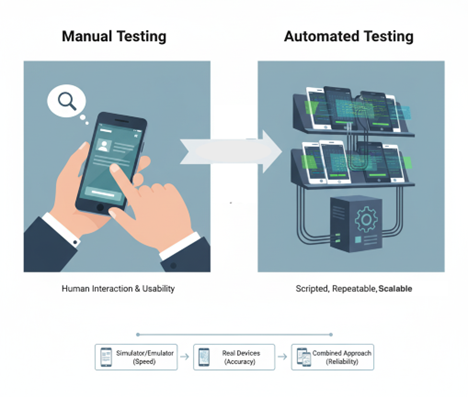
Picking between manual testing and automated testing is a foundational strategic choice. Here’s the difference between the two, so you can better understand the use cases:
Manual testing is exactly what it sounds like. A human tester (like a GA analyst) physically picks up a device and follows a test case, tapping buttons and looking for problems.
It’s excellent for usability testing, exploratory testing, and verifying complex, hard-to-script user flows.
Automated testing uses scripts and software to run tests automatically. This is the go-to approach for tests that need to be run often, like regression testing, performance testing, and compatibility testing across hundreds of device combinations. It’s fast, repeatable, and scalable.
A good strategy employs both. You automate the repetitive, time-consuming tests and use manual testing for the human-centric usability and exploratory checks.
Picking between real devices, emulators, and simulators is another major decision. Simulators (like Apple’s) mimic an OS, while emulators (like Android’s) mimic both software and hardware. Both are fast and good for early development.
Real device testing uses the actual physical hardware and is the only way to get a 100% accurate picture of the user experience, especially for testing battery drain or network switching.
No single option is enough. Developers often start on simulators/emulators, then move to a smaller set of real devices for more complex integration and performance testing before release.
While the specific tools will change, a solid testing process follows a clear and repeatable workflow. For teams new to mobile testing or looking to improve their existing methods, it generally involves these main phases:
You can’t test everything at once. This first phase is about defining your scope, including your target devices, most important user workflows, and the mix of manual and automated testing you’ll use.
Once you figure out what to test, you document how to test it. This involves writing clear test cases for both manual and automated testing that cover the functional, usability, and performance requirements.
This is the technical preparation phase. Your team will acquire the needed physical devices, configure emulators/simulators, and set up any test automation frameworks.
This is the main “testing” phase. The QA team runs the test cases, and when a test fails, they log a clear and concise bug report for the development team.
After the team fixes the bugs, QA retests those specific features and runs regression tests to ensure the fixes didn’t break anything else
Finally, you analyze the results. After the team fixes the bugs, QA retests those specific features and runs regression tests to ensure the fixes didn’t break anything else. This cycle continues until the app meets your quality standards and is ready for release.
A well-planned mobile testing process does more than just stop bugs; it becomes a driver for business success.
Finding a bug during development is simple and cheap to fix. Finding that same bug in production is exponentially more expensive, requiring developer time, a new QA cycle, and a new app store release, not to mention the cost of lost customers.
A strong testing process catches issues early, leading to a much higher return on investment.
This might seem counterintuitive, but a good automated testing strategy is a massive accelerator. A reliable suite of regression tests gives your team confidence to add new features. They’ll know if the new code breaks something because a test will catch it, allowing them to release faster and more frequently.
A structured process improves efficiency. Clear reports mean developers spend less time reproducing problems. Automation handles repetitive checks, freeing up manual testers for high-value usability and exploratory testing. This reduces team friction and lets everyone contribute more effectively.
Mobile device testing is important. It’s not just something that’s nice to have; it’s a continuous, central part of building successful mobile applications.
The market is full of users who expect speed, reliability, and a great experience while using apps. A structured process is your best strategy, as it is the most effective way to protect your brand, retain your users, and build a high-quality product that delivers real value.
This post was written by Chris Ebube Roland. Chris is a dedicated software engineer, technical writer, and open-source advocate. Fascinated by the world of technology development, he is committed to broadening his knowledge of programming, software engineering, and computer science. He enjoys building projects, playing table tennis, and sharing his expertise with the tech community through the content he creates.