

eBooks & Guides
4 ways generative AI will transform the way you manage testing
In this guide, we’ll share four ways generative AI can boost your IT...
In this post, you will learn about the advantages and disadvantages of AI test case generation, as well as how to get started.

A test case is a set of instructions used to verify whether a software application functions as expected. Test cases are important for ensuring the software meets all requirements.
However, writing test cases manually can be time-consuming and lead to mistakes. It requires extensive research and data gathering, which slows down the QA process. You might also leave out some test scenarios while rushing to meet deadlines. Using AI to generate test cases reduces error and saves time, which allows you to focus on more critical issues.
This guide will teach you how to use AI to create test cases. You will learn about the advantages and disadvantages of AI test case generation, as well as how to get started.
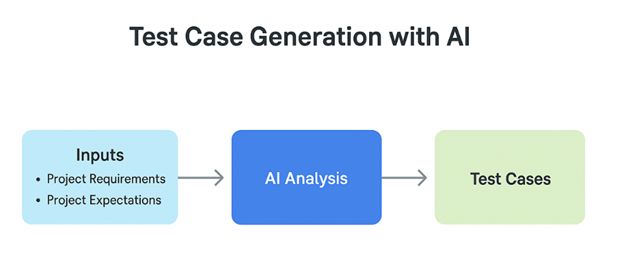
Generating test cases with AI automates the traditional manual process of creating test scenarios. Instead of relying on human effort, testers use AI-powered tools to generate test cases based on project requirements, user stories, or system behavior.
AI analyzes existing data, such as requirements documents, past test cases, or application logs, using machine learning (ML), algorithms, and natural language processing (NLP) to identify patterns, edge cases, and potential test scenarios. This method helps to ensure wide test coverage.
To use AI for test case generation, you’ll need to select a tool that suits you and your team. There are several AI tools out there, but you should consider certain factors like:
This information will help you make the right decision when choosing a particular tool.
Here are some of the benefits that come with generating test cases with AI:
Unlike the traditional manual method of generating a test case, AI saves significant time. It reduces hours spent on researching, gathering requirements, and writing individual cases. This speeds up the entire QA process and boosts overall productivity.
Using AI to generate test cases helps minimize human error. As humans, we’re naturally prone to mistakes, whether due to incomplete research, distraction, or the pressure of tight deadlines. AI brings consistency to the process, ensuring fewer errors in test creation.
AI enables broader test coverage by analyzing the system thoroughly to identify what needs to be tested
AI enables broader test coverage by analyzing the system thoroughly to identify what needs to be tested. When creating tests manually, some scenarios might be missed due to limited information or time constraints. Missing critical test cases can affect the software’s quality, but with AI, this risk is significantly reduced.
AI helps prioritize test cases by identifying and ranking them based on their impact and risk. This allows the team to focus first on the most critical areas, ensuring that major issues are addressed early, rather than wasting time on less important test scenarios.
AI is great for making test cases, but there are some things you should keep in mind. When using AI to make test cases, you should think about these problems:
One important thing to consider when using AI is security. Providing AI systems with sensitive or private project data could expose you to security risks or breaches, especially if the tool stores data externally or uses third-party services. You should always be cautious and avoid feeding AI tools personal, confidential, or business-critical information without the proper safeguards in place.
Although AI can operate more quickly, its output may not always be entirely accurate. This can be caused by a number of things, including giving ambiguous or insufficient input to the AI model itself or that the AI model does not fully comprehend the context of the application under test.
Using AI tools to generate test cases can be expensive, particularly for start-ups or small businesses. Depending on the tool and the organization’s budget, subscription plans and maintenance fees could be costly.
AI may sometimes struggle with understanding complex business logic, edge cases, or specific requirements. Human testers often have insights that AI might miss, which means full human oversight is still necessary.
Tricentis offers a range of software testing tools, including qTest. The qTest Copilot feature uses AI to automatically generate test cases from requirements, streamlining and enhancing manual test case creation.
qTest Copilot leverages advanced large language models (LLMs) to analyze your requirements and draft detailed test cases quickly. This helps QA teams increase test coverage and improve overall software quality.
Key features of Tricentis qTest Copilot include:
You can use Tricentis qTest Copilot to create test cases by following this easy, step-by-step procedure:
Make sure your requirements are clear, complete, and written in simple language
To get the most out of AI when generating test cases, here are a few best practices to keep in mind:
AI depends on the input you give it. Make sure your requirements are clear, complete, and written in simple language. The more detailed your input, the more accurate your test cases will be.
AI-generated test cases are a great starting point, but they might not always be perfect. Review each test case to ensure it makes sense and covers what it should. Don’t rely on AI to catch every edge case.
Use the customization options (like regenerate, elaborate, or summarize) to fine-tune your test cases. Adjust test steps so they match your project’s unique needs and standards.
AI is a tool to speed up and improve your workflow, but it shouldn’t replace your overall test strategy. Check to see if your test cases still match the goals of the business, the areas of risk, and what users want. According to Chris Launey, Principal Engineer at Starbucks (on Global App Testing), “Automation is an accelerator, not a replacement. It’s about putting brains in your muscles.”
When using AI features, especially if your tool uses cloud-based AI models, don’t enter sensitive or private information. To lower risk, only use inputs that aren’t sensitive.
Make sure everyone using the AI tool understands how it works and how to get the best results. A little training goes a long way in improving output quality and adoption.
AI provides lots of benefits when it comes to test case generation. It saves testers time and effort usually spent on manual and repetitive tasks, which allows them to focus on more critical parts of the QA process.
However, while AI can make a big difference, it’s not perfect. You should always keep its limitations in mind. The point of using AI is for assistance, not as a complete replacement. When used properly, AI can help your team work faster, identify more issues, and deliver quality software.
This post was written by Chosen Vincent. Chosen is a web developer and technical writer. He has proficient knowledge in JavaScript, ReactJS, NextJS, React Native, Node.js, and databases. Aside from coding, Vincent loves playing chess and discussing tech-related topics with other developers.

Learn more about how to scale, orchestrate, and accelerate test automation for complete visibility into your testing process.
Learn more about how to scale, orchestrate, and accelerate test automation for complete visibility into your testing process.