

eBooks & Guides
3 ways AI will reshape quality engineering teams
QE teams are rethinking how quality is delivered as testing becomes a...
Learn what API test automation is, why it matters, and how to implement it with best practices for faster, reliable software testing and delivery.

TL;DR
AI is reshaping software quality assurance by automating test creation, predicting defects, and boosting overall testing efficiency.
Software applications are becoming more sophisticated by the day. As this effect escalates, quality assurance (QA) teams face phenomenal pressure to ensure software is free from defects, all while maintaining lightning development speed.
While traditional QA approaches get the job done, they can’t keep up with the speed of iteration on software applications, especially in the new age of AI.
Today, AI offers the ability to speed up the QA process. In this guide, we’ll learn how AI can be incorporated into existing QA processes, the benefits it offers, and the challenges that come along with it.
Software quality assurance is the process of ensuring software is free from defects and meets standard benchmarks for performance and quality.
This process involves planning tests, executing them, tracking issues and defects, relaying feedback to improve the process, and reporting the status of the tests to stakeholders.
Quality assurance helps you build a reliable and high-quality software product that can, in turn, drive your business goals
Quality assurance helps you build a reliable and high-quality software product. This helps teams drive their business goals, providing a seamless experience to their customers while maintaining their trust in the product.
It also reduces the cost of maintaining the software in the long run by eliminating expensive issues and failures early on.
“The cost of fixing a defect after release is significantly higher—up to 100 times—than fixing it during the early stages of development.” – IBM System Science Institute
Traditionally, QA engineers have heavily relied on manually testing software to find bugs and usability issues.
Over time, they started writing scripts or using automated testing tools to perform automated software testing. Automation of manual testing not only reduced the time for a testing cycle, but it also made testing in QA less prone to errors.
However, QA engineers still have to maintain these scripts and update them whenever necessary. They also have to oversee the execution of these scripts to ensure that the whole testing process runs smoothly.
Traditional automated testing methods struggle to incorporate the evolving complexity of applications.
For instance, an e-commerce app today will become more sophisticated three months from now, with more powerful features and an updated interface. The original automation scripts in this case may not be adequate.
Luckily, AI can be used to complement traditional testing methods and significantly boost the productivity of QA teams.
By leveraging AI-driven machine learning and natural language processing capabilities, QA teams can forecast issues and continuously update the testing scripts to meet the evolving complexity of an application.
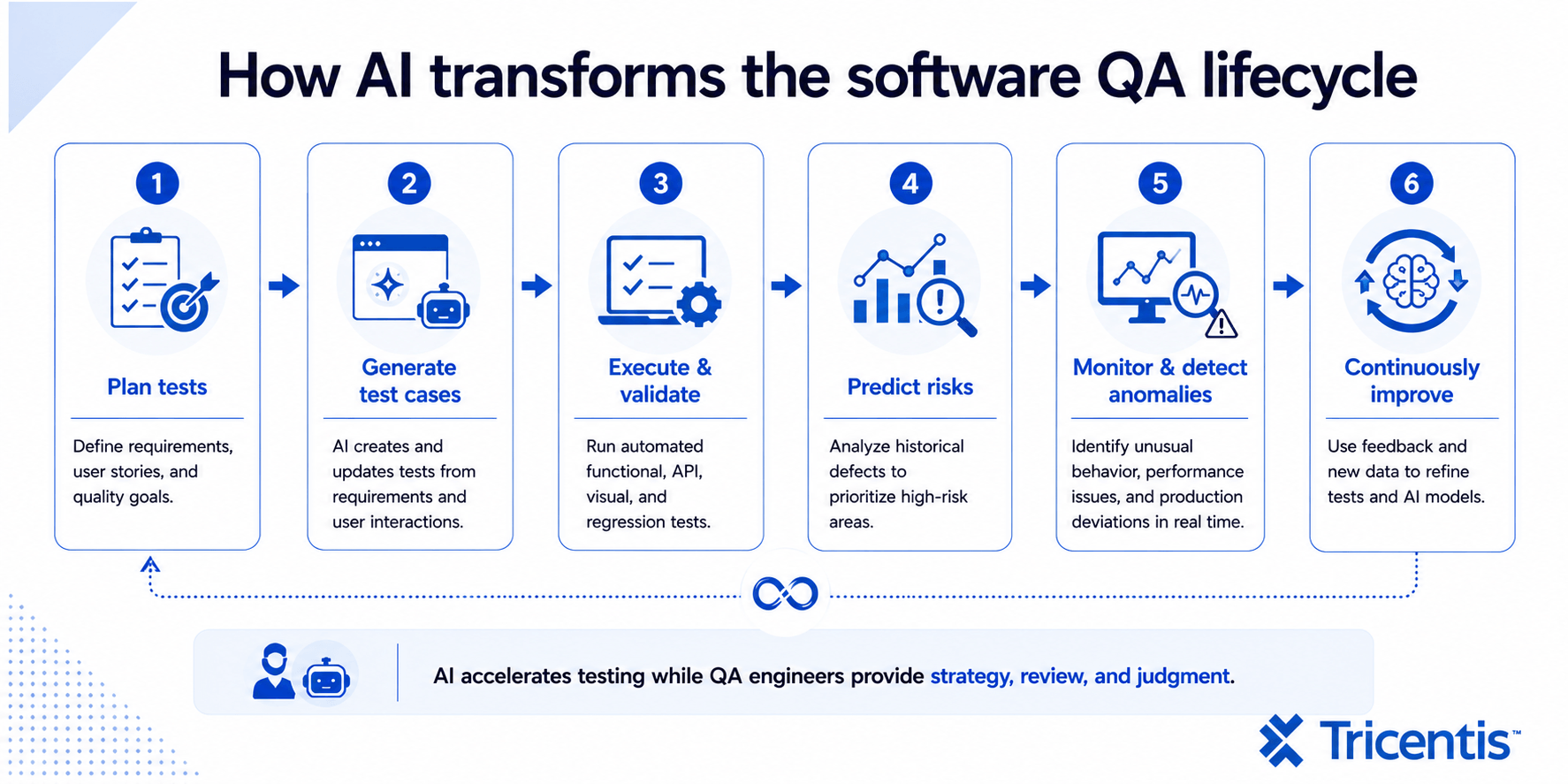
When we integrate AI into QA, the following components of AI can positively impact the overall result of the QA process:
Predictive analysis is when AI can analyze historical data related to an application’s defect patterns and use it to predict potential issues or areas of high risk. It can also give you a sense of usage patterns that lead to such defects or issues.
NLP can directly automate various test cases using data from user stories and other relevant documents.
Machine learning models continuously learn from a dataset and use their updated knowledge to improve a workflow. Using existing testing processes, these models can learn from the available test data and refine the testing process to prioritize critical tests.
| Dimension | Traditional QA | AI-assisted QA |
| Test creation | Manually written by QA engineers, one case at a time | AI generates test cases from user stories, requirements, or app interactions |
| Test maintenance | Scripts break when the UI changes; engineers manually locate and fix broken steps | Self-healing tests identify elements by context, reducing manual fixes |
| Test coverage | Limited by how many cases a team can realistically write and maintain | Broader coverage achievable without a proportional increase in headcount |
| Defect detection | Reactive. Issues found when a written test case happens to catch them | Predictive. Historical defect patterns flag high-risk areas before failures occur |
| Visual/UI testing | Manual comparison across devices and browser or basic pixel-diff tools with heavy false positives | AI distinguishes meaningful UI breaks from harmless rendering noise |
| Test prioritization | Full regression suite typically run regardless of what changed | Risk-based prioritization runs the highest-value tests first based on code changes |
| Anomaly detection | Issues often surface through user complaints in production | Real-time detection flags deviations before users notice |
| Test data | Often pulled from production, raising privacy/compliance concerns | Synthetic data generation mirrors real data without exposing sensitive records |
| Speed of iteration | Struggles to keep pace with fast-changing, complex applications | Continuously updates alongside application changes |
| Human role | Writing, running, and maintaining tests end-to-end | Directing, reviewing, and validating AI-generated output; focus shifts to strategy and exploratory testing |
| Scalability | Scaling requires scaling the team | Scales test volume and coverage independent of team size |
| Best suited for | Small, stable applications with infrequent changes | Fast-moving, complex applications with frequent releases |
Some strategies for implementing AI in QA are as follows:
AI algorithms can read application data and user interactions. They can also automatically generate and maintain test cases.
This means QA engineers no longer have the burden of writing and updating test cases whenever an application update has to go out, saving considerable time for QA teams.
In practice, this starts with AI ingesting relevant user stories, gathering requirements, recording user sessions, and then translating them into structured scripts.
For instance, a retail team rolling out new filters needs AI’s acceptance criteria to generate baseline test cases. QA engineers can review the cases AI missed rather than writing them from scratch.
Predictive analysis uses historical data on defects an application has experienced and anticipates similar defects that can occur in the future based on certain changes.
This can prompt QA engineers to communicate potential defects to the developers early on. Teams can use this to proactively monitor these defects and take preventive measures to reduce them in the application.
Predictive analysis works most effectively when it’s tied directly into CI/CD workflow. A pull request is made, and then the AI model checks the diff and flags the areas most likely to regress.
For instance, say a retail team has seen repeated bugs in its checkout logic. Every future change touching that module can get flagged for extra scrutiny automatically using AI. This can cut down on defects that might surface only after a release.
AI-driven visual testing can be performed more rapidly and accurately, eliminating the need for manual visual testing and saving significant time and bandwidth for QA teams.
Visual testing is the process of visually testing an application and identifying UI issues across cross-functional devices and platforms to ensure a consistent and seamless user experience everywhere.
AI-driven visual testing can be performed more rapidly and accurately, eliminating the need for manual visual testing, saving significant time and bandwidth for QA teams.
Visual testing with AI in QA really helps in eliminating noise. Let’s say there’s a screenshot comparison tool in the QA process that flags every pixel difference that occurs when releases are merged.
This workflow can drown teams in false positives every time a UI renders slightly differently on different browsers.
With AI-driven visual testing, teams can easily distinguish a meaningless rendering shift from a genuine layout break, narrowing down the set of issues to be actually reviewed.
AI can detect anomalies or deviations from traditional behavior in real time, giving you a heads-up about these anomalies before your users start reporting them.
By detecting these anomalies in real time, QA teams can reduce the time it takes to detect and resolve critical issues in production.
Anomaly detection can run as a monitoring layer alongside production traffic. It can watch for any deviations in common metrics like response times, error rates, usage patterns, etc. against some benchmarks.
A SaaS company can use this to catch a memory leak before it causes an outage. AI can notice response time lags creeping upwards and flag them. The team can then catch it before it causes any real damage.
Teams must be mindful of the following mistakes when implementing AI in QA.
AI can generate test cases that look complete but actually aren’t. QA teams should review the test cases AI generates to ensure AI-generated suites provide value to teams in terms of test coverage.
Often teams try to automate everything from test generation, defect prediction, and visual testing simultaneously, making it difficult to manage and tell apart from what’s working and what’s not. The correct approach is to start from one workflow, automate it, and gradually expand.
Predictive models provide value based on the data they’re trained on. Using poor quality historical data will lead to unreliable predictions. Teams should ensure historical data fed to AI is clean and has complete logs and consistent tagging.
AI can significantly speed up multiple parts of the QA process, from running tests to writing them, thereby reducing the overall cycle time of a typical QA process
Some common real-world scenarios where AI-driven QA can be used in practice are:
Say a payment team’s AI testing tool flags a backend update that changes how currency values render on the confirmation screen during checkout. Visual AI engines can catch the issue, isolate it from other issues, and route it to the right engineer.
A retail platform redesigned their product page. They shifted several buttons and renamed some form fields.
Legacy testing scripts would break, but an AI-driven suite would intelligently identify elements through context rather than fixed identifiers. Due to this, the existing tests still stay relevant and useful.
A SaaS platform can use AI to analyze what code changes and which tests have historically caught defects in that area. This can result in shorter test runs that can surface highest-risk issues first, enabling teams to prioritise their time on urgent issues.
Due to strict patient-privacy regulations, a healthcare team uses AI to generate synthetic datasets that mirror the structure and edge cases pertaining to real-world medical records. This lets them test thoroughly without touching protected and private data.
As AI enters the QA workflow, a few places consistently show efficiency gains:
Test prioritization mitigates the gap between code changes and knowing when it breaks something. Engineers and developers can reach answers in a lot less time due to faster feedback loops with AI.
Self-healing tests and AI-assisted script updates can help QA engineers spend less time fixing broken locators and spend more of their time on broader testing and QA strategy.
By clustering failures, AI can eliminate noise and save teams the effort required to manually rerun and recheck tests.
Here are some benefits of incorporating AI into QA:
AI can significantly speed up multiple parts of the QA process, from running tests to writing them, thereby reducing the overall cycle time of a typical QA process.
Human errors are mitigated with AI-driven tests, which increases the overall reliability and consistency of an application.
Large and complicated test scenarios may be more complex for humans to tackle, but AI can easily manage them and enhance the software test coverage to improve an application’s reliability.
As AI starts taking over more manual and routine tasks, QA teams can become leaner, saving organizational resources.
Using AI in QA is not without its challenges. Here are some of them:
QA engineers who aren’t well-versed in AI may need to upskill themselves. This may require investing significant time and resources.
Predictive analysis and self-learning machine learning algorithms require high-quality data. If the data’s quality is off, it can instead degrade the performance of the QA teams, as they will have to spend extra time cleaning this data.
While modern AI QA platforms like Tricentis reduce maintenance overhead, in-house or custom AI models can be tedious and expensive to maintain and update. Technical expertise and substantial resources are required to maintain these models.
Despite the above challenges, the benefits of AI in quality assurance seem promising. AI models are becoming smarter and cheaper, which will reduce costs and lessen learning curves for QA engineers to integrate AI into the QA process.
Automated AI platforms have also reduced the overhead of fixing broken scripts, saving teams a considerable amount of costs against traditional automation.
Release cycles have compressed, due to teams shipping multiple times a week. A testing process that hinges on slower release cadences would not be compatible with the modern pace of software development.
Automated AI platforms have also reduced the overhead of fixing broken scripts, saving teams a considerable amount of costs against traditional automation.
Also, applications are getting harder to test by hand and manual processes. Modern applications are intricate, complex, and evolving much more rapidly. AI-driven testing can handle the pace of change and scale at which these applications operate.
The gains achieved in efficiency, resource conservation, and accuracy have led teams and companies of all sizes to adopt automated AI quality assurance platforms.
Today, AI-driven QA is a completely different approach to software engineering and quality assurance.
With benefits such as predictive insights, extensive automation capabilities, and unprecedented efficiency, AI can empower QA teams and supercharge their productivity, all while making applications more reliable.
To bring AI into your own QA process,
QA teams must understand what AI brings to the table and how to make the best use of it. By leveraging AI extensively in their QA processes, teams can gain an edge in shipping quality applications and propelling their business outcomes.
Ready to see what AI-driven QA looks like in practice? Explore Tricentis’ AI testing solutions to find the right starting point.
This post was written by Siddhant Varma. Siddhant is a full stack JavaScript developer with expertise in frontend engineering. He’s worked with scaling multiple start-ups in India and has experience building products in the Ed-Tech and healthcare industries. Siddhant has a passion for teaching and a knack for writing. He’s also taught programming to many graduates, helping them become better future developers.

AI can be utilized across the entire lifecycle of the QA process.
It can be used for generating huge amounts of synthetic test data matching real-world data, creating and maintaining tests, analyzing code changes to prioritise tests, clustering tests based on similar failures to triage defects, and performing visual and validation testing.
AI is very good at small repetitive tasks, but it’s not a drop-in replacement for QA.
QA decides what “good enough” means for a sprint or a release based on organizational context and product understanding, taking into account factors like business risk. AI cannot completely replace that judgement.
AI capabilities in QA can be in the form of an AI-native testing platform, a feature inside a CI/CD pipeline, or complete LLM-based QA assistants.