

Webinars
Test automation in 2026: Tosca in the cloud, agentic AI, and a smarter, more scalable future
Watch this webinar to hear two Tricentis experts discuss what’s next...
Learn the difference between MCP servers, clients, and agents- and how they work together for scalable, intelligent test automation.
AI is getting better at writing code and analyzing systems, among other things. However, without a structured way to connect this intelligence to your tools, the integration can become fragile, insecure, and even difficult to scale.
The Model Context Protocol (MCP) solves this by providing a structured bridge between AI and the systems it needs to use. At the center of this architecture are two components: the MCP server and the MCP client.
This article explains their roles, how they work together to keep AI workflow secure, efficient, and easy to manage, and how Tricentis tools use this protocol to turn your integrations into a smooth, reliable workflow for AI and enterprise systems.
TL;DR: An MCP server exposes tools, data, and workflows to AI through standardized interfaces, allowing systems to interact with testing infrastructure and other services in a controlled and structured way.
An MCP server is a system that provides controlled access to tools, data, and workflows for AI to use.
As described in the MCP documentation, “MCP servers are programs that expose specific capabilities to AI applications through standardized protocol interfaces.” Specifically, through three primitives: tools (executable functions), resources (data and files), and prompts (reusable templates).
In a software testing context, it acts as an exposure layer between AI-driven tools and testing assets such as your repositories, test management systems, APIs, and execution environments.
Its main job is exposing these primitives so AI can use them in a structured, standardized format. That might mean accessing a test case repo, triggering an automated suite, or pulling test requirements while also enforcing permissions and execution boundaries.
Importantly, it does not make decisions or apply intelligence—it simply enables structured, controlled interaction with testing systems.
TL;DR: An MCP client connects to an MCP server, discovers available tools and resources, sends requests such as running tests or retrieving data, and processes the server’s responses.
An MCP client is the tool or system that manages connections to an MCP server, discovers available capabilities, and handles communication between the agent and the server.
In testing, it could be a test runner, an automation interface, or an AI agent needing to read test cases or trigger executions.
Its job is to send requests like “run this test suite” or “get the latest test cases,” then wait and handle the response. It maintains session state within a connection but holds no persistent storage. It just connects and uses what’s already there—discovering available tools and then tapping into them.
In testing, an MCP client could be a test runner, an automation interface, or an AI agent needing to read test cases or trigger executions.
TL;DR: The MCP server provides and controls access to capabilities, while the MCP client requests and uses those capabilities from within a host application or AI system.
Although they work together, MCP servers and MCP clients play clearly different roles within the architecture.
| MCP server | MCP client | |
| Role | Infrastructure provider | Requester/consumer |
| Location | Host tools, workflows, and execution environments | Instantiated within a host application (e.g., Claude Desktop) |
| Responsibility | Exposes structured capabilities and enforces permissions | Discovery capabilities, sends structured requests, and handles responses |
| Control layer | Controls access and execution boundaries | Initiates actions within allowed limits |
This separation is architectural. The server owns and controls the infrastructure; the client consumes it. Both are required for a structured MCP workflow to function properly and securely.
TL;DR: The client connects to the server, discovers available capabilities, sends structured requests, and receives responses while the server executes tools and enforces permissions.
As the official MCP documentation states, “MCP clients are instantiated by host applications to communicate with particular MCP servers.” The client lives inside the host app—think Cluade Desktop—and manages structured JSON-RPC communication between the agent and the server.
It starts with the client sending an initialize request to negotiate protocol version and discover available capabilities. Once established, the client makes a request like “get the latest test coverage report.”
The server validates access, executes the appropriate tool or resource handler—pulling data, triggering automation, or interacting with some other systems—and returns a structured response the client can consume.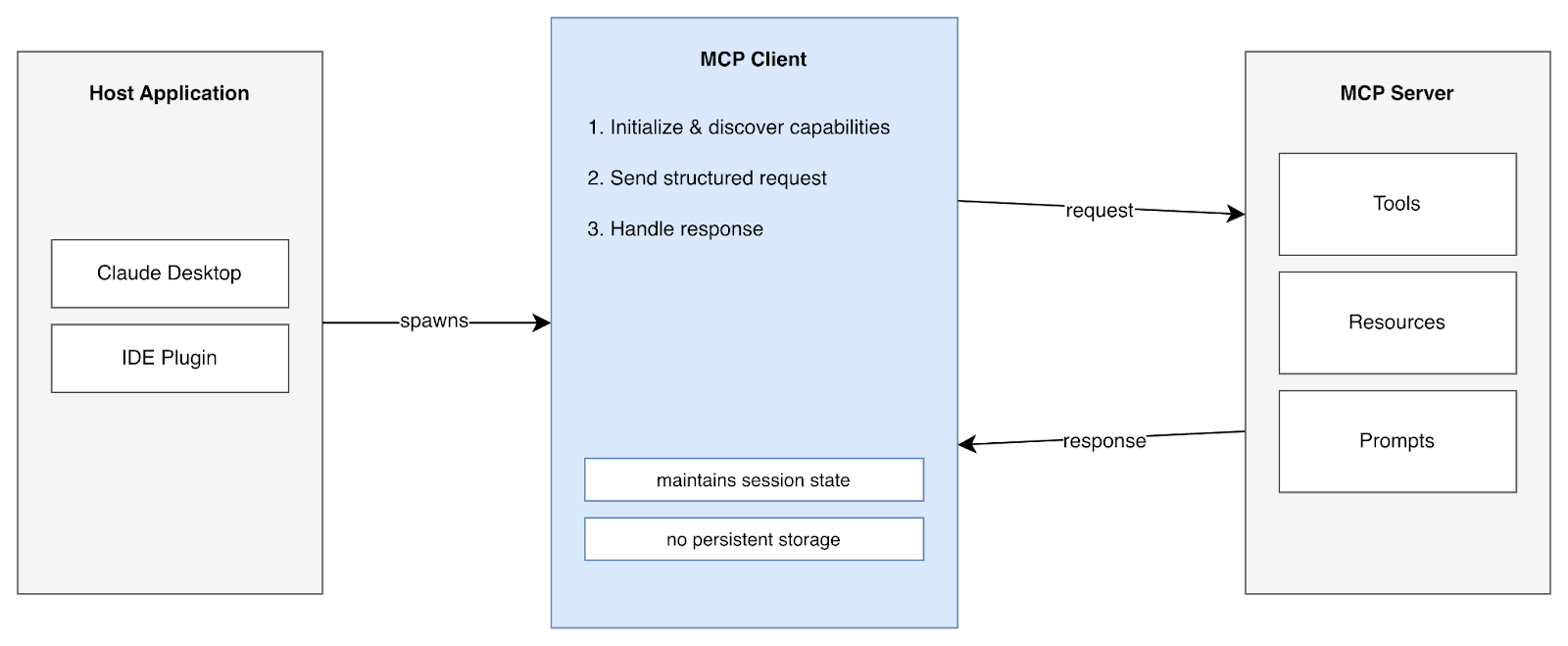
Since the client doesn’t touch internal systems directly, everything remains structured, traceable, and reliably secure.
TL;DR: APIs expose fixed endpoints for software communication, while MCP servers provide AI-friendly interfaces that allow dynamic discovery of tools and structured interaction.
APIs and MCP servers kind of do the same job—moving data or triggering actions—but they’re not interchangeable. APIs are flexible, general-purpose interfaces designed for communication between software systems, typically stateless and built around fixed endpoints.
MCP servers, on the other hand, are built specifically for AI agents, providing a structured, machine-readable layer on top of APIs that enables dynamic discovery of tools and capabilities—no prior knowledge of endpoints required.
Unlike APIs, MCP servers support stateful, context-based interaction, allowing AI clients to adapt without pre-programming.
| API | MCP server | |
| Purpose | Execute specific actions | Expose structured capabilities |
| Interaction | Direct calls to endpoints | Dynamic discovery and structured access to tools |
| Control | Permissions and rate limits | AI-context management and safe boundaries |
| State | Stateless by default | Stateful and session-based |
APIs handle isolated actions, while MCP servers manage complex AI workflows safely.
TL;DR: An agent decides what actions to take, while the MCP server provides the tools and resources the agent can access through the MCP client.
An agent is any system or process that takes action—it doesn’t have to be AI. It could be a scheduled script, a CI/CD pipeline, or a human-operated tool. The term “agent” has existed long before AI, meaning anything that acts on behalf of something else, like a browser or email client.
In the MCP architecture, an agent sits above the client layer—It decides what to do and uses the MCP client to send requests and act on the results.
It doesn’t necessarily have to be an AI-powered system that can plan or reason, although AI often comes up because MCP was built with AI use cases in mind.
An AI agent is a system that reasons, decides what to do next, chooses the right tools, and acts.
TL;DR: An AI agent handles reasoning and decision-making, while the MCP server connects the agent to external tools and systems safely.
An AI agent is a system that reasons, decides what to do next, chooses the right tools, and acts. For example, it can review your recent test results and notice your login tests failed three times this week, so it can then prioritize fixing them.
To investigate, the AI agent may retrieve failure logs, trigger a targeted test run, pull related test data, and even cross-check recent code changes to narrow down the cause. It handles all this thinking and planning autonomously while allowing human supervision.
This is where agentic AI becomes useful. The AI agent provides the reasoning and decision-making and what external capabilities it needs, while the MCP server connects it to tools and systems, enforcing boundaries and structured access so those decisions can turn into actions.
TL;DR: Agentic AI enables dynamic tool selection, adaptive workflows, and goal-driven automation, turning MCP from a simple tool interface into an intelligent orchestration layer.
Agentic AI is what turns MCP from just a protocol that exposes a list of tools into something that solves complex problems dynamically.
With agentic AI layered on top, the combined system gains adaptive, intelligent capabilities:
With agentic AI, the system can dynamically select which tools—based on context and evolving goals—to use at runtime, instead of following a hardcoded sequence.
When a tool returns something broken, maybe incomplete data, an error, or an unexpected result, the agent can adjust its next step instead of following a fixed script, reducing manual intervention and turning MCP from a rigid pipeline into a responsive, self-correcting orchestration framework.
The agent doesn’t follow a preset order. Instead, it works backward from the outcome and uses only the relevant MCP tools it needs along the way, making the overall system proactive and outcome-focused.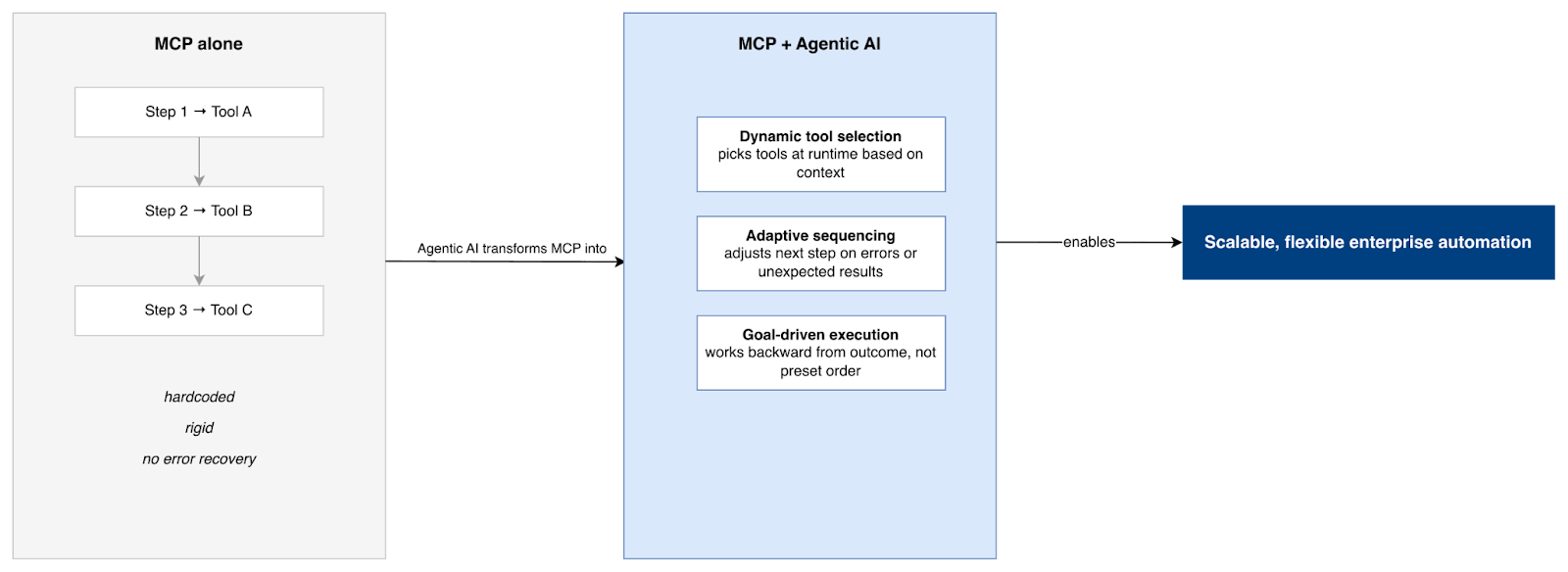
With these capabilities, the combination of MCP and agentic AI becomes a foundation for scalable, flexible automation in enterprise systems.
TL;DR: Tricentis integrates MCP with tools like Tosca, qTest, NeoLoad, and SeaLights, enabling AI assistants to manage tests, analyze results, and automate testing workflows.
Tricentis exposes several of its testing tools through MCP, helping AI assistants connect to its testing system and automate tasks across test management, performance testing, and quality analysis.
Tricentis tools, like Tricentis Tosca, Tricentis qTest, Tricentis NeoLoad, or Tricentis SeaLights, can connect to your AI via remote MCP servers, so instead of having separate custom integrations, your AI can pull requirements, test cases, and metrics directly.
Through MCP integration, qTest allows testers to manage test operation conversationally. You can ask AI to summarize your test results, find uncovered requirements, or retrieve defects.
When connected to Tosca MCP, AI can generate automated test cases directly from requirements or user stories.
Also, SeaLights MCP provides coverage intelligence, so AI can spot untested areas of your codebase and recommend additional tests. NeoLoad MCP complements this by exposing performance insight, letting AI review load-testing outcomes and highlight bottlenecks.
This is where things get interesting. An AI agent can pull requirements from qTest, write tests in Tosca, check coverage in SeaLights, and run performance tests in NeoLoad—basically doing in minutes what used to take a lot of time and Jira tickets.
TL;DR: MCP servers expose capabilities and MCP clients consume them, creating a structured and secure way for AI systems to interact with enterprise testing tools.
The roles of an MCP server and client are thus: The MCP server exposes tools, data, and workflows in a controlled way, while the client sends structured requests from an app or AI agent. This separation helps keep the system secure and usable by AI.
Tricentis already does this across Tosca, qTest, NeoLoad, and SeaLights, making it easier to connect AI-driven workflows to your testing environments.
To see MCP-based testing in practice, Tricentis is a good place to start.
This post was written by Inimfon Willie. Inimfon is a computer scientist with skills in JavaScript, Node.js, Dart, Flutter, and Go Language. He is very interested in writing technical documents, especially those centered on general computer science concepts, Flutter, and backend technologies, where he can use his strong communication skills and ability to explain complex technical ideas in an understandable and concise manner.

Learn how to supercharge your quality engineering journey with our advanced testing solutions.
Learn how to supercharge your quality engineering journey with our advanced testing solutions.
No, MCP servers don’t replace APIs; they just sit on top of your existing APIs, giving AI systems a standardized way to interact with your system.
Yes, multiple MCP servers can run in the same architecture. One might expose GitHub, while another exposes a database or internal APIs. Your AI client just connects through MCP, making it much cleaner than building many integrations everywhere.
MCP servers solve a common enterprise problem where AI systems try to connect directly to many tools and services. Instead of building custom point-to-point integrations everywhere, they add a controlled layer that standardizes how AI accesses tools, APIs, and internal systems.