

eBooks & Guides
How to evolve your test management strategy when you’ve outgrown 3rd party Jira add-ons
At enterprise scale, Jira test management apps can cause significant...
A test summary report (TSR) is a document that explains what was tested, what passed, what failed, and how the application meet the defined release goals.

You run your tests, and some pass while some fail. Then the questions come—what did we test? What didn’t we? Can we ship? If you’ve ever fumbled for answers, you’re not alone.
This guide is for test engineers, QA analysts, and developers who want to address these questions with more confidence. A test summary report (TSR) tells the story of your testing: what was covered, what passed, what failed, and what it all means. It’s short, focused, and helpful.
You’ll learn how to write one that’s clear, traceable, and useful, because great testing isn’t just about finding bugs, it’s also about making sure everyone knows what’s been found.
A test summary report (TSR) is a document that explains what was tested, what passed, what failed, and how the application meets—or falls short of—the defined release goals. That includes quality targets, risk tolerance, and key business requirements. It cuts through the noise and shows what happened during testing.
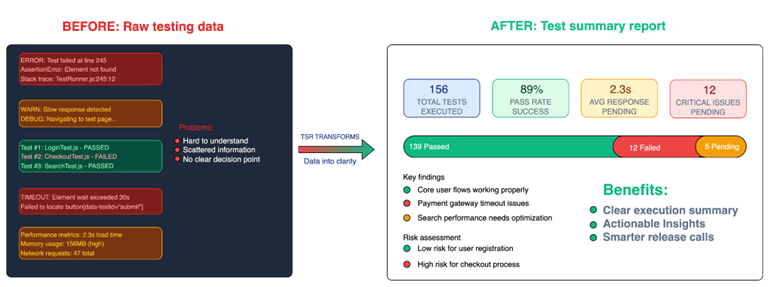
As the ISTQB Glossary puts it, a test summary report is “a document summarizing testing activities and results. It also contains an evaluation of the corresponding test items against exit criteria.” In plain terms, it tells you what you tested, how it went, and if the product is ready.
You write it after test execution, once all planned tests are done. A strong TSR gives insight and highlights what went well, what broke, and what still needs attention.
A test summary report is for those who need to act—like a QA lead reviewing quality, a developer validating their fixes, or a project manager keeping an eye on scope and deadlines.
It speaks to anyone making decisions based on test results. It offers a clear, focused snapshot of what was tested and where things stand, without forcing the reader to dig through logs or scattered updates.
Without the right structure, a test summary report turns into noise. Details get buried and risks get missed. But with the right flow, it becomes useful and clear. It drives alignment across teams and helps stakeholders act fast. Here’s what it should include:
State the goal of testing clearly. What were you validating, and why? This could be tied to a business requirement, a critical user journey, or risk mitigation.
Give a high-level summary of the product features that were tested. For instance, functional testing on user registration, login, and password reset.
Be transparent about what wasn’t tested and why. Untested areas raise concerns if not explained.
Briefly describe how the testing was done. Manual or automated? Exploratory or structured? Mention the methods used and any techniques applied.
List the environments, tools, and configurations used. Include OS, browser versions, mobile devices, or cloud test environments.
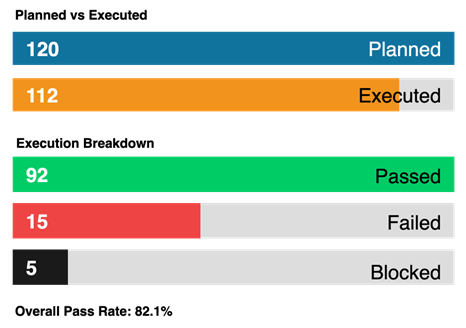
Summarize test results in a quick, readable format. Example: 56 test cases executed. 46 passed. 10 failed. Pass rate: 82%
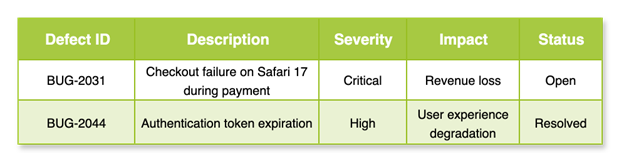
Include major bugs with identifiers. This will help tie findings back to bug reports. Example: Checkout crash on Safari—BUG-20021. Even if the bugs are logged elsewhere, calling them out in the TSR provides helpful context.
Call out issues that didn’t block the release but might impact user experience. Even small ones matter. Flag them so your team can plan a fix early.
Reflect on whether the agreed test goals were met. If the release criteria included a 90% pass rate and zero critical defects, say whether that was achieved. Be honest and specific.
Give a final view of the application’s health. Highlight any blockers, critical concerns, and readiness for release. Include clear next steps.
When a test summary report is well written, it becomes a tool that helps teams stay aligned, spot risks early, and make confident release decisions
When a test summary report is well written, it becomes a tool that helps teams stay aligned, spot risks early, and make confident release decisions. Here’s how it helps across teams and timelines:
A good test summary report cuts through the noise. It shows what passed, what failed, and what still needs attention.
It gives your team direction, and it helps stakeholders move quickly and with confidence. Instead of scattered notes or partial updates, they see the whole picture—clear, focused, and easy to act on.
Let’s walk through how to create one.
Start by stating what the report is for. One or two lines are enough. Keep it focused.
This report summarizes the testing activities completed during sprint 14 for the XYZ Market e-commerce platform.
Next, explain what you tested. Think of someone outside your immediate team reading this. They need to understand the product and what changed in this release. This helps everyone connect your testing effort to real features and business value.
XYZ Market is an online shopping app where users browse, order, and pay for products from sellers across the country. This release includes a redesigned checkout flow, PayPal integration, and new product recommendation features, along with bug fixes from previous releases.
Now, be clear about what you tested and what you didn’t. Missing this step leads to misunderstandings and wrong assumptions.
Break it into three simple parts:
List what was covered.
User authentication, cart functionality, PayPal payment processing, recommendation algorithms.
Mention areas intentionally skipped in the current test cycle.
Legacy browser compatibility, multi-region deployment.
Be honest about what couldn’t be tested and why.
iOS notification testing was skipped because of incorrect provisioning profiles, and load testing was delayed because the staging environment wasn’t ready.
Here’s where numbers speak. But don’t offer an overwhelming view. Just give the key stats.
Include:
Example:
Use a pie chart or a bar graph if your audience prefers visual aids. A quick chart often says more than a long paragraph.
What kinds of testing did your team do? This adds clarity to your results. Include both manual and automated types, but keep it practical. Add brief notes on tools or focus areas if relevant.
List the systems, tools, and platforms used during testing. This helps future readers replicate or verify your results. Mention your test data sources, integrations, or anything unusual.
Call out the major bugs found, but no need to list every tiny thing. Focus on the ones that matter.
This is your chance to share insights. What did you notice? What slowed things down? Also, what would you do differently next time?
The recommendation system had unexpected behavior when no user history was available. This surfaced during exploratory testing with new user accounts.
Help your stakeholders make the next move. Be direct and helpful.
We should fix BUG-2031 before releasing.
It’s also important that we increase mobile test coverage for Android tablets in the next cycle.
We should do a walkthrough of the updated payment flow with QA and product teams before the next sprint.
Wrap it up. Did the product meet your exit criteria? Say so. If not, explain what’s missing.
All planned test cases were executed. No critical bugs are open. Based on the results, the team recommends moving forward with the release.
A test summary report is more than just a formality—it’s your voice at the end of the testing
A test summary report is more than just a formality—it’s your voice at the end of the testing. It tells the team what was done, what worked, what didn’t, and what still needs attention. That clarity matters. Without it, things go silent. Assumptions creep in and bugs slip through.
But with it, you stay in control.
Keep your report short and honest, as you’re writing for people who need to act. Call out the big issues. Show what was covered and what wasn’t. Give your team the signal they need to move forward—or pause.
Make it a habit. Structure your reports after every sprint. Use tools like Tricentis qTest to centralize your testing—manage manual and automated runs, log defects, and generate clear, customizable dashboards that make your status and coverage easy to see and act on.
When testing ends, reporting keeps the story alive.
This post was written by Inimfon Willie. Inimfon is a computer scientist with skills in JavaScript, Node.js, Dart, flutter, and Go Language. He is very interested in writing technical documents, especially those centered on general computer science concepts, flutter, and backend technologies, where he can use his strong communication skills and ability to explain complex technical ideas in an understandable and concise manner.
Learn more about how to scale, orchestrate, and accelerate test automation for complete visibility into your testing process.
Learn more about how to scale, orchestrate, and accelerate test automation for complete visibility into your testing process.