

Webinars
Agentic Test Creation: AI-driven creation, analysis, and management
Boost release confidence with AI driven test creation that focuses...
Learn what agentic testing is, how autonomous AI agents design and adapt tests, and how teams apply agentic testing in modern QA.

Last spring, my team hit a breaking point in regression. Our UI shifted twice a week, selectors broke nightly, and honestly, the team spent more time repairing tests than validating new features.
The pivot that worked wasn’t another framework. It was a change in how tests got executed: let an agent read intent, act like a user, and adapt when the UI moves.
TL;DR: Agentic testing uses autonomous AI agents to execute tests from intent, adapt to UI changes, and report results without relying on fixed scripts. It shifts testing from rigid step execution to goal-driven autonomous action.
Agentic testing is a testing approach where autonomous AI agents plan and execute tests from intent, observe outcomes, and adapt their next steps without relying on fixed scripts. The goal stays stable while the agent chooses the best actions to reach it.
Agentic capabilities are the planning, tool use, and feedback loops that let an AI system decide, act, and learn within guardrails. In QA, that translates to tests that can recover from UI drift, choose alternate paths, and report results in human-friendly language.
Software testing still anchors the mission here. As Jason Arbon, CEO of Checkie.ai, put it, “The future of testing isn’t about writing more tests, it’s about letting intelligent agents explore your application the way real users would, finding the bugs that scripted tests miss.”
This mindset shift is what makes agentic testing different. Agentic testing turns test intent into autonomous action.
The future of testing isn’t about writing more tests, it’s about letting intelligent agents explore your application the way real users would, finding the bugs that scripted tests miss.
TL;DR: Traditional automation follows fixed scripts and struggles with UI changes, while agentic testing executes from intent and adapts when interfaces shift. The focus moves from brittle step authoring to defining goals and outcomes.
Traditional automation is powerful when systems are stable and change is slow. But let’s be real, how often is that the case anymore? Agentic testing shifts the work from writing brittle steps to defining goals and outcomes.
| Area | Traditional Automation | Agentic Testing |
|---|---|---|
| Authoring | Scripted steps and selectors | Intent and expected outcomes |
| Maintenance | High when UI changes | Lower when UI shifts |
| Execution | Fixed path | Adaptive path |
| Best for | Stable flows | High-variance user journeys |
| Failure handling | Stops on unexpected UI | Attempts alternate paths |
A clean test suite is still required, though. Agentic testing doesn’t excuse unclear requirements or unstable environments. It just reduces the tax of change.
TL;DR: AI-assisted testing helps humans generate or summarize test artifacts, whereas agentic testing executes and adjusts tests autonomously at runtime. In short, AI-assisted helps you write, agentic helps you run.
This distinction trips people up a lot. AI-assisted testing helps humans write tests faster or summarize results. Agentic testing makes the AI responsible for executing and adjusting the test itself.
AI-assisted testing…
A short way to remember it: AI-powered helps you write. Agentic helps you run.
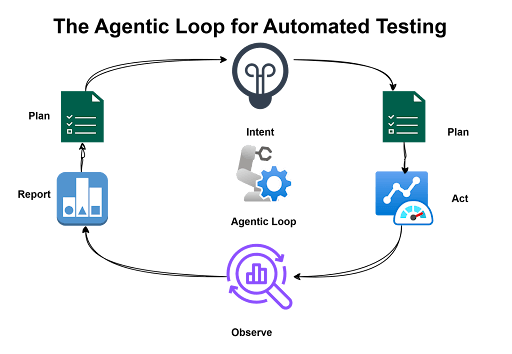
TL;DR: Agentic testing follows a loop where intent is defined, actions are planned, execution is performed, and results are adapted and reported. The agent observes changes and adjusts paths rather than stopping on unexpected UI behavior.
In most implementations we’ve seen, an agentic loop looks something like this:
It’s not magic, but it feels close when you see a test recover from a button moving three pixels to the left.
TL;DR: Agentic testing enables intent-based execution, UI resilience, natural language reporting, and reduced maintenance overhead. It shifts effort from repairing brittle scripts to expanding test coverage.
Here are the capabilities we see driving adoption in modern QA teams:
The short takeaway: agentic testing shifts effort from repair to coverage.
TL;DR: Agentic testing is best suited for high-change, high-value user journeys like checkout, onboarding, and exploratory smoke validation. It delivers the most value where traditional UI automation tends to be fragile.
Agentic testing doesn’t replace your entire pyramid. It shines where stability is low and feedback matters most.
We’ve seen teams get the most value at the top of the pyramid, where traditional automation tends to be most fragile anyway.
TL;DR: Start with a small pilot on one high-value flow, clearly define intent and assertions, stabilize data, and scale gradually. Successful adoption builds confidence incrementally rather than attempting broad rollout immediately.
If you’re new to agentic testing, start with a scoped pilot. A simple path works best:
Don’t try to boil the ocean on day one. The teams that succeed start small and build trust incrementally.
TL;DR: Clear intent, explicit assertions, strong observability, guardrails, and isolated test data are essential for trustworthy agentic execution. Autonomy must be paired with control and visibility.
We’ve learned a few rules that keep adoption smooth and outcomes trustworthy:
Autonomy without observability is just automation you can’t trust.
Autonomy without observability is just automation you can’t trust.
TL;DR: Vague prompts, unstable environments, data collisions, and overreliance on AI can undermine agentic testing effectiveness. Planning for these risks early prevents unreliable results.
Agentic testing isn’t magic. These are the friction points we see most often:
Plan for these up front and you’ll save yourself a lot of headaches later.
TL;DR: Agentic testing aligns with modern QA’s need for speed and adaptability by elevating test design to goal definition and enabling adaptive execution. It enhances tester leverage rather than replacing human expertise.
Modern QA is about speed and adaptability. Agentic technology fits because it aligns with how teams already work: rapid changes, continuous delivery, and a constant need for fast feedback.
This is why agentic testing feels less like a new tool and more like a modern QA operating model. It’s not replacing testers, but rather giving them better leverage.
Agentic testing is not replacing testers, but rather giving them better leverage.
TL;DR: Tricentis positions agentic testing within a broader AI-driven platform that connects intent to execution, reduces maintenance, and improves delivery confidence at enterprise scale.
Tricentis positions agentic testing as part of a broader AI-driven testing platform. The focus is on using AI to connect test intent to execution, reduce maintenance, and improve confidence across the software delivery life cycle. If you’re exploring this space, it’s worth seeing how the pieces fit together.
See how Tricentis can enable AI-driven testing and modernize quality across your enterprise.
This post was written by Rollend Xavier. Rollend is a senior software engineer and a freelance writer. He has over 18 years of experience in software development and cloud architecture, and he is based in Perth, Australia. He’s passionate about cloud platform adoption, DevOps, Azure, Terraform, and other cutting-edge technologies. He also writes articles and books to share his knowledge and insights with the world. He is the author of the book Automate Your Life: Streamline Your Daily Tasks with Python: 30 Powerful Ways to Streamline Your Daily Tasks with Python.
Agentic testing in QA is an approach where AI agents execute tests from intent, adapt to changes during execution, and report results without relying on fixed scripts. It’s designed to handle fast-changing user interfaces and reduce test maintenance.
Agentic testing differs from traditional automation because it uses adaptive execution instead of fixed scripts. Traditional automation follows a predetermined path, while agentic testing can adjust when the UI or data changes.
Agentic testing differs from AI-assisted testing because the AI takes responsibility for executing and adjusting tests, not just generating test artifacts. AI-assisted testing helps humans create tests faster, while agentic testing helps run them autonomously.
High-value user journeys that change often are best suited for agentic testing, such as checkout, onboarding, or subscription updates. These flows benefit most from adaptive execution and reduced maintenance.
Teams get started with agentic testing by piloting one high-value flow, defining clear intent and assertions, stabilizing test data, and running in a controlled environment. Once outcomes are stable, they can expand coverage incrementally.