

Demo Videos
Automate, orchestrate, and accelerate testing within DevOps workflows using Tricentis qTest
In this demo, we’ll provide an overview of qTest Manager, Launch, and...
This post will provide an overview of test orchestration. You’ll understand what it is, its components, and how to implement it.

When you’re building a web app with a team, if someone pushes code, your CI pipeline will have to run all tests, which might include unit tests, integration tests, and E2E tests. However, the problem with this is that it might take 30 or more minutes to complete. Moreover, a single failed test can stop all other ones from running, and no one knows which tests to prioritize.
In this situation, you need test orchestration. It helps you avoid unnecessary delays and allows your team to focus on more critical tasks instead of constantly monitoring your test pipeline.
This post will provide an overview of test orchestration. You’ll understand what it is, its components, and how to implement it.
Test orchestration is the process of setting up, managing, and running automated tests in an efficient way. It makes sure the right tests are run in the right places, at the right time, and with the right set of tools.
For instance, in software development, you might need to run different kinds of tests at different times. Also, you might want to do performance tests, E2E tests, integration tests, and unit tests. With test orchestration, it becomes easier to plan and run these tests.
Test orchestration is important because it:
People often misunderstand the differences between test orchestration and test automation. However, here’s a clear comparison table highlighting the difference between the two concepts.
| Aspects | Test orchestration | Test automation |
| Definition | Coordinate and manage multiple automated tests in a defined sequence or workflow | Automates individual test tasks or scripts |
| Purpose | Optimize the testing pipeline for efficiency, reliability, and scalability | Reduce manual effort by automating repetitive tasks |
| Scope | Manages the entire testing process, including order, timing, and dependencies | Focuses on single, isolated test cases or tasks |
| Used with | CI/CD tools like Jenkins, GitHub Actions, GitLab CI | Test frameworks like Jest, Mocha, CodeceptJS |
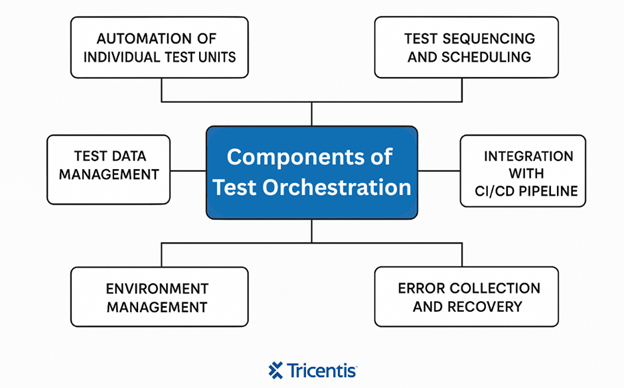
Test orchestration is made up of different components that work together to plan, run, and monitor tests. They include:
Here are some of the key benefits test orchestration brings to your testing process and development cycle.
Test orchestration runs tests continuously and in the right order, so bugs and issues are caught early in the development cycle
Test orchestration runs tests continuously and in the right order, so bugs and issues are caught early in the development cycle. Fixing problems early prevents them from growing into bigger and more complex issues later.
Test orchestration reduces delays in testing. This means that developers will get quick feedback on their code changes. It’ll help them resolve issues faster and keep the development process moving smoothly.
Test orchestration allows you to run a wide range of automated tests across different parts of the application, environments, and platforms. This increases test coverage, reducing the chance that critical bugs go unnoticed.
Test orchestration frees testers from manual work by automating repetitive tasks. It allows them to focus on complex testing scenarios and creative problem-solving. This increases productivity among team members.
Choosing the appropriate tools can significantly impact your orchestration process. Here are some common sets of tools associated with test orchestration.
CI/CD platforms automate the building, testing, and deployment of software. They trigger test execution automatically whenever code changes occur. They also manage the sequence of tests and integrate testing into the overall software delivery pipeline. Examples:
These tools specialize in managing and optimizing the orchestration of tests across different environments and stages of the pipeline. They offer advanced features like intelligent test scheduling, parallel execution, environment provisioning, and detailed reporting. This makes the orchestration process more efficient and scalable. Examples:
These are the frameworks and libraries used to create and run automated tests themselves. While they don’t orchestrate tests on their own, they integrate into orchestration platforms to execute the actual test scripts across browsers, devices, and APIs. Examples:
Adding test orchestration to your workflow doesn’t have to be complex. Here’s a simple set of steps for how you can implement test orchestration.
This is the first step in implementing test orchestration. You’ll need a clear testing strategy before you add test orchestration to your workflow. You have to break down your CI/CD pipelines into stages and decide what types of tests should run at each stage and in what order.
The key activities in this step include:
Good planning ensures the orchestration pipeline is well-structured, efficient, and aligned with business goals.
The next step after planning is to automate your test cases and integrate the necessary tools.
Start by identifying the types of testing you need, whether it’s a unit test, an integration test, or an end-to-end test. Then write these tests using automation frameworks. After that, select and configure an orchestration platform and integrate it with the testing tools to ensure that tests run automatically.
This step ensures that automated tests are reliable, consistent, and reflect how your application will behave in production. Tests often fail not only because of a bug in the code but also because the environment wasn’t set up correctly or the data was not accurate.
Monitoring how the test performs and analyzing the results is the final and ongoing step in test orchestration
Monitoring how the test performs and analyzing the results is the final and ongoing step in test orchestration. It helps you identify issues faster, understand test trends, and improve the reliability of your pipeline.
Here are some best practices that ensure your test orchestration is reliable and aligned with your development goals.
There are some common challenges that come with test orchestration that you need to know to help you plan better.
Flaky tests are tests that sometimes pass and sometimes fail without any changes in the code. They cause instability in the pipeline because they can trigger false alarms, making it difficult to trust test results.
Solution:
Implement retry logic to automatically rerun flaky tests, but also track and fix their root causes to improve stability.
As the test suite grows, running tests sequentially can take too long, delaying feedback and releases. This is a problem, especially for complex tests or when multiple environments are involved.
Solution:
Use test parallelization to run tests simultaneously across different machines or environments, significantly reducing execution time.
When tests fail, a lack of clear and detailed failure information makes it difficult and time-consuming to diagnose and resolve issues.
Solution:
Use centralized CI dashboards that provide real-time, detailed reports with logs, screenshots, and failure analysis to speed up troubleshooting.
Getting your testing tools, CI platform, environment setup, and reporting system to work together can be frustrating, especially across different teams or stacks.
Solution:
Choose tools with strong integration support. For example, you can use tools like Tosca and qTest, as they offer built-in CI/CD integrations. After that, once your integration is stable, implement alerting systems to notify teams about issues.
Test orchestration plays a key role in modern software development by making your testing process faster, smarter, and more reliable. As a result, it helps teams catch bugs early, speed up feedback loops, and reduce the chaos in CI/CD pipelines.
Furthermore, by automating and coordinating tests efficiently, teams can deliver reliable software more quickly and with less manual effort.
This post was written by Chosen Vincent. Chosen is a web developer and technical writer. He has proficient knowledge in JavaScript, ReactJS, NextJS, React Native, Nodejs and Database. Aside from coding, Vincent loves playing chess and discussing tech related topics with other developers.

Learn more about how to scale, orchestrate, and accelerate test automation for complete visibility into your testing process.
Learn more about how to scale, orchestrate, and accelerate test automation for complete visibility into your testing process.