

Automated software testing
Automated software testing solutions can overcome the challenges of...
Learn what functional testing is, how it works, and the benefits it brings to ensure your software performs as expected.

Software applications have become complex and complicated over the years. Nevertheless, users still expect applications to work flawlessly. Therefore, organizations put a lot of effort into making sure that applications meet their expectations. One of such ways to achieve this is through Functional testing.
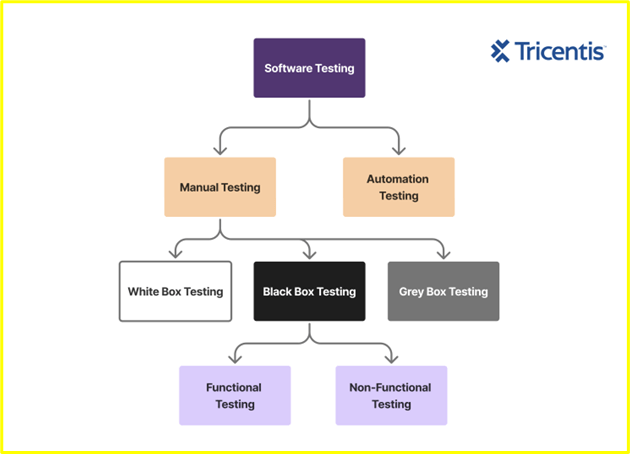
Functional testing focuses on verifying an application’s functionality against specified technical requirements. Testers evaluate every functionality, from user interface elements and APIs to complex workflows.
It’s important for businesses that functional testing is done right to get the desired outcome. So, in this post, we’ll dive deeper into what functional testing is and how it works. Then, we’ll discuss the benefits, challenges, and solutions that come with it.
Functional testing is a type of software testing that focuses on the functionality of an application.
This is a kind of software testing that focuses on testing a system against all the software requirements and specifications, like the technical details, data manipulation/processing and other specific functionalities. It is a black box approach, which means testers will evaluate an application without knowing/exploring the application’s internal code or structure.
Unlike other white-box testing methods that are more focused on examining the code for logic errors, performance and security, functional testing evaluates applications from the user’s perspective.
During testing, testers create test cases (which are step-by-step instructions to perform different tasks) for each functionality with appropriate input data, expecting the outcome, and comparing and validating the actual output with the expected output.
In functional tests, testers identify “what” an application is supposed to do rather than “how” it does it and run a series of tests to make sure that it performs as expected. This involves testing individual features, user interfaces, and system interactions.
Let’s take an example of an e-commerce platform. One of the functions of the applications is to allow users to add items to a cart, proceed to checkout, and complete a purchase. If a tester is testing this function, they’ll check the following:
The ultimate objective of functional testing is to ensure that a piece of software meets the customer’s specific functional requirements. It also ensures that users don’t encounter feature issues or bugs while using the application.
While this satisfies most of its meaning, functional testing doesn’t just stop at checking individual features like buttons and forms, but also how they work together to deliver a cohesive user experience.
For example, when it comes to testing a social networking app, testers will likely verify:
It is a more holistic approach and is typically carried out after unit testing and before system testing (where the entire system is validated).
Before we proceed, you should also know that, in addition to functional testing, quality assurance (QA) teams will perform non-functional tests designed to review and verify other aspects of a software application.
Non-functional testing may evaluate usability, reliability, scalability, compliance, performance under different loads, and other criteria that are not directly related to business function.
Where functional testing is intended to ensure that software meets the requirements of an organization, non-functional software testing is designed to ensure that software meets the expectations of users. Most non-functional tests are automated.
Non Functional software testing is designed to ensure that software meets the expectations of users.
Functional testing requires proper planning and understanding of the application and what the users would use it for.
More than the act of testing, the act of designing tests is one of the best bug preventers known
— Boris Beizer, author of “Software Testing Techniques”
First, you begin with a thorough understanding of the functional requirements. You can usually find this information in specifications, user stories, or acceptance criteria during the design and development phase. This helps you identify the functions to test and define outcomes to expect.
Next, you create test cases to test different functions of the application. Test cases should include both positive and negative scenarios. Once the test cases are ready, choose the tools to use for testing and set up a testing environment that closely resembles the production environment.
Now, it’s time to start functional testing. The steps involved in functional testing typically include:
During functional testing, you should properly document the results. If you identify any functional bugs, create detailed documentation mentioning how you found the bug, the steps you followed, and the input you provided that led to the bug, including screenshots and screen recordings if necessary.
The next step is to pass this information on to the development team so that they can fix the issues. Once you do that, retest the functions to confirm they’re working, and keep repeating the process until the application reaches an acceptable state.
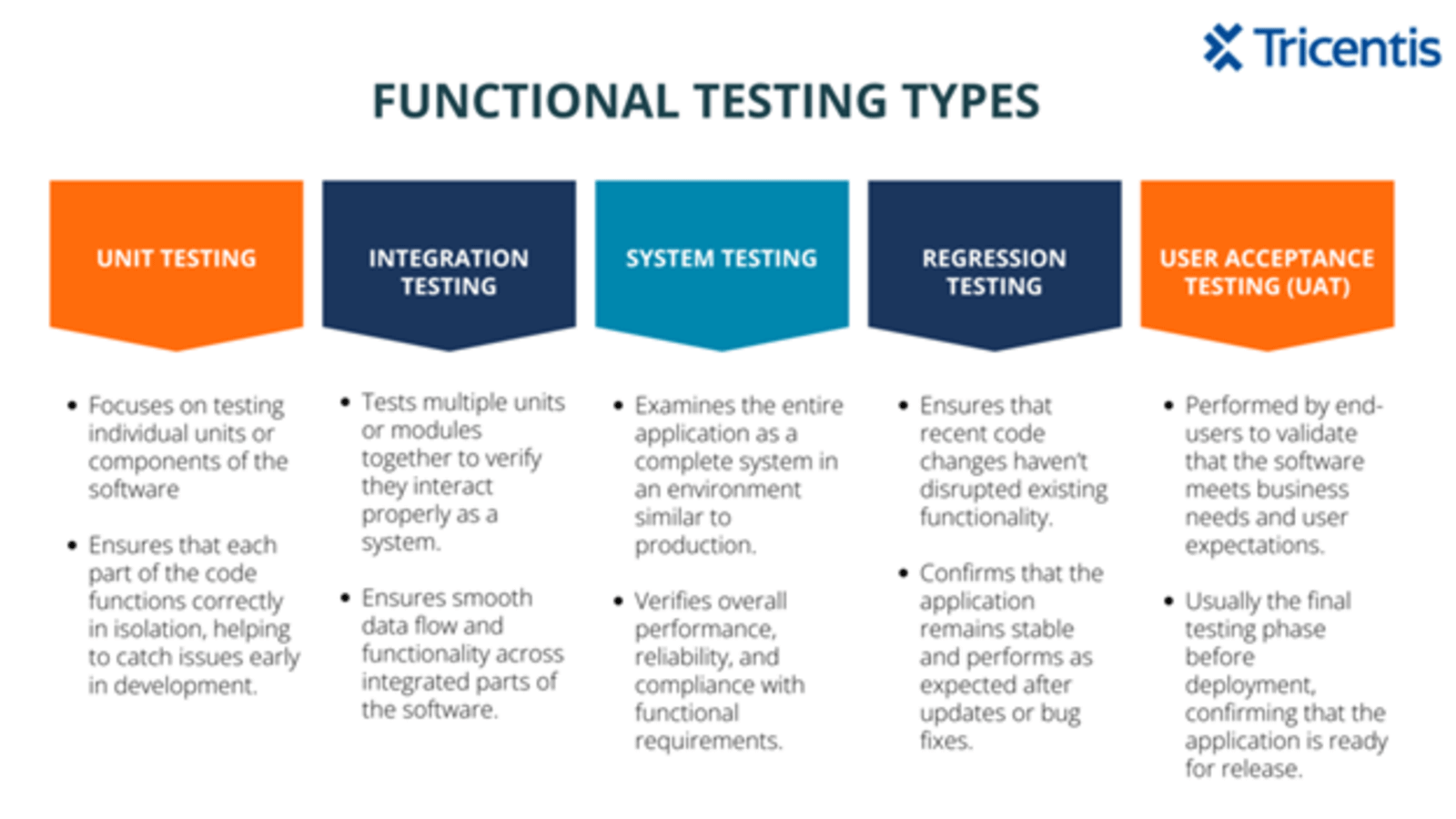
The most common types of functional tests include the following:
Unit tests exist at the base of the testing pyramid, evaluating each individual piece of code (module, functions, method and classes) to make sure it performs appropriately at the lowest level.
Conducted during the app development phase, it focuses on using tools like vitest, JUnit or pytest to test specific components like functions and classes in isolation, validate their logic and handle various edge cases, before integrating them with other parts of the software.
The number of unit tests you have to write depends on what your goal is for the testing strategy. You should aim to test every single line of your code, but if you can’t do that, then that’s a sign that your functions are handling too many tasks, you didn’t write the code with testability in mind, and you now need to break them down.
Component tests validate complete sections of applications without interference from other parts of the system. This helps to see how the app will behave under certain conditions. It makes sure that all the already tested units work well when put together.
Integration tests examine multiple individual units of the software as a group to make sure they interact appropriately. Just like unit and component testing, they are all run during the build process and before release.
A little misconception with this type is that you need to test your entire application, but that is not the case. You should only test the integration between components.
Regression tests ensure that the already tested features are not negatively impacted by recent code or environment changes to the functionality of the software. This type of testing can be done by running all test cases again, prioritising test cases, breaking down or classifying the tests and running exploratory testing.
Testers often get this wrong by assuming that you need to run the entire test suite for every change made, even when it has nothing to do with the test they might be running. Hence, having a risk-based approach that will prioritize tests based on their potential impact on the business and areas with the likelihood of failure is the way to go.
Smoke tests, a type of regression test, check the critical functionality immediately after a change, detect defects early that could block further testing, confirm overall stability, and reveal potential sources of “smoke.”
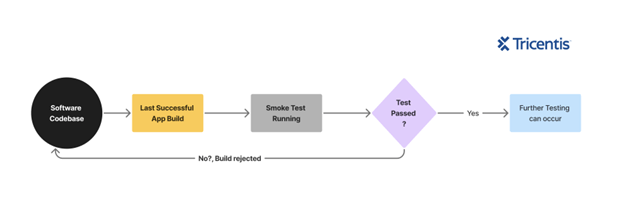
It evaluates software in a noncomprehensive manner to ensure the software works well enough (or isn’t riddled with too many issues) to move on to additional tests. A smoke test is also known as a build verification test, as it acts as an initial checkpoint and gatekeeper for builds.
Developers can run this before sending builds to the QA team, and QA can run it before starting more rigorous testing — or both can do it. Ideally, teams run it whenever they add a new feature.
Sanity tests, a subset of regression tests, are performed after smoke tests, to evaluate in a noncomprehensive manner that the new functionality, specific errors found and fixes made do not create any persisting issues in the app. One advantage of this is that it saves time as it focuses on a specific area after a minor change has been made.
System tests ensure that all system elements work as intended. They also verify system performance and functionality, and are typically performed by testers who have not played a role in developing the program.
User acceptance tests make sure the software meets user needs. Often, the last step before software goes live, these tests are usually performed by end users and measure how well the application performs in a typical scenario.
Functional testing is important to ensure that the software is performing as expected to deliver value to both users and businesses. It helps detect and fix issues early, improving user experience and enhancing the overall software reliability. Let’s look into some of the major benefits of functional testing.
Functional testing improves software quality because you test the application thoroughly and validate each feature and functionality according to requirements. This minimizes bugs, reduces unexpected behaviors, and ensures the software meets user and business requirements.
Functional testing focuses on testing the application from an end-user perspective. It uses real-world scenarios to verify that the software behaves as expected when users interact with it. This context helps in identifying and fixing issues, which is critical to enhance user experience.
Detecting and fixing bugs during the early phases of development and testing is cheaper than addressing them post-release. Functional testing allows you to identify flaws before they become a major issue—especially if it has high dependency. Fixing them earlier reduces the risk of costly, time-consuming bug fixes later.
Functional testing tests and verifies each function of the application multiple times. This makes the application more predictable and stable, reducing system failures. This improves high uptime, resilience, and, therefore, reliability.
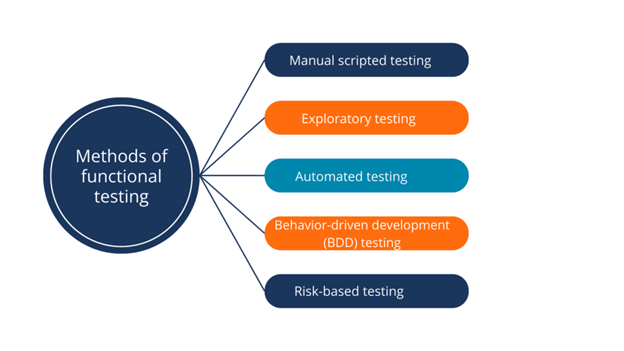
There are several methods and QA testing tools that you may employ to execute tests and gather data.
Regardless of what type of functional test is performed, there are several methods and QA testing tools that may be employed to execute tests and gather data.
Managing functional testing can be extraordinarily complex, especially in an environment with multiple technologies. The challenges of conducting functional tests include:
Traditionally, functional tests are categorized as manual tests, and depending on how large an app is and the rate at which the team needs to ship, performing these repeated tests by hand becomes redundant.
By automating functional testing, you can run test scripts repeatedly and consistently across different environments.
Automated functional testing allows testers to execute a large number of test cases in less time, making it ideal for regression testing and frequent releases. Testers can identify bugs faster and with less human effort.
Automated functional testing also supports continuous integration and continuous deployment (CI/CD) pipelines.
By automating functional testing, you can run test scripts repeatedly and consistently across different environments.
Not all test cases should be automated; choosing incorrectly can lead to wasted resources and high maintenance costs. The focus should be on repetitive tasks like form submissions and login flows, as well as on critical features that could significantly impact a business, like payment processing.
Also, you should automate data-driven tests that require multiple data inputs using a data file like CSV or JSON. Avoid automating one-off tests and subjective tests like exploratory tests, design-focused tests that require human opinions/bias, and usability tests.
When you have to run the same test on different operating systems, multiple devices, and across browsers, it’s definitely time to automate it to maintain consistency.
It is recommended to have a team that possesses the right skill set, technical expertise, and domain knowledge to write and maintain scripts. This structure will define and uphold standards, ensure accountability, and scalability.
Invest in periodic training to keep them updated with the latest tools, frameworks, and trends. A team like this may comprise a test architect who will design the framework the team will adopt, an automation engineer, and a DevOps engineer to integrate into the CI/CD pipelines.
Poorly written scripts often return false issues like positives/negatives when they run.
Write your scripts using modular design techniques, such as the Page Object Model (POM), which separates the test logic from UI elements, making the code well-organised and easy to update when changes to the application are made.
Implement proper error handling and validate outcomes by writing precise assertions, and avoid fake checks that can hide issues. Teams should conduct code reviews to enforce code quality across the test suite.
Configure the pipeline to run tests in parallel, reducing the time of execution and speeding up release cycles. The pipeline should trigger a smoke test for every commit.
As a rule of thumb, an automatic retry mechanism should be integrated for when the network fails or is slow and for other transient failures.
This open-source automation framework supports acceptance testing, acceptance-test-driven development (ATDD), and robotic process automation (RPA). It provides a simple, tabular syntax for writing test cases in a language-neutral manner, making it accessible to both technical and non-technical users.
Robot is versatile, widely adopted, and uses a keyword-driven approach where you write test cases using keywords. Its modular and extensible architecture lets you integrate it easily with other libraries and tools.
These two are mobile solutions for performing functional UI testing in mobile apps. Espresso, which Google developed, is an open-source testing framework for writing scalable and reliable Android UI tests.
Being tightly integrated with Android Studio, it focuses on testing individual UI components within a single activity. It also uses APIs to interact with the UI elements and avoids flaky tests by synchronising with the app’s UI thread.
On the other hand, XCUITest, developed by Apple, is a closed-source native testing framework integrated into Xcode. It accesses the app UI elements via accessibility identifiers.
You can write tests with both Swift and Objective-C, and Xcode’s test runner is available for fast executions.
Tricentis Tosca simplifies functional testing by overcoming the barriers of legacy and conventional functional test automation methods. It is a scriptless, AI-driven automation tool for designing functional, end-to-end tests across all layers of enterprise architecture, including web, mobile, desktop, APIs, and SAP applications.
Instead of setting up a framework, Tricentis Tosca provides a ready-to-use, drag-and-drop interface that simplifies test creation and maintenance.
When Tosca scans an application, it uses machine learning to dynamically build up a model of its elements, enabling testers to design and run the tests visually without much technical expertise.
With its innovative risk-based and model-based test automation approaches, Tricentis Tosca simplifies testing for more than 160 technologies.
Tricentis Tosca provides Agile software testing teams and DevOps with:
Build inclusive software from the start, get started with a free trial, and ensure accessibility for every user with Tricentis.
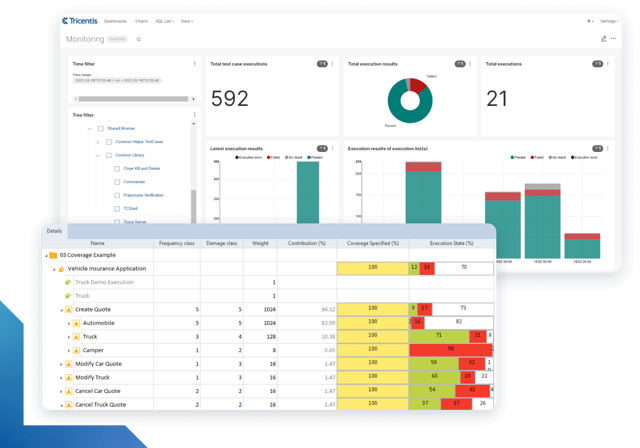
Learn more about intelligent test automation and how an AI-powered testing tool can optimize enterprise testing.
Learn more about intelligent test automation and how an AI-powered testing tool can optimize enterprise testing.
Functional testing is performed to ensure that software works the way it is supposed to and conforms with the requirements for the software as determined by the customer.
Functional testing aims to ensure that software is free of defects and will satisfy the needs of the customer and end user. It checks that software functions as it is supposed to and works as expected. Functional testing is designed to improve the quality of the software and reduce the risk associated with the product.
Non-functional testing focuses on quality concerns that aren’t directly related to the functional requirements of software. Non-functional testing may verify the usability, compliance, performance, security, and scalability of an application. If functional testing is designed to ensure that software meets business requirements, non-functional testing is designed to ensure that software meets user expectations.
Functional Testing involves testing if specific features work as per requirements during development, while in UAT, the user tests the entire system to confirm that it meets all business needs before release.
Yes, API testing is a type of functional testing that involves verifying whether APIs function correctly and integrate seamlessly into the software.
The decision is made based on several factors, such as past defects, feature risk level, importance to business, and frequency of usage.
Functional Testing focuses on verifying that individual, specific features work correctly, while QA Testing takes a broader view, ensuring overall software quality across both functional and non-functional aspects.