

A beginner's guide to volume testing
Learn the essentials of volume testing by uncovering different testing...
As developers examine their own code, they bring their own biases to each test, frequently limiting their ability to see software from a user’s perspective or testing the application in unexpected ways. That’s where black box testing can deliver real value.
Black box testing is a category of testing techniques that examine software applications from the outside, without any knowledge of the design or structure of a software system. Black box tests can happen at a variety of levels, from unit testing that examines the functionality of bits of code to integration testing, system testing, or acceptance testing. In a black box test, testers examine inputs and outputs to make sure an application operates as it’s supposed to, and to discover any errors that should be fixed.
Black box testing may reveal:
An advantage of black box testing is that the tester doesn’t need technical or coding know-how. Anyone can do it. Because they’re only looking at one thing (“if Y does X”), testers can find and report issues quickly. It’s the behavior testing of software.
White box testing techniques, on the other hand, are functional tests of the structure of the code. In white box testing, the tester is typically a software engineer and has knowledge of how the technology works—the internal structure or code. You could test an algorithm, for example, with white box testing. Whereas with black box tests, you can only test user functions.
Read more about the differences between white box and black box testing on geeksforgeeks.org.
Black box testing is used because anyone can check to see if a feature is functioning as intended. If the test fails, it’s up to the engineering team to explore what went wrong.
Black box testing techniques can be functional or non-functional. Here are the typical black box testing techniques used.

How does black box testing compare to white box testing? In black box testing, we don’t make any assumptions about the inner workings of the system we’re testing. Whereas in white box testing, we test the internal control flow of the target of our tests. In the case of software, this means the tester can look at the code and design tests based on the possible code paths they see. The test can also verify that certain side effects occurred when executing the test.
By looking at the inner workings of the code, white box tests can discover specific edge cases. But a tester might also miss potential test cases that weren’t apparent by looking at the code, but that were part of the requirements. By focusing only on the implementation, we might be “tricked” into thinking this is the correct implementation and design our tests according to the code we see, instead of the specifications that were requested.
It should be clear now that both methodologies have advantages and disadvantages. That’s why a software development team doesn’t have to choose one or the other. Most teams use a combination of both. This is called gray box testing. It gives testers all necessary information to come up with the most complete test suite possible.
Steps involved in a black box test include:
We mentioned that black box testing is ideal for higher-level tests like UI testing and end-to-end testing. Of course, we can perform these tests manually by using our application, but that doesn’t scale well. So which testing tools can help us more easily create black box tests?
A tool that implements the Gherkin language (like CucumberJS or SpecFlow) makes it easy to write up tests without the need to know a programming language. It forms an abstraction over code that automates the application. Although we can also write white box tests with the Gherkin language, it’s ideal for higher-level black box tests.
Another type of tool is a record and playback tool. Tools like Selenium, Appium, and Waldo allow testers to use an application and record the steps they went through. Later, the tool can run through these steps again and perform any verifications the tester specified. There is no need to know anything about how the features were implemented.
Because black box testing can be used at all levels of software testing, we can also design these tests with unit testing libraries.
Let’s look at some specific black box testing techniques.
Using equivalence partitioning, we design test cases by creating “partitions” (or equivalence classes) of test cases where all inputs in a certain partition can be regarded as equivalent. Take a function that receives a birthdate as input and verifies that this date makes the user 18 years or older. Basically, this function has two partitions that can be used for its tests. First, a date range that should return false because the user is younger than 18, and a date range the should return true because the user is 18 or older.
Instead of executing hundreds of tests for different inputs, we can basically reduce it to two test cases. Optionally, we could identify a third partition if we regard the cases where someone is exactly 18 years old as a special case.
Equivalence partitioning is a black box testing method because we only look at the specifications to design our tests.
Boundary value analysis builds on the equivalence partitioning technique. With this technique, we take input values at the boundaries of our partitions. In the above example, we would take dates that make the user one day younger than 18 years old, exactly 18 years old, and one day older than 18 years old.
Again, no knowledge of the code is required, only knowledge of the functional requirements.
Decision tables are a useful way of visually representing the different inputs and expected outputs of a system. Each line in the table represents a test case. This is useful for more complex test cases with many variables.
Take a look at this table:
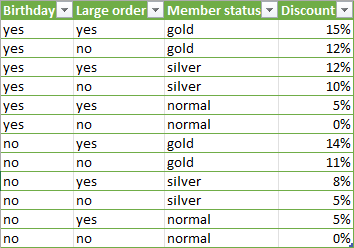
It contains the data for a discount calculation routine. The decision table is much clearer than summing this up in a long specification text. Both developers and testers can use it to implement and test the system. The tester can identify the necessary test cases without looking at the implementation.
State transition testing is a technique that’s ideal for systems that transfer from one state to another. As an example, think about a system that processes videos. The system is designed in such a way that it can be “idle,” “processing,” or “paused”. When the system receives a video, it’ll move from “idle” to “processing.” If it receives a file it can’t handle, it’ll do nothing and remain “idle.” And finally, a user should be able to pause and resume the video processing.
We can graphically clarify this with a state diagram:
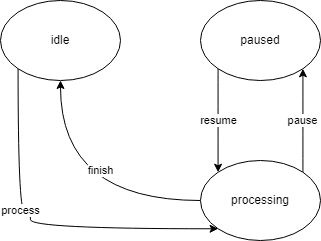
This diagram clearly shows us the different transitions from one state to another, and it can help identify test cases for our tests. The tests that we design based on this diagram won’t be complete, of course. We will still want to verify the outcome of the video processing. But the state transition technique gives us a visual representation of the system, making it easier to discover new test cases.
In this technique, the tester tries to find bugs by “guessing” which conditions or actions may lead to issues with the software application. A good tester has enough experience to know the type of actions and inputs that typically lead to errors in software. Often, these are cases that developers didn’t think about. Things like using special characters in inputs, large files for file processing, and double clicking buttons to trigger back-end logic twice.

Black box testing is a technique of testing where we test our system without looking at the inner implementation details. It differs from white box testing, where we look at the implementation to identify new test cases. It’s a form of behavioral testing because we verify the external behavior of the system. Most teams use a combination of both, i.e. gray box testing.
To discover new test cases, we can use techniques like equivalence partitioning, boundary value analysis, decision tables, state transition diagrams, and error guessing. These techniques don’t require testers to look at the implementation, and as such, don’t require technical knowledge.
Black box testing is ideal for both functional and non-functional testing. It can cover all the way from user acceptance testing and UI tests to performance and security testing. We can even apply the black box testing technique to lower level tests like integration and unit tests.
Tricentis products offer the ability to automate functional testing, regression testing, and non-functional testing, as well as orchestrate these tests with scalable test management, which supports black box testing as well as manual, exploratory, and automated testing with any tool. Providing centralized control and visibility throughout the software development lifecycle, Tricentis allows QA and development teams to approach testing more strategically and collaboratively, leading to faster and higher-quality software releases.
Tricentis offers automated software testing solutions and test management tools that support continuous integration and a wide variety of testing methodologies, including data integrity testing, app-native testing, performance testing, and chaos engineering.
This post was written by Peter Morlion. Peter is a passionate programmer that helps people and companies improve the quality of their code, especially in legacy codebases. He firmly believes that industry best practices are invaluable when working towards this goal, and his specialties include TDD, DI, and SOLID principles.

Learn how to supercharge your quality engineering journey with our advanced testing solutions.
Learn how to supercharge your quality engineering journey with our advanced testing solutions.
Black box testing is a type of software test that assesses the performance and reliability of a system from the outside – the tester has no knowledge of the internal structure or design of the system. In other words, the system is a “black box”, allowing the tester to only observe inputs and outputs and see how they compare to the requirements and specifications of the software.
While black box testing is conducted without knowledge of a system’s internal workings, white box testing allows testers to understand how a system functions. Many development organizations use both black box and white box testing to achieve greater test coverage.
Black box testing examines an application from the perspective of a user, resulting in software that better serves the needs and wants of users. Because black box testers have no knowledge of the application, they’ll inevitably use it and test it in different ways than development teams will, finding issues that developers may miss.