

End to end testing: Everything you should know
Learn what end-to-end testing is, why it matters, and how to apply...
Discover how service virtualization accelerates software testing with practical examples, AI insights, best practices, and enterprise use cases.

TL;DR
Discover what service virtualization is, its benefits, best practices, and how Tricentis Tosca helps accelerate software testing and delivery.
Service virtualization is a technique that simulates the behavior of a dependent system component so testing can proceed without needing that real component to be available, stable, or accessible.
By simulating these dependencies, service virtualization technologies ensure that tests will be based on appropriate dependency behavior and data, each and every time the test is run.
Service virtualization is typically used when a test needs to interact with dependent system components that are:
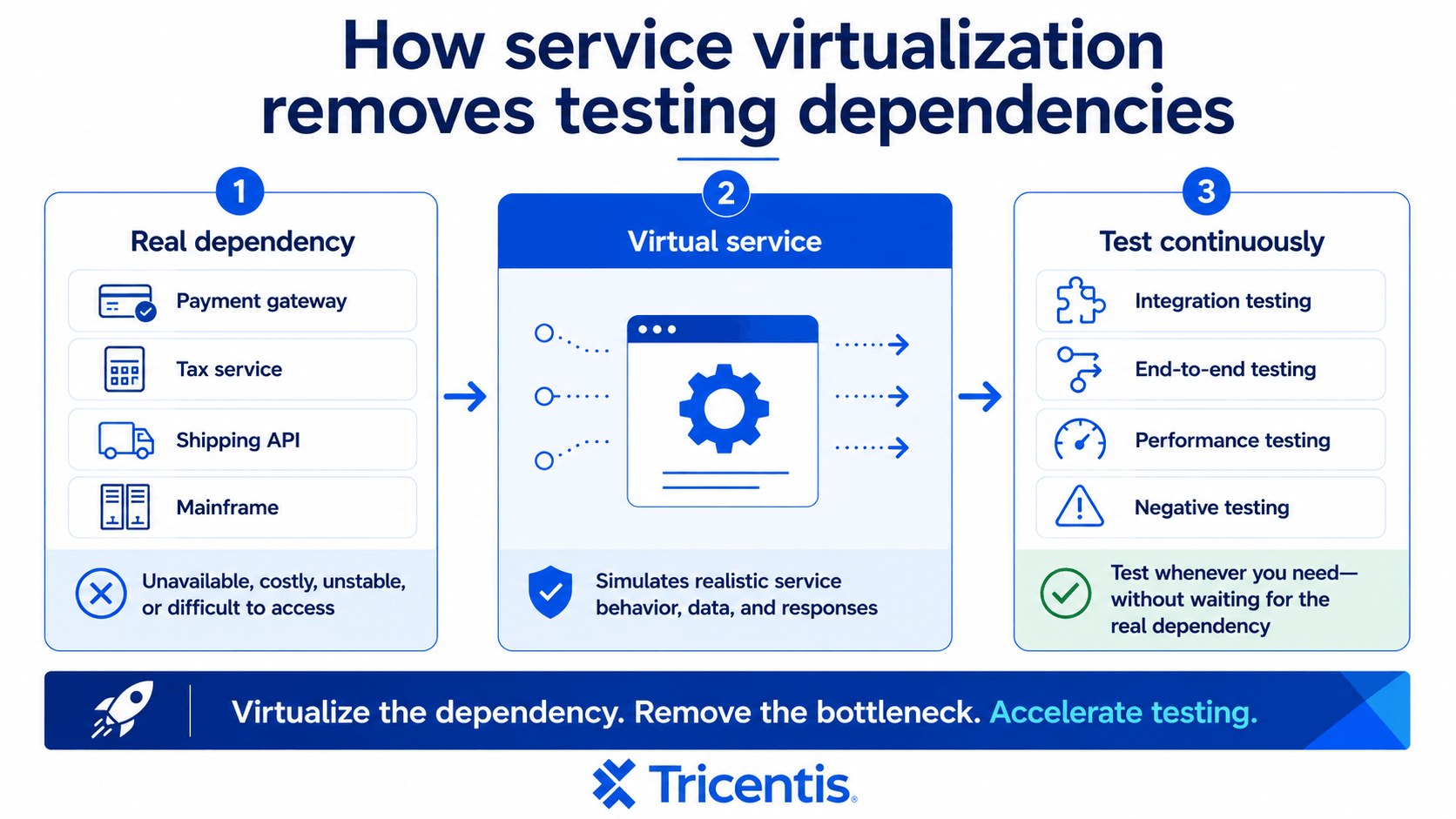
Modern applications do not operate in isolation. As an example, let’s say a single checkout flow calls a payment processor, a tax calculation service, a shipping API, and two or three internal microservices owned by other teams. Every one of those dependencies is a choking point for testing.
As architectures keep splitting into more services owned by more teams, the number of things a test depends on but doesn’t control directly keeps climbing, and each dependency is a new opportunity for a test to fail for reasons that have nothing to do with the code actually being tested.
Diego Lo Giudice, Vice President and Principal Analyst at Forrester, described a case that captures why this matters in practical terms, not just architectural ones. A team he had worked with could only access their mainframe for testing in a 30-minute window once a month.
“With service virtualization, they were able to virtualize that access to the mainframe, and therefore the team now kind of had the virtual access to the mainframe available all the time,” he told SD Times.
That’s the key takeaway from this: service virtualization turns a scarce, gatekept dependency into something a team can test against whenever it needs to, instead of scheduling development around someone else’s availability.
One example I love to use to explain the concept of service virtualization is the e-commerce checkout flow.
When a customer places an order, the application typically needs to call a third-party payment gateway to process the charge, a tax calculation service to determine what’s owed based on location, and a shipping API to generate a rate and delivery estimate.
None of those three systems is owned by the team testing checkout, and none of them is something you’d want to hit for real on every test run since the payment gateway charges per transaction, the shipping API has rate limits, and the tax service might be down for maintenance at the exact moment a release needs to ship.
With service virtualization, a team records real traffic between the checkout application and each of these three dependencies. They then build a virtual service that reproduces their behavior, including realistic error conditions like a declined card or a shipping API timeout.
They test against those simulations instead. The checkout flow gets exercised end-to-end, including the failure paths that are hardest to trigger against the real services, without a single real charge, a single rate-limited API call, or a single dependency on someone else’s uptime.
Service virtualization turns a scarce, gatekept dependency into something a team can test against whenever it needs to, instead of scheduling development around someone else’s availability.
The core difference between mocking and service virtualization is scope.
Mocking simulates a single function or API response for one test, while service virtualization simulates the full, stateful behavior of an entire dependent service, built once and reused across a team.
With the rise of API-driven architectures, the distinction between mocking and service virtualization has become somewhat blurred. Here are the key differences.
| Feature | Service Virtualization | Mocking |
| What is it? | Simulates full backend services or systems to test complete workflows. | Simulates specific API responses for testing isolated components. |
| Use Case | Integration, system, and performance testing of composite applications, legacy systems, unavailable services, or complex systems. | Unit testing, quick failure scenario tests, early-stage development, and API-based application testing. |
| Scope | Emulates full-service behavior and dependencies. | Focuses on individual functions or endpoints. |
| Reusability | Built once and shared across environments and test cycles. | Usually built for one test or purpose. |
| Depth | Dynamic, stateful, data-driven simulations | Static or predefined responses; limited state awareness |
This captures real traffic between the system under test and the dependency being virtualized, recording the actual requests and responses that pass between them.
Built from that recorded traffic, this is the simulation itself. It’s the artifact that reproduces the dependency’s behavior, including stateful transactions where the response needs to change based on what request came before it.
This is where a team manages, runs, and steers the virtual services in use, similar to how Tricentis Tosca’s Orchestrated Service Virtualization uses an OSV monitor to control environments and scenarios and an OSV host to run them.
Service virtualization can be an invaluable tool in specific situations.
Negative tests evaluate an application’s performance when unexpected data is input or when unforeseen conditions are present. Because it’s often impossible to replicate these conditions or input in a live environment, testers can use service virtualization to identify and fix potential problems.
Some applications are built with specific behavior that’s difficult to replicate and manipulate in production environments. Service virtualization allows testers to re-create this behavior easily to accelerate the speed of software testing.
Automated testing requires all dependent systems to be available with the appropriate configuration, functionality, and test data at any time a test is run. Service virtualization makes it possible to accurately recreate these dependencies, enabling testing to proceed as needed.
Beyond the general categories above, a few recurring situations show up across teams that can derive a lot of value by adopting service virtualization.
For example, consider a core banking or insurance ledger system that’s only accessible during narrow maintenance windows, similar to the mainframe example above. Or think of a payment processor that charges per transaction, making realistic load testing prohibitively expensive against the real thing.
Or perhaps there’s a dependency that’s still being built by another team, where the interface has been agreed on but the actual service doesn’t run yet, forcing testers to either wait or build against a moving target.
Service virtualization enhances productivity by removing dependencies on unavailable external systems.
Service virtualization enhances productivity by removing dependencies on unavailable external systems. This allows your team to work in parallel and simulate expected responses. Thus enabling faster iterations within your agile environments.
Virtualizing APIs allows teams to test and integrate even before implementation. This allows your team to get early feedback, facilitates collaboration across teams, and ensures compatibility while reducing delays in the development process.
To further explain, let me walk you through a real-life case study, which works as a great use case for service virtualization:
SPAR ICS’s ecommerce division needed to test its SAP B2C platform end-to-end, but the checkout and order flow depended on multiple connected systems it didn’t fully control, including SAP Hybris and external image and file-transfer services.
Testing the full order process required tedious manual steps across these systems just to check things like article availability and stock levels.
SPAR used Tricentis Tosca’s Orchestrated Service Virtualization to virtualize those dependencies, removing the need to coordinate with, or wait on, the real connected systems for every test run.
End-to-end test scenarios that used to take hours dropped to under two minutes per test case. In 2019, SPAR executed more than 84,000 automated test cases at an average execution speed of 72 seconds, an 800% increase in speed over the previous year, with the team reporting full return on investment within one year.
You can read more about this case study here.
You can leverage service virtualization to stimulate your network variability, performance degradation, and security vulnerabilities. This will allow you to get more than what traditional testing can offer you, especially when you can’t access the real system and simulate how it performs under stress.
Map out all dependent systems for your application, assess their configuration complexity and cost of access, and determine expert availability. Virtualization offers a faster, leaner alternative for legacy systems where the availability of domain experts is critical or slow to access.
One key benefit of service virtualization is reducing operational overhead by enabling teams to provision their test environments. By removing the dependency on a centralized environment, your team can iterate faster.
While testing against the most realistic environments is ideal, you need to consider the cost. Simulated services can reduce infrastructure costs, system access fees, and the burden of maintaining large test environments. Thus, only explore service virtualization to get the most value from your investment.
Virtualization offers a faster, leaner alternative for legacy systems where the availability of domain experts is critical or slow to access.
Virtualization offers a faster, leaner alternative for legacy systems where the availability of domain experts is critical or slow to access.
Service virtualization can play a role in many types of software testing.
Use service virtualization to stress-test individual components under conditions that would be difficult or costly to reproduce against real systems.
For example, think of simulating a payment gateway under heavy concurrent load to see how a checkout flow holds up during a sale without actually processing thousands of real transactions.
Isolate and test an application component earlier in the SDLC, before the real systems it depends on are ready. A team building a new microservice can validate its logic against a virtualized version of a dependency that’s still under construction elsewhere.
Eliminate testing constraints tied to mainframe access. This is a recurring theme in how service virtualization actually gets adopted.
As Forrester’s Diego Lo Giudice noted, mainframe access windows are one of the most common reasons teams turn to service virtualization in the first place, since a virtualized mainframe dependency is available for testing at any time, not just during a scheduled window.
Service virtualization makes it possible to trigger negative scenarios that are difficult to reproduce in a live environment, like a payment gateway returning a malformed response, a timeout, or an unexpected error code.
That way, teams can confirm the application degrades gracefully instead of discovering the failure mode in production.
Remove access constraints and reduce costs when testing against third-party APIs, such as a shipping-rate or tax-calculation service that charges per call or enforces rate limits. Virtualizing the dependency lets a team run as many tests as it needs without worrying about usage fees or throttling.
1. Eliminate delays
Service virtualization enables testers to test highly interconnected systems at any time without needing to wait for access to dependent components that are not yet implemented, that are still evolving, or that are under the control of a third party. By enabling multiple testing teams to test systems simultaneously, service virtualization helps accelerate testing and development timelines.
2. Test earlier
With the ability to start testing whenever an application is ready, testers can expose defects earlier in the software development lifecycle when they are easier, faster, and cheaper to fix.
3. Minimize costs
Many modern applications are dependent on third-party services that charge a fee every time the service is used or accessed. By simulating the behavior of these services, service virtualization allows tests to be executed and incorporated into continuous integration without worrying about having to pay exorbitant, recurring service fees.
As much as service virtualization reduces testing dependencies, setting up, maintaining, and implementing the infrastructure can be complex, not cheap, and require significant time and resources. When all of this is considered, the cost and effort can sometimes outweigh the benefits.
Service virtualization doesn’t always support every protocol and technology. Thus, if your infrastructure relies on these specialized protocols or proprietary technologies, it would be challenging to stimulate backend services and systems to test your workflows.
You must identify the critical component your system relies on. This will help you know what is unavailable or hard to control in test setups. It will also help you decide what you should virtualize, accelerate your testing, and reduce the test environment constraints you will face. Once you know this, knowing the requirements will come naturally.
What are your goals for exploring service virtualization? Analyze your current development and test environment for its needs and any bottlenecks. This will help you achieve your project goal.
Avoid overengineering your virtual services, as this will ensure they align with your project’s objectives, are reusable, and are relevant. Thus, it is important to virtualize only the behaviors required by your test cases and let your test plan guide which transactions to simulate.
Pick a tool that complements your team’s and environment’s technical stack. Research the tool’s integration capabilities with existing infrastructure, features, vendor support, scalability, and performance. Choosing the wrong tool can be expensive and cause issues.
Pick a tool that complements it. Before committing to a tool or strategy, run a small, targeted PoC to stimulate a few core behaviors to validate the value and feasibility of service virtualization. This will clear any doubt, verify your assumptions, demonstrate ROI early, and guide how best to adopt it.
Some testing platforms have started offering AI assistants that build a fully configured virtual service directly from a written description or an API specification, with no scripting and no recorded traffic required.
Traditionally, building a virtual service has meant recording real traffic and using that recording as the basis for the simulation, which is exactly how Tricentis Tosca’s service virtualization works today.
It listens in on the messages exchanged between an application and its dependency, learns the expected interactions, and automatically flags messages that are malformed or arrive out of order, removing the need to manually check thousands of messages by hand.
The broader industry is now pushing a step further, toward generating virtual services without needing real traffic to record in the first place.
Some testing platforms have started offering AI assistants that build a fully configured virtual service directly from a written description or an API specification, with no scripting and no recorded traffic required.
This matters most in exactly the situation service virtualization was built for, which was simulating a dependency that doesn’t exist yet to test against.
As this capability matures across the industry, it’s likely to lower the technical bar for building virtual services further, making service virtualization something more teams can use directly rather than something that requires a specialist to set up.
While the benefits of service virtualization might be pretty straightforward, it is important to know the difference between service virtualization and other forms of virtualization, as they are all different.
| Feature | Service Virtualization | Server Virtualization |
| What is it? | Simulating software services (like APIs, databases, or systems) so testing and app development teams can occur without needing the real services available. | Method of dividing one physical server into multiple virtual machines, each with its own OS and resources. |
| Use Case | Unit testing, quick failure scenario tests, early-stage development, and API-based application testing. | Running multiple virtual machines (VMs) on one physical server saves hardware resources. |
| Scope | Operates at the application level (specific services, APIs, components). | Operates at the infrastructure level (entire servers, OS environments). |
| Reusability | Built once and shared across environments and test cycles. | Reused across environments. |
| Depth | Simulates only the necessary behavior of a service for test coverage. | Includes the entire OS stack, drivers, and compute resources. |
Gateways and virtual services are essential building blocks for simulating realistic traffic flows, even when testing. On the one hand, service virtualization focuses on simulating backend behavior. On the other hand, gateways and virtual services define how traffic reaches and interacts with your services. However, as similar as they sound, there are some differences between them:
| Feature | Gateway | Virtual Service |
| What is it? | An Istio resource that defines how external traffic enters the service mesh. | Defines the rules that control how requests are routed to services within the mesh. |
| Use Case | Manages incoming/outgoing traffic to the mesh from external sources. | Defines routing rules to direct traffic to services inside the mesh. |
| Scope | Network edge and entry point. | Internal routing behavior. |
| Role in Service Virtualization | Simulates how external users or systems enter your app. This is important for testing API exposure scenarios. | Simulates internal service-to-service communication. This is ideal for testing complex workflows and routing. |
Tricentis dramatically accelerates software delivery by taking a new and fundamentally different approach to software testing. Our solutions are totally automated, fully codeless, and intelligently driven by AI.
By addressing the needs of Agile development and complex enterprise apps, Tricentis increases software delivery speed, reduces costs, accelerates cloud migration, and improves the quality of each iteration.
Tricentis Tosca’s service virtualization (SV) enables you to simulate the behavior of dependent systems, components, and services that might be unavailable, costly to deploy, or not yet built.
This removes one of the major sources of testing delays, enabling automated tests to run at any time. With Tosca’s SV, you drastically accelerate your end-to-end testing while reducing testing costs and catching 60-90% more defects in the development lifecycle.
Tricentis dramatically accelerates software delivery by taking a new and fundamentally different approach to software testing.
Tosca SV works by recording messages exchanged between the software being tested and its constrained dependencies, automatically learning the expected interactions by “listening in” on these messages.
Its model-based approach enables users with limited expertise to quickly create and run reliable virtualized environments for more than 100 technologies and protocols.
Tosca SV automatically flags messages that are improperly formed or sent in the incorrect order, eliminating the need to manually check thousands or millions of messages.
Along with Tosca SV, Tricentis offers a suite of testing solutions from unified test management, end-to-end testing, data integrity testing, app-native testing, performance, and load testing, including smart impact analysis.
It even supports every flavor and type of testing, from black box testing, white box testing, exploratory testing, regression testing, and chaos engineering.
Service virtualization isn’t really about one single tool. It’s more about refusing to let a dependency you don’t control set the pace of your testing.
Whether that dependency is a mainframe with a 30-minute access window, a payment gateway that charges per call, or a service another team hasn’t finished building, the underlying problem is the same.
Real testing shouldn’t have to wait for someone else’s system to be ready, available, or affordable to use.
As AI continues to lower the effort required to build accurate virtual services, that capability is only going to become more accessible, which means the real work shifts from “Is it possible to virtualize this?” to “What is the best thing to virtualize first?”

In software testing, service virtualization is a technique that simulates the behavior of other components on which an application is dependent, but which are unavailable, difficult to access, or too expensive to use in testing.
By simulating the behavior of a variety of components, service virtualization allows testers to test software in an environment that is almost identical to a production environment.
Stubs, or stubbing, offer another approach to testing when an application’s dependencies are not accessible.
Stubs are typically fake applications that imitate the specific behavioral response of real-life software. They’re content-specific and provide simulation at the class level. In contrast, service virtualization simulates a larger spectrum of behavior.
Mocking simulates a specific API response for a single, isolated test. Service virtualization, on the other hand, simulates the fuller, stateful behavior of an entire dependent system, built once and reused across environments and test cycles.
Mocking tends to suit unit testing and early-stage development; service virtualization is built for integration, system, and performance testing of composite applications, legacy systems, or third-party dependencies
Server virtualization divides one physical server into multiple independent virtual machines, each running its own operating system. It does so using a software layer called a hypervisor to manage the underlying hardware.
For example, a single physical server could run one virtual machine on Windows and another on Linux at the same time, letting a team test cross-platform behavior without buying separate hardware for each.
This operates at the infrastructure level, in contrast to service virtualization, which operates at the application level by simulating specific services and APIs rather than entire machines
Service virtualization allows testers to move forward whenever software is ready for testing, regardless of whether the other components that an application depends on are available at the same time.
As a result, testing can be accelerated to keep pace with aggressive development timelines. Testing can also take place earlier in the software development lifecycle, allowing developers to address issues when it’s faster, more convenient, and less costly to do so.