

What is cloud testing? A complete guide
Learn what cloud testing is, how it works, and how teams use it to...
What is cloud migration? Get a clear definition, the types and strategies to consider, migration stages, and how to test for a smooth transition.

TL;DR
As of 2026, the cloud migration market sat at $330.27 billion. This number will soar to a massive $776.17 billion by 2030. This isn’t surprising at all, considering we are seeing an increasing surge of both enterprises and mom-and-pop businesses moving to the cloud.
This change is (in part) the result of businesses changing hands from boomers to more tech-savvy inheritors (Millennials and Gen Z’ers) as part of the Great Wealth Transfer.
Cloud migration is big business and is only growing. But the problem is that one in three enterprise cloud migrations fail. According to McKinsey, 75% of cloud migrations go over budget. The causes of these glaring statistics are manifold, and we will discuss a number of these in just a moment.
This guide will break down what cloud migration is, the types and strategies that cloud professionals employ, and methods organizations can use to pull off a migration without blowing past budgets and timelines.
We’ll also cover a crucial element that teams skip or don’t pay much heed to: testing. To ensure a smooth cloud migration, thorough testing is essential to ensure that the applications that have been moved to the cloud are functioning correctly and working as intended.
Cloud migration is the process of moving your business’s data, applications, and workflows from an on-premises infrastructure (such as a local computer, server, or data center) to a cloud service provider’s platform such as AWS, Microsoft Azure, or Google Cloud.
Some orgs might choose to migrate everything at once in a “big bang” approach. But most don’t. A migration might be happening for a variety of reasons: you might be shifting a single app or an entire data center, or you might just be duplicating for backup and data recovery. All of it counts as cloud migration.
Businesses aren’t making the switch just for novelty and to modernise tech stacks. They do it because it helps grow their business. This can be gauged through the widespread adoption of the cloud.
Flexera’s 2026 State of the Cloud Report reports that 76% of large enterprises now spend more than $5 million a month on cloud services, while 73% of them are running a hybrid cloud model.
A migration might be happening for a variety of reasons: you might be shifting a single app or an entire data center, or you might just be duplicating for backup and data recovery.
All cloud migrations don’t look the same. Depending on context, you will have to adopt a different type for each scenario. The type really depends on where your current workload sits and where you intend to move it. The table below lists the major types of cloud migration:
| # | Type | Mechanism | Advantage |
| 1 | On-premises to cloud | This is the typical data center migration where you move servers, storage, and applications from your own local infrastructure (such as a PC or data center) to a public, private, or hybrid cloud. | Reduces CapEx spend and replaces it with a pay-as-you-go model (OpEx). Businesses gain elasticity with easy scaling of resources at the click of a button. |
| 2 | Cloud to cloud migration | Entails moving from one cloud provider to another (say, AWS to Azure). This could happen due to a number of reasons: cheaper pricing, unsatisfactory service, or better conformity to business needs. | Helps avoid vendor lock-in and is useful when your business needs to comply with dynamic regulatory requirements. |
| 3 | Hybrid cloud migration | Moving some of the data and work processes to the cloud while keeping the other part on-premises. | Helps those legacy systems that aren’t cloud-ready. particularly due to compliance and latency reasons. |
| 4 | Cloud repatriation (reverse migration) | Moving work processes from the cloud to on-premises private data centers or to a local server. | Although more unusual, this type of migration is sometimes employed to solve for performance and data sovereignty-related challenges. |
A hybrid cloud migration approach might seem strange to some of our readers, so we’ll spend a minute on this one. This type specifically comes into play for regulated industries like the medical industry.
Say, you run a hospital in China where you manage dozens of radiology patients. You need to hold X-ray and CT scans and other personally identifiable information (PII) for thousands of patients.
According to Chinese law, you need to keep the PII within the borders of the country. However, your radiology team wants to run AI-assisted diagnostic models for research purposes that perform best on a certain global cloud provider’s infrastructure.
The team can tackle this problem using a hybrid cloud. The sensitive patient records and raw scans stay on a private cloud within the hospital to satisfy the law. Next, the imaging data can then be sanitized of any personal identifiers and then moved to a global cloud environment for AI model training.
This way you can achieve a win-win by ensuring you don’t breach the local law while capitalizing on the enhanced compute power provided by the global cloud provider.
Similarly, cloud repatriation might not sound obvious at first. But in some cases, it makes all the more sense. Imagine you are an application owner sitting in New Zealand and have recently introduced a highly sensitive workload that does not tolerate latency.
The nearest cloud provider’s data center is on the opposite side of Australia, and while the rest of the app works fine, the particular feature cannot function with such high latency. You then decide to shift your app back to on-premises.
Repatriation doesn’t necessarily mean your cloud strategy was an outright failure. In fact, it’s a healthy sign that the strategy is being treated as a decision that is right for your business. Migrations aren’t supposed to be a one-way door.
You got your app and data sitting peacefully on your own servers. You have full control. Life is peaceful. Then why would you want to move it all into the cloud? That’s a valid question every IT manager and app owner should ask themselves.
Broadly speaking, the reason here really boils down to five business realities: cost, speed, scale, resilience, and compliance. Let’s have a look at each one in a bit of detail.
Buying and running your entire infrastructure means you’re paying for the peak capacity every day, all 365 days of the year. Not really wise. Imagine having an e-commerce website, and you decide to buy infrastructure so that your site is able to handle surges during Christmas, Black Fridays, and Easter buying sprees.
Average daily visitors go up to 50,000, but the number swells over the holidays, climbing up to 250,000 visitors.
This means you need to buy and deploy hardware that can cater to the surge. With a cloud migration, you trade this capital expense with an operational one. You get to scale up or down at will, near instantaneously, and you pay for only what you consume.
An AWS business value study found that organizations that migrate to the cloud enjoy an average of 20% savings. Meanwhile, the top performers can reach up to an impressive 47%.
With a cloud migration, you trade this capital expense with an operational one.
Should you need an expansion or a refresh of your infrastructure, you will need to wait days or even weeks at a minimum. For countries where the hardware isn’t readily available and needs to be shipped from overseas, the process can take months.
At a manufacturing facility I worked in 2018, a small firewall for the local data center took four months to ship and receive, and a significant part of it went towards detention at customs due to faulty paperwork from the vendor.
This is unacceptable for many businesses where the speed of business delivery has to be spontaneous. In the cloud, increasing, decreasing,g or procuring resources takes a matter of minutes.
Traffic spikes can be sudden and unexpected. Cloud infra can scale up and back down automatically. This is particularly important for apps and workloads handling seasonal and event-driven traffic.
On another note, the cloud has the possibility to scale (almost) infinitely. This is great if your app becomes an overnight success and millions of people start to pour in.
In the case of on-prem infrastructure, this would have been a nightmare. You’d have to quickly deploy servers, and your scaling bids would have been limited to the amount of hardware and physical space available to you in the given time.
For most cloud providers, whenever you save something, three copies of the same are kept in the data center (local redundancy). This is life-saving if one of the copies gets corrupted or deleted.
You can build more resilience by making more copies to another data center or even to a different region (zone and geo redundancy). This built-in redundancy and geographic failover capability makes the cloud reliable and robust.
You can program automated backups based on your business needs, allowing you to keep your data up to date. If you were to try and replicate the same level of resilience locally yourself, you’d run into a potential multi-million dollar project.
Modern cloud platforms boast certifications, encryption, and identity controls (the full shebang!) that would take internal teams years to build. Based on the compliance and security requirements, you can customize your workload’s configurations.
Like any technology, cloud migration has its own set of benefits and challenges. A good app manager and IT manager should be able to recognize the ones specific to their business and plan accordingly.
Let’s start with the benefits:
You don’t need to procure and maintain expensive hardware and “pay for the peak.” You end up paying for only what you use.
Cloud infrastructure scales to meet the surge and drops back down to base automatically.
Sudden spike of traffic during New Year’s? No sweat. Cloud infrastructure scales to meet the surge and drops back down to base automatically.
Moving to the cloud abstracts away a lot of the technical knowledge and expensive staffing required to run a data center, including networking, hardware, firewalls, and data center security and controls. You can run your app on the cloud with relatively basic knowledge of how the cloud works.
When your engineers need to spend less time on utility provisioning, server troubleshooting, patching, networking, and auditing, they can become more productive and focus on the actual data and application instead.
As we discussed earlier, the cloud offers various levels of redundancy, allowing businesses to choose the level of resilience at a click. Enabling geographic redundancy otherwise in an on-prem setting would mean having to set up a duplicate data center in another region on your own.
Cloud-based systems are accessible from anywhere you have an internet connection. In a world where software teams are more distributed now than ever, this is particularly useful.
Just as an example, I’ve worked on projects where the application was based in Japan, the business process expert sat in Kobe, the devs sat in Chennai and Mumbai, the ops team sat in Kolkata, and I (as the product owner) worked out of Lahore.
But the cloud isn’t a magic bullet. Naturally, it does come with its own set of challenges.
Depending on the business and the nature of the risk and affordability, migrations can have very variable timelines.
If you don’t know what you’re doing, cloud costs can ramp up really fast. I assumed ownership of a platform that was bleeding $36,000/month with just three small applications.
The initial developers had little understanding of cloud cost drivers. I reduced that bill to $12,000 while increasing the number of applications sixfold.
The learning for me was that devs are pressed for delivering features and functionality. They rarely have time to think about cloud costs. High-level advice here is to ensure cloud cost KPIs are built into dev work plans and provide visibility to product/platform costs.
IDC research reports that 38% of migrations exceed their original budget, while Forrester reports 31% missed their original timelines.
This is because cloud migrations can become complex very fast. Depending on the business and the nature of the risk and affordability, migrations can have very variable timelines.
For instance, I was working on a legacy application migration to the cloud that relied heavily on SAP data. The plan was made. Costs were locked, and my team kickstarted the migration. One month in, corporate announced that we needed to make a migration to SAP S/4HANA.
That meant I had to go back to the drawing board and create workarounds/ business continuity plans and implement an integration plan as well. This naturally impacted timelines and budgets.
Moving large globs of data comes with its own inherent risk. A blip in your connection or a misconfigured migration job can corrupt files beyond repair. Always conduct a reconciliation of the files and data checks to ensure that the data accurately made its way over to the other side.
Plan for business workarounds since I’ve seen migrations turn messy. Planned two-hour migrations have cascaded into three-day affairs. Thankfully, the team had a manual workaround available to help them resume business as usual.
This avoided hundreds and thousands of dollars in supply chain losses.
Rarely is culture thought of as a challenge, but often, this can be a big blocker. Peter Bendor-Samuel, CEO of the Everest Group, argues “…cloud migrations are less about strategy and application/technology challenges and more about organizational resistance and organizational structure.”
Devs managing legacy systems tend to have little incentive to move fast. What usually works best is to have a pulse check with the org before a project kicks off, transparently addressing their fears.
In my experience, most legacy engineers fear being made redundant. Supporting them in their upskilling journey to learn the cloud goes a long way.
Before any migration, map out all the upstreams and downstreams, as well as any APIs and authentication mechanisms. Inform their managers of the migration and ensure the data streams are working.
Map out any potential delays in data delivery during the migration and align with the business. Having a robust business continuity plan, should the migration go south, helps loads.
Here are some common mistakes that tank cloud migrations:
Before any migration, map out all the upstreams and downstreams, as well as any APIs and authentication mechanisms.
We talked about some pre-checks to do before the actual migration begins. But let’s deep dive a bit into more factors holistically:
You should have a tentative idea for the amount and type of storage you will be using, the complexity of the workflows (to choose the right type of compute), and any dependencies.
Determine how the data will be used and what it will consist of. Will it contain PII? Will it be comprised of sensitive data? Any data residency requirements? What are the local laws regarding the data?
Answers to these will primarily dictate whether HIPAA, GDPR, PCI DSS, or any other laws or regulations apply. You will also need to account for your organizational compliance requirements. Consult with your infosec POC or the IT audit team for details when it comes to cloud data management.
As mentioned earlier, a huge reason for resistance to change comes from the skills gap in your team. First, conduct a skills gap analysis to determine if your existing team has the expertise and experience to operate cloud workflows.
If not, consider hiring experienced resources and, in parallel, upskill existing talent. You can check if your organization is already a partner for a cloud service provider.
Google, Amazon, and Microsoft Azure regularly run free certification programs for corporations and offer discounted exams (such as the Microsoft Enterprise Skills Initiative and AWS re/Start programs).
Is the application/data you’re trying to migrate business critical? Is a workaround possible? Can you afford to shut down for the duration of the migration, or do you need 24/7 availability?
This should be determined in tandem with business teams, and mitigation plans should be drawn up and thoroughly tested.
Brainstorm a solid testing strategy, and ensure the testers are clear on the acceptance criteria for each test.
Brainstorm a solid testing strategy, and ensure the testers are clear on the acceptance criteria for each test. You need to be certain that the migrated system works as intended.
The end users should not be the ones “testing” and finding out about defects. Insufficient testing leads to buggy releases, and customer trust fades away quickly as a result.
By now, you’ll have locked down on what you’re migrating. The next step is to choose the right strategy. Back in 2010, Gartner introduced the original 5 Rs.
Since then, AWS added to the framework. The point of these Rs is to give each migration a decision pathway. During your migration, you will most likely be using a combination of these.
| # | Strategy | Meaning | Ideal for |
| 1 | Rehost | Lift and shift approach where you move the data/application as is | Teams with limited cloud experience and instances where on-prem infra is approaching end of life |
| 2 | Replatform | Making small optimizations without the full rebuild of the app | Apps and processes that require better performance but no change in business logic |
| 3 | Repurchase | Replacing the app with a SaaS alternative | Legacy systems where it doesn’t make sense to build and a fit-for-purpose SaaS is available |
| 4 | Refactor | Re-architecting apps that need to adapt to cloud environments | Business-critical apps that need long-term scalability |
| 5 | Relocate | Moving the entirety of virtual machines with their configs intact | Large VMs with little affordance of downtime |
| 6 | Retain | Keeping the app/process on-prem for the time being | Compliance constraints or where the app is about to sunset anyway |
| 7 | Retire | Decommission the app entirely | Redundant or unused end-of-life systems |
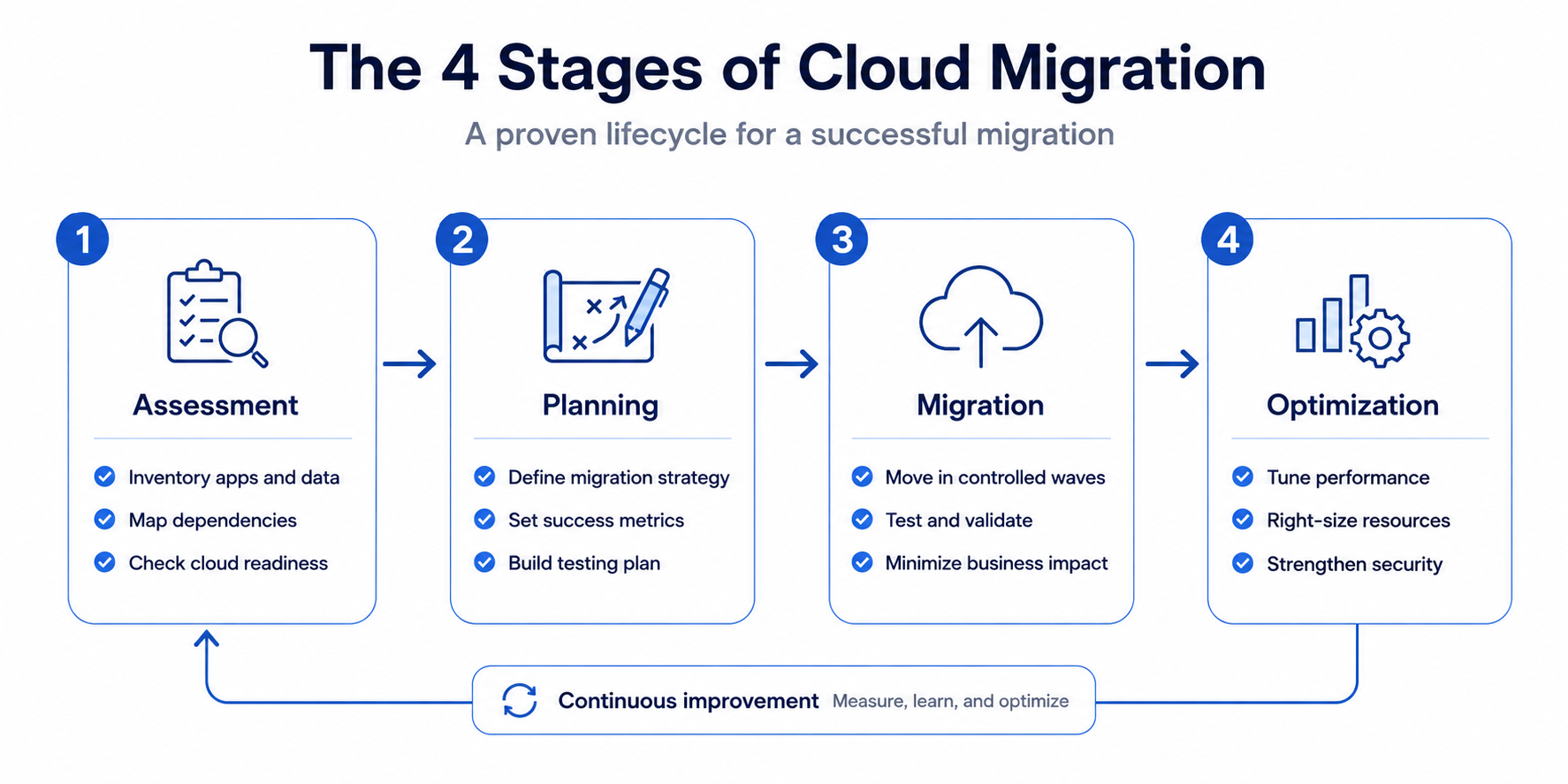
Cloud migrations can be categorized into four phases. These phases hold regardless of whether you’re running a startup or a Fortune 500.
Outline the business objective. Are you making the change to save costs, make the app scalable or resilient? Or do you want to leverage some compliance or disaster recovery features of the cloud? Next, assess whether or not your data and apps are cloud-ready.
Start by inventorying your apps, data signals, integrations, servers, and any other resources. Map out the dependencies, just as we talked about earlier, and assess whether it makes sense for you to even make the migration in the first place (in case of end-of-life systems).
Next, draw up the project charter and identify the stakeholders (business, engineering, leadership, etc.).
The best way to do this, typically, is to have everyone in the same room (read: call) and lay out the intent of the migration, what is being migrated, the why and the how. Align expectations on migration resources and timelines.
Adeel Arshad, cloud architect at Tkxel, warns, “One of the most common pitfalls in cloud migration is unrealistic expectations. It’s tempting to push for an aggressive go-live date, but skipping steps often leads to extended outages, data loss, or application failures.”
Set the migration order and precedence, if you have several applications or components. Settle on the strategy to use and define success metrics (time for migration, operational stability, etc.).
You should also chart out a testing plan. Discuss and lock what functional, performance, security, and integration testing will look like for each app/component.
This is where the actual migration takes place, and your team executes the move. Ideally, this is done in a canary approach rather than a big-bang cutover.
In a canary strategy, you move the app/data in waves/portions (25% → 50% → 75% → 100%) or similar. Test and validate each portion inclusive of integrations to ensure minimal impact to business.
Now that you’re live and achieved some stability, you can fine-tune performance and right-size resources.
Now that you’re live and achieved some stability, you can fine-tune performance and right-size resources. Perform a security audit and tighten security. Remove access for any of the devs no longer needed after the migration.
When migrating applications to the cloud, huge volumes of data must be moved from one system to another, introducing a great deal of risk into the process. Any small mistake during migration can cause data to be corrupted or go missing.
Application components may be migrated to the wrong location, causing applications to break. After migration, software in the cloud may not be compatible with other applications, and integrations with third-party solutions may not function.
As a result, servers may fail, systems may go down, and database errors may cause business disruption.
To ensure a smooth cloud migration, software testing is essential to ensure that the applications that have been moved to the cloud are in the right place and that they work as intended.
After a cloud migration, the following tests can help ensure a functional, stable, and secure environment.
Functional testing determines the production-readiness of apps that have been migrated to the cloud. Testing verifies that key aspects of the migrated applications still perform as intended or that they meet performance levels specified in SLAs.
Functional validation can show whether valid inputs generate expected results, whether object references and page layouts work as intended, and whether applications are compatible and integrate with other software, systems, and services.
Integration testing evaluates whether third-party integrations are still intact and whether applications can communicate seamlessly with other services.
Security testing is designed to eliminate the risks of running software systems in the cloud. Types of testing include business process security testing, application transaction security testing, user privacy security testing, data privacy testing, and data security testing.
Performance testing validates how well an application can scale in the cloud and how cloud migration has affected response time.
Load testing ensures that migrated applications will continue to operate smoothly during spikes in traffic and at times when user volume is higher than anticipated.
Testing after a cloud migration offers several significant benefits.
Testing can help ensure that business-critical processes are not disrupted and that every word, number, and bit of data has been moved to the right location.
Testing can help ensure that business-critical processes are not disrupted and that every word, number, and bit of data has been moved to the right location.
Testing can help to validate the integrity of legacy databases.
Automated testing can help to find and fix mistakes that are the result of migration, ensuring data and content are migrated to the correct destination.
Automated testing allows testers to accomplish more with less time, minimizing the total cost of migration.
Testing can help to pinpoint missing security controls or identify compliance configurations that may have been lost, damaged, or destroyed during cloud migration.
Tricentis is the world’s #1 Continuous Testing Platform. Providing a totally automated and fully codeless solution that’s intelligently powered by AI, Tricentis dramatically accelerates digital transformation, application delivery, and cloud migration.
Tricentis supports continuous integration and continuous delivery by accelerating and managing all phases of testing – from unit tests and performance tests to end-to-end testing, black box testing, and white box testing. The Tricentis platform includes solutions for:
Tricentis qTest provides centralized test management that unifies, manages, and rapidly scales testing across the enterprise.
Tricentis Tosca optimizes and accelerates end-to-end testing for all enterprise, mobile, and cloud-native applications. Tosca also provides a test management tool that uses service virtualization to make testing easier and less costly.
Tricentis NeoLoad offers simple and scalable performance testing for everything from APIs and microservices to end-to-end application testing.
Tricentis Data Integrity provides automated end-to-end data integrity testing that works across the entire data landscape to prevent costly issues with data migration, integration, and reporting.
Cloud migrations might seem daunting affairs. They don’t have to be, though—not with the right team, preparation, and strategy. The businesses that make the leap and successfully navigate to the cloud enjoy significant ROI compared to those who don’t.
We covered the watchouts in detail: proper planning and a robust testing strategy for cloud migrations are a no-miss. Migrations that skip testing find out about the defects in production, in front of their customers.
Are you looking to build a cloud migration and testing strategy? See how we can help you migrate with confidence with our continuous testing platform.

Cloud migration is the process of moving data, applications, or other business assets to a cloud computing environment. By moving software to the cloud, organizations can reduce cost, increase performance, enhance security, and make applications more available.
Cloud migration testing is the process of testing and validating applications after they’ve been moved to a cloud environment. Migrating applications can be a complex and time-consuming task, and any errors in the process can degrade application performance or cause applications not to work as intended.
Testing applications after migration can help ensure that applications still function as intended and that performance is acceptable. Testing can also help to pinpoint security vulnerabilities and ensure that any integrations with third-party applications continue to work.
Broadly speaking, these types include: on-prem to cloud (moving from local infrastructure to cloud), cloud to cloud (moving from one cloud to another), hybrid cloud (maintaining presence across on-prem and the cloud), and repatriation (moving back to on-prem infrastructure).
The four phases consist of assessment, planning, migration, and optimization.